Retirement planning through a workplace 401(k) plan is one of the most reliable ways to build long-term financial security. The biggest advantage of these plans comes from employer matching contributions, free extra cash many employees leave unused each year.
Most working adults struggle to tally total retirement savings by hand. Math errors, changing income brackets, variable match tiers and annual contribution limits make manual spreadsheets messy and unreliable.
Many people miss out on maximizing their employer match simply because they cannot quickly visualize how much extra money they could earn by adjusting their payroll deductions. Manual math cannot account for compound growth, annual raises or shifting company matching rules.
Learning how to use 401 (k) calculator with employer match removes all these guesswork barriers. This specialized financial tool automates every calculation tied to company matching, compound interest, annual contribution caps and long-term retirement projections in minutes.
This in-depth user guide breaks down the flaws of manual 401(k) math, core advantages of dedicated matching calculators, must-have tool features, real-life use cases, and a complete beginner-friendly workflow to accurately estimate and maximize your workplace retirement funds.
Common Roadblocks of Calculating 401(k) Employer Matches Manually
Crunching 401(k) match numbers without a dedicated estimator creates consistent financial blind spots that cost employees thousands in unclaimed retirement funds over time.
Slow, error-prone manual math
Figuring out tiered matching formulas, pre-tax deduction percentages and yearly contribution limits requires dozens of separate equations. Basic arithmetic mistakes drastically skew your total projected retirement balance.
No built-in compound growth modeling
Employer match funds grow alongside your personal contributions year after year. Handwritten calculations cannot accurately forecast decades of compound interest without complex recurring formulas.
Confusion over tiered matching structures
Many businesses use tiered match rules, such as matching 100% of the first 3% of salary and 50% of the next 2%. Tracking these layered rules on paper leads to underestimating total employer contributions.
Failure to account for annual IRS contribution limits
Federal rules cap how much an individual can deposit into a 401(k) each calendar year. Manual calculations often ignore this hard cap, leading to unrealistic overestimations of annual savings.
Lack of long-term projection visibility
Employees want to see their total nest egg at age 60, 65 or full retirement age. Manual math only generates single-year snapshots, with no clear view of multi-decade growth potential.
Difficulty adjusting for future pay raises
Regular salary increases boost both personal contributions and employer matching amounts. Recalculating projections for every potential raise manually takes hours of repetitive number work.
Key Benefits When You Learn How to Use 401 (k) Calculator With Employer Match
Mastering how to use 401 (k) calculator with employer match streamlines your retirement planning and unlocks the full value of your workplace benefit program for immediate and long-term financial gains.
Instant accurate total match calculation
The tool automatically reads your income, deduction percentage and company match policy to output the exact dollar amount your employer will deposit annually. No manual tiered math required on your end.
Built-in compound interest forecasting
Premium calculators factor in average annual market return rates to project total account growth over 20, 30 or 40 working years. This paints a realistic picture of your final retirement balance.
Clear visibility of unclaimed matching funds
If you contribute too little to hit the full company match threshold, the tool flags exactly how much free retirement money you leave on the table each year. This motivates you to adjust payroll contributions accordingly.
Automatic IRS contribution limit compliance
All calculations respect official annual pre-tax contribution caps. The tool prevents you from building unrealistic savings projections that exceed federal regulatory limits for workplace retirement accounts.
Quick adjustments for salary growth and deduction changes
You can tweak expected annual raises, adjust your payroll contribution percentage, or update company match rules to compare multiple savings scenarios side by side in seconds.
Zero advanced financial math knowledge required
You do not need accounting or investment expertise to operate the tool. Simple input fields replace complex spreadsheets, making accurate retirement planning accessible for every full-time employee.
Compare multiple contribution scenarios side-by-side
Test low, moderate and maximum payroll deduction rates to see how each choice impacts employer match totals and long-term compound growth. This makes it easy to pick the optimal savings rate for your budget.
Must-Have Features of a Reliable 401(k) Calculator With Employer Match
Not all retirement calculators support employer matching logic. When selecting a tool to learn how to use 401 (k) calculator with employer match, prioritize these employee-focused financial features for precise planning results.
Custom tiered employer match input fields
Top calculators let you input layered company matching rules, such as match percentage for first salary brackets and reduced matching for higher salary thresholds. This replicates your exact workplace benefit policy.
Annual salary raise adjustment slider
A dedicated input box lets you enter expected yearly pay increases. The tool automatically recalculates rising personal contributions and growing employer match amounts for every future working year.
IRS annual contribution limit lock-in
The tool hardcodes official yearly 401(k) maximum deposits, so all projections automatically cap personal contributions at the legal limit with no manual cross-checking needed.
Adjustable average investment return rate
You can set conservative, moderate or aggressive annual market return estimates to generate multiple growth projections aligned with your 401(k) asset allocation strategy.
Multi-year retirement age projection tool
Input your current age and target retirement age to generate a year-by-year breakdown of personal contributions, employer match deposits and total compounded account value.
Shortfall alert for missed full match eligibility
The calculator displays a clear alert if your selected payroll deduction percentage falls below the threshold needed to receive the complete employer match, showing the exact dollar gap annually.
Side-by-side scenario comparison functionality
Save multiple calculation drafts to compare different contribution rates, salary growth estimates and match policy changes without retyping all your personal financial data repeatedly.
Simple plain-language financial summaries
Raw number outputs come paired with easy-to-read summaries that explain how small payroll adjustments unlock thousands more in employer matching funds over your career.
Real-World Use Cases for a 401(k) Calculator With Employer Match
A versatile tool designed to show users how to use 401 (k) calculator with employer match fits every employee’s unique financial situation, from entry-level staff to mid-career professionals planning early retirement.
New hires reviewing their first 401(k) enrollment options
First-time participants in a workplace retirement plan use the calculator to pick the ideal payroll deduction percentage that captures 100% of available employer matching without stretching monthly household budgets too thin.
Mid-career employees negotiating salary raises
After securing a pay increase, workers recalculate their matching contributions to see how the higher base salary boosts both their personal deposits and the company’s annual match amount.
Budget restructuring after major life changes
Life shifts like rent adjustments, new household expenses or reduced monthly debt payments let users raise their 401(k) deduction rate; the calculator quantifies the extra employer match gained from the adjustment.
Employees considering early retirement timelines
Workers aiming to retire before standard age 65 run multiple projection scenarios to see if maxing out employer matching accelerates their target retirement date by several years.
Job switchers comparing two companies’ 401(k) benefit packages
When weighing multiple job offers, candidates input each employer’s unique match tier rules and base salary to directly compare total projected retirement savings across both roles over a 10-year window.
Financial planners creating client retirement roadmaps
Personal finance advisors use the calculator to demonstrate matching benefits to clients, building clear visual projections that motivate consistent payroll contributions for long-term wealth building.
Seasonal income and variable salary staff
Commission-based workers or hourly employees with fluctuating yearly wages input average annual earnings to estimate a baseline employer match and plan consistent deduction percentages through high and low income cycles.
Step-by-Step Complete Guide: How to Use 401 (k) Calculator With Employer Match
Follow this streamlined, beginner-friendly workflow to master how to use 401 (k) calculator with employer match and generate fully accurate, actionable retirement savings projections in minutes.
Step 1: Gather all critical personal and employer plan details
First, pull your latest pay stub and workplace 401(k) benefits summary document. Note down your current gross annual salary, existing payroll deduction percentage and full employer matching policy breakdown.
Write down tiered match rules clearly: record the percentage your employer matches for each salary bracket, plus the maximum percentage of your income the company will contribute each year.
Jot down your current age, target retirement age, and a realistic estimate of average annual salary raises you expect to receive throughout your career.
Step 2: Open the dedicated 401(k) calculator with employer match tool
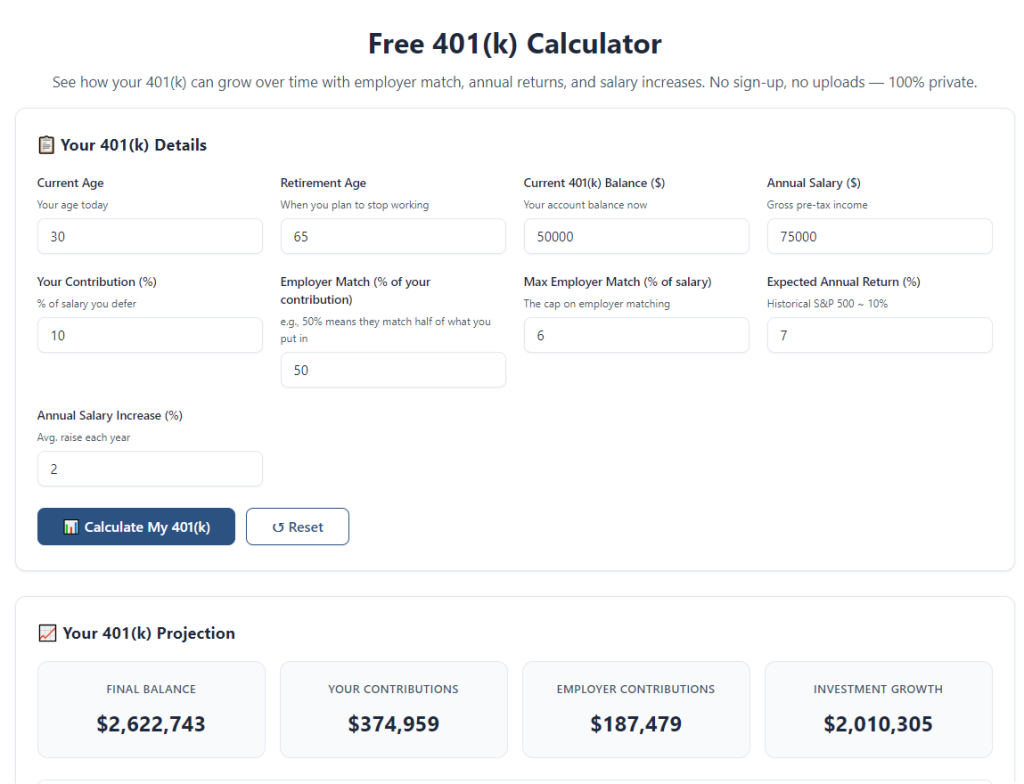
Launch the financial calculator tool on your browser. The main interface will separate input fields into three simple groups: personal income data, employer match policy settings, and long-term growth projection variables.
Take 30 seconds to scan each section’s labels to understand where every piece of your gathered information will be entered before starting data input.
Step 3: Input core annual income and payroll contribution data
Locate the gross yearly salary field and enter your full pre-tax annual compensation from your most recent official pay documentation.
Next, fill in your current 401(k) payroll deduction percentage. If you plan to test multiple savings rates later, note this baseline number for side-by-side comparison scenarios.
Enter your expected average annual salary raise percentage into the dedicated growth slider field to model rising matching contributions over time.
Step 4: Configure your full employer match tier rules
Navigate to the employer matching configuration panel, the most critical section when learning how to use 401 (k) calculator with employer match.
Input the first tier matching percentage, such as 100% match on the first 3% of your gross salary. Then add the secondary tier rule if your company offers partial matching on additional salary brackets.
Enter the maximum total percentage of your salary the employer will match each year, which creates a hard cap on company contributions for accurate yearly calculations.
Step 5: Set investment growth and timeline parameters
Select an average annual investment return rate aligned with your 401(k) portfolio mix. Conservative portfolios use lower annual returns, while stock-heavy allocations use moderate or higher projected rates.
Input your current age and your ideal target retirement age to define the total number of working years the calculator will use for compound growth forecasting.
Confirm the tool’s built-in IRS annual contribution limit toggle remains active to automatically cap personal deposits at the legal maximum each calendar year.
Step 6: Run the full savings projection calculation
Double-check all typed numbers and match tier rules for typos, then select the calculate or generate projection button to launch the full financial analysis.
Within seconds, the tool will display a complete breakdown: yearly personal contributions, yearly employer matching deposits, annual total combined savings and cumulative compounded growth year over year.
Step 7: Review the missed match shortfall alert (if applicable)
Scan for the dedicated alert panel that highlights any unclaimed employer matching funds. If your deduction percentage is too low to capture the full company match, the tool lists the exact dollar amount left unclaimed every 12 months.
Note the recommended minimum deduction percentage needed to hit 100% of available matching contributions for your current salary bracket.
Step 8: Create alternate contribution scenarios for comparison
Adjust your payroll deduction percentage up or down to test different savings strategies. Save each separate calculation as a unique scenario label for easy side-by-side evaluation.
Test the recommended full-match deduction rate first to see the maximum possible employer funds you can add to your retirement account annually and over your full career timeline.
You can also edit salary raise estimates or switch up investment return rates to build conservative, baseline and optimistic retirement projections for balanced planning.
Step 9: Analyze multi-year total growth projections
Scroll through the year-by-year breakdown table to track how employer match deposits compound alongside your personal contributions over decades of working years.
Compare the final projected total account balance across all your saved scenarios to identify which deduction rate delivers the largest nest egg by your target retirement age.
Pay special attention to the gap between partial match and full match projections to quantify the long-term financial impact of small payroll deduction adjustments today.
Step 10: Finalize your optimized contribution strategy
Pick the payroll deduction percentage that balances your monthly household budget constraints while capturing the full available employer matching amount each year.
Record your ideal deduction rate, target retirement balance projection and estimated annual employer match amount to reference when updating your workplace 401(k) enrollment form.
Save or export your full calculation summary for personal financial records, annual budget reviews and future benefit re-evaluations when your salary or employer match policy changes.
Common Costly Mistakes to Avoid When Using a 401(k) Employer Match Calculator
Even when you fully understand how to use 401 (k) calculator with employer match, these frequent input errors and planning oversights lead to flawed retirement projections and missed matching opportunities.
Entering net take-home pay instead of gross annual salary
All employer match calculations rely on pre-tax gross income. Inputting your after-tax paycheck amount drastically understates available matching funds and skews every long-term growth projection.
Ignoring tiered match rules and only inputting a single flat match percentage
Many employees simplify their company’s layered matching policy into one flat number. This shortcut makes the calculator output inaccurate yearly employer contribution totals for tiered benefit structures.
Forgetting to adjust calculations after receiving a salary raise
A higher gross income raises both your personal contribution limit and the employer’s matching dollar amount. Reusing old salary data creates outdated, understated savings projections year after year.
Setting an overly aggressive or unrealistic annual investment return rate
Overestimating market growth inflates your final retirement balance projection, creating false confidence in your savings timeline. Always balance high and conservative return scenarios for realistic planning.
Only running one single contribution scenario without comparisons
Testing just your current deduction rate hides how much extra matching money you gain by raising payroll contributions slightly. Multiple scenarios reveal the clear financial value of hitting the full match threshold.
Disabling the built-in IRS annual contribution limit setting
Turning off the regulatory cap feature lets the calculator generate impossible over-contribution projections. This creates unrealistic savings estimates that cannot legally be achieved under federal retirement account rules.
Skipping review of the missed match alert panel
Many users only glance at final total balance numbers and ignore the shortfall warning. This critical alert reveals free retirement funds you are leaving unclaimed each calendar year.
Pro Financial Tips to Maximize Results When You Know How to Use 401 (k) Calculator With Employer Match
Implement these expert planning tactics to get the most accurate, actionable retirement projections every time you run calculations on your employer matching 401(k) tool.
- Bookmark the calculator tool for quarterly check-ins. Re-run projections whenever you receive a raise, adjust payroll deductions or your employer updates their matching benefit policy.
- Always build three separate projection scenarios: baseline current contributions, full match optimized contributions, and maximum legal annual contributions to see tiered growth differences clearly.
- Input a moderate, realistic average salary raise instead of extreme high or low growth estimates to build balanced long-term retirement forecasts.
- Separate short-term budget constraints from long-term wealth building when comparing scenarios; small monthly budget sacrifices unlock tens of thousands in compounded employer match funds over decades.
- Share your calculation summary with a personal finance professional during annual financial reviews to align your 401(k) strategy with broader savings, debt and investment goals.
- Re-run full projections before accepting new job offers to directly compare total matching retirement benefits between competing employment packages.
- Keep a running document of all saved calculator scenarios to track growth projection changes as your income, age and workplace benefit rules shift throughout your career.
Final Thoughts
Employer matching contributions represent one of the most guaranteed risk-free returns available to working adults building retirement wealth. Failing to accurately calculate these funds leads countless employees to leave substantial amounts of free retirement savings unclaimed year after year.
Manual spreadsheet math and mental arithmetic cannot replicate the layered logic of tiered matching, compound interest growth and federal contribution limits that shape every 401(k) account’s long-term value. These outdated planning methods create blind spots that derail retirement timelines.
Learning how to use 401 (k) calculator with employer match eliminates every guesswork barrier to retirement planning. This specialized financial tool automates complex tiered match math, multi-decade compound growth modeling and regulatory limit compliance in a user-friendly interface built for all income levels and financial literacy backgrounds.
Whether you are a new hire enrolling in your first workplace retirement plan, a mid-career professional adjusting savings rates, or a job seeker comparing competing benefit packages, this calculator delivers transparent, data-backed projections to guide every financial decision tied to your 401(k).
By following the complete step-by-step workflow outlined above, avoiding common calculation mistakes and running multiple comparison scenarios, you can lock in the full value of your employer’s matching program, accelerate your retirement savings growth and build a reliable long-term financial roadmap aligned with your target retirement age and lifestyle goals.
After learning the operation method, click the link below to enter the tool page for immediate use.