Every online seller, content creator, and brand manager understands how critical clean product imagery is to sales performance. Shoppers judge merchandise instantly based on how professional product photos appear on listing pages, social media storefronts, and promotional landing pages.
Unwanted shadows are one of the most common visual flaws that drag down product photo quality. Harsh bottom shadows, uneven side shading, and faint cast shadows around items create cluttered, unpolished shots that make products look unappealing to potential buyers.
Traditional photo editing workflows to erase shadows require advanced software training, manual brush masking, and hours of careful retouching. Most small business owners and beginner creators lack the time or technical skill to master these complex manual editing workflows.
This is where modern automated editing solutions change the entire creative process. Mastering how to use AI tool to remove shadow from product images lets anyone generate flawless, shadow-free product shots in minutes, no professional design background required.
This in-depth practical guide breaks down the limitations of manual shadow editing, core advantages of AI shadow removal tools, non-negotiable tool features, real-world e-commerce use cases, and a complete beginner-friendly workflow for perfect shadow elimination on every product photo you capture.
Why Manual Shadow Editing Fails Most E-commerce Creators
Before learning how to use AI tool to remove shadow from product images, it helps to understand the frustrating drawbacks of old-school manual photo retouching for shadow cleanup. These pain points slow down content production and create inconsistent product visuals across your store.
Pain Point 1: Extensive technical skill barriers
Standard desktop editing software relies on layers, masking tools, clone brushes, and lighting adjustment sliders to lift shadows. New creators must spend weeks learning basic functions before they can even attempt natural-looking shadow removal.
Pain Point 2: Extremely time-intensive editing sessions
A single product shot with heavy cast shadows can take 20 to 40 minutes to retouch manually. When you manage catalogs with hundreds of product listings, this manual workload quickly becomes unsustainable for tight content deadlines.
Pain Point 3: Unnatural, patchy final results
Hand-operated clone and healing brushes often leave uneven lighting after shadow removal. Manually erased shadows frequently create blotchy white backgrounds, mismatched item lighting, or faded product texture that hurts visual trust.
Pain Point 4: Inconsistent results across photo batches
Different editors or rushed manual sessions produce uneven shadow treatment across your product catalog. Some listings have fully shadow-free backgrounds, while others retain faint dark edges, creating disjointed brand aesthetics.
Pain Point 5: High cost of professional retouching services
Outsourcing shadow removal to freelance photo editors adds recurring business expenses. Bulk product photo retouch fees eat into profit margins for small brands and independent sellers operating on tight marketing budgets.
Core Benefits When You Learn How to Use AI Tool to Remove Shadow From Product Images
Once you fully grasp how to use AI tool to remove shadow from product images, your entire product photography workflow becomes faster, cheaper, and far more consistent. Every advantage below directly improves your online store conversion rates and content output speed.
Benefit 1: Fully automated, one-click shadow detection
Trained AI algorithms instantly identify all shadow types in product shots—hard floor shadows, soft edge shading, reflection shadows, and background cast shadows. The tool pinpoints problematic dark areas without manual user selection.
Benefit 2: Preserves authentic product texture and lighting
Top-tier AI shadow removal systems separate shadow pixels from the actual product surface. The tool erases dark shading without washing out item colors, fabric texture, metal finishes, or printed graphic details on merchandise.
Benefit 3: Cuts photo editing time by over 90%
Where manual retouch takes half an hour per photo, processing an image with an AI shadow cleanup tool finishes in mere seconds. You can edit full batches of product listings in the time it takes to retouch a single shot by hand.
Benefit 4: Uniform, brand-aligned visuals across all listings
Every product photo processed through the same AI tool receives identical shadow removal treatment. Your store, social media ads, and blog product roundups maintain a cohesive, premium visual style shoppers associate with trusted brands.
Benefit 5: Zero advanced technical training required
You do not need design school experience or years of editing practice to operate the tool. The simplified interface focuses only on shadow cleanup, so beginners master how to use AI tool to remove shadow from product images within their first session.
Benefit 6: Eliminates recurring retouch outsourcing costs
After learning the simple workflow, you handle all shadow removal in-house. There is no need to pay third-party editors for every new batch of product photos you shoot for seasonal launches or catalog updates.
Benefit 7: Compatible with all common product photo formats
AI shadow removal tools support every standard image file type used for online retail. You can upload raw camera exports, compressed web-ready files, and high-resolution print-quality product shots with no formatting errors.
Must-Have Features in an AI Tool to Remove Shadow From Product Images
Not every automated photo editing platform delivers clean, natural shadow elimination for retail merchandise. When picking a tool to master how to use AI tool to remove shadow from product images, prioritize these retail-focused core features for reliable output.
Feature 1: Multi-layer shadow recognition algorithm
Quality tools distinguish between harsh ground shadows, soft drop shadows you want to keep, and accidental dark blotches. You retain subtle professional drop shadows for depth while erasing distracting unwanted cast shadows entirely.
Feature 2: Texture retention technology
Avoid basic AI editors that over-blur product surfaces while lifting shadows. The right tool preserves fabric weaves, wood grain, plastic gloss, metal sheen, and printed artwork after shadow pixels get removed from the background.
Feature 3: Batch upload and bulk processing support
E-commerce brands rarely edit one product photo at a time. Look for tools that let you upload dozens of item shots simultaneously and run shadow removal across the entire batch with a single command.
Feature 4: Adjustable shadow removal intensity sliders
Customizable strength controls let you tweak how aggressively the AI erases dark areas. Dial back intensity for subtle lighting correction or max out settings to fully wipe heavy floor shadows on white backdrop product shots.
Feature 5: Transparent background compatibility
Many sellers use shadow removal alongside background replacement for pure white listing pages. Top AI shadow tools work seamlessly with transparent PNG exports, perfect for marketplace product listing standards.
Feature 6: Before-and-after split preview panel
A side-by-side comparison view lets you instantly check shadow removal results against the original photo. You spot uneven lighting or missed shadow edges before exporting the final retail-ready image.
Feature 7: High-resolution output exports
Retail marketplaces require sharp, large-format product photos for zoom functionality. The AI tool should export uncompressed high-res files without blurring or pixelating merchandise after shadow cleanup.
Real-World Use Cases for AI Shadow Removal on Product Photos
Learning how to use AI tool to remove shadow from product images delivers value for every category of online merchandise creator. These common use cases show exactly where automated shadow editing transforms your retail content workflow.
Use Case 1: Marketplace e-commerce product listings
Platform-based sellers rely on uniform shadow-free white background shots to meet listing guidelines. AI shadow cleanup eliminates uneven studio shadows so every product thumbnail and full-size listing photo looks polished and compliant.
Use Case 2: Social media product advertising visuals
Instagram, TikTok, and Facebook product ads perform better with bright, clutter-free imagery. Removing distracting dark shadows with AI makes your featured merchandise stand out against feed backgrounds and captures scrollers’ attention quickly.
Use Case 3: Blog and content marketing product roundups
Lifestyle bloggers and review creators often snap product shots at home with limited studio lighting. Uncontrolled indoor lighting creates messy shadows; AI tools fix these flaws without reshooting every featured item.
Use Case 4: Print catalog and marketing flyer assets
Physical brand catalogs require crisp, shadow-minimal product imagery for professional print quality. AI shadow removal delivers consistent lighting across hundreds of product photos used for printed marketing materials.
Use Case 5: Handmade craft and small artisan shop inventory
Independent creators selling handmade jewelry, home decor, and apparel rarely own professional studio lighting setups. Fast AI shadow editing fixes amateur lighting flaws without expensive equipment upgrades.
Use Case 6: Drop-shipping and wholesale brand content creation
Wholesale brands produce product imagery for dozens of retail partners. Bulk AI shadow processing lets them generate standardized shadow-free photo packs to distribute to every store in their partner network.
Use Case 7: Product video thumbnail and hero banner creation
Website homepage banners and video cover thumbnails depend on eye-catching clean product shots. AI shadow removal ensures hero visuals look premium and free of messy dark shading that weakens landing page conversion rates.
Complete Step-by-Step Tutorial: How to Use AI Tool to Remove Shadow From Product Images
This simplified, actionable workflow walks you through every stage of shadow cleanup. Follow each step sequentially to master how to use AI tool to remove shadow from product images and generate perfect retail-ready photos every single time.
Step 1: Capture or source your raw product image file
Start with your original unedited product photograph. Shoot items against a plain neutral backdrop for easiest AI shadow detection, though quality tools work even with textured or colored background surfaces.
Save the image to your local device storage; avoid heavily compressed low-quality screenshots, as blurry source files limit how clean the AI shadow removal results can appear.
Step 2: Open your chosen AI shadow removal editing tool
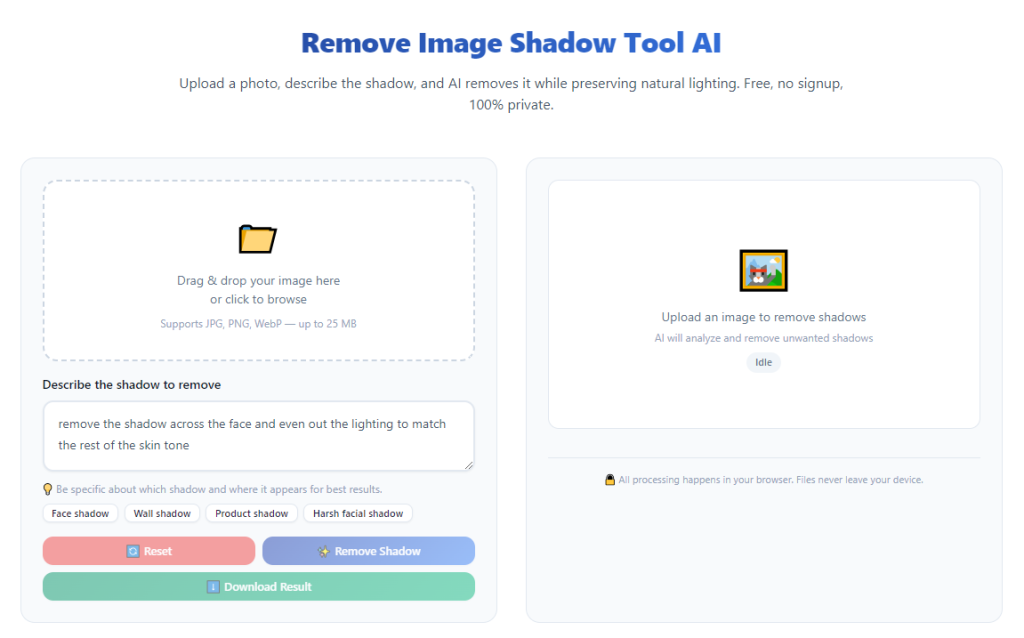
Launch the AI photo editor built for product shadow cleanup directly in your browser or desktop application. No complicated installation packs or advanced setup steps are required to access the core shadow elimination function.
Navigate straight to the dedicated shadow removal module within the tool’s main navigation panel. Avoid general all-in-one editing tabs that dilute the AI’s shadow-detecting precision.
Step 3: Upload your target product photo to the tool’s workspace
Locate the upload button within the shadow removal panel and select your saved product image file from your device folders. Wait one to three seconds for the photo to load fully into the editor’s preview window.
For bulk catalog editing sessions, use the multi-file upload feature to select an entire folder of product shots instead of importing images one at a time.
Step 4: Activate the automatic shadow detection AI scan
Locate the “Detect Shadows” or “Remove Cast Shadow” primary control button and click to start the automated analysis. The AI model scans every pixel of your product shot to map all dark shadow areas surrounding your merchandise.
The tool will highlight detected shadow regions with a subtle overlay on the preview screen so you can confirm the algorithm captured all unwanted dark patches around your item.
Step 5: Adjust shadow removal intensity to match your brand style
Use the sliding intensity control to customize how much shadow the AI erases from the image. Most standard e-commerce white-background listings work well with medium to high intensity settings.
For lifestyle product shots where you want soft natural depth, lower the slider strength to retain faint gentle drop shadows while wiping harsh uneven floor shading completely.
Step 6: Fine-tune missed shadow spots with manual touch-up brushes
Inspect the split-screen before-and-after preview closely for tiny leftover shadow edges the AI algorithm missed around curved product surfaces or thin small accessories like jewelry and keychains.
Use the tool’s small manual erase brush to touch up any remaining dark pixels. This quick minor adjustment ensures zero faint shadow traces along every edge of your merchandise.
Step 7: Lock in product texture and color balance
Locate the texture preservation toggle and enable it before finalizing edits. This critical setting prevents the AI from washing out vibrant product hues or blurring fine surface details while lifting shadow pixels.
Check the color balance preview to confirm the item’s original tones did not shift warmer or cooler after shadow removal processing. Minor brightness sliders let you tweak exposure if needed.
Step 8: Run secondary quality check on the edited preview
Scroll across the full image preview to scan for common editing flaws: blotchy background patches, faded product edges, uneven lighting gradients, or unnatural hollow spaces where shadows once sat.
If any visual inconsistencies appear, reset the shadow intensity slider and re-run the AI detection scan to generate a cleaner revised version of the product photo.
Step 9: Export your shadow-free product image in retail-ready format
Select your preferred output file type based on where you plan to use the photo. Standard marketplace listings use high-resolution JPG files, while graphic design projects require transparent PNG exports.
Adjust the output resolution slider to match platform requirements—most online storefronts recommend a minimum pixel dimension for clear zoom-in functionality on product pages.
Step 10: Save and organize edited imagery for catalog use
Download the finalized shadow-free product photo directly to your device storage. Create dedicated labeled folders to separate raw unedited shots from AI-processed shadow-free imagery for streamlined catalog management.
Repeat the full workflow for every remaining product photo in your batch before uploading finished visuals to your online store, social media, or marketing asset library.
Common Mistakes to Avoid When Using AI Tool to Remove Shadow From Product Images
Even after learning the core workflow for how to use AI tool to remove shadow from product images, these frequent user errors create low-quality, unprofessional product photos that hurt retail performance. Learn to avoid each pitfall consistently.
Mistake 1: Maxing shadow intensity on all lifestyle product shots
Full maximum intensity settings strip all natural depth from lifestyle imagery. Over-erasing every soft shadow creates flat, artificial-looking product photos that feel cheap to browsing shoppers. Reserve high intensity only for pure white background listing shots.
Mistake 2: Skipping the texture preservation toggle during editing
Disabling texture retention delivers smooth-looking backgrounds at the cost of faded product detail. Fabric, metal, and printed merchandise lose visual appeal when the AI blurs surfaces to fully eliminate shadow pixels. Always enable this feature before exporting.
Mistake 3: Editing heavily compressed low-quality source screenshots
Blurry, pixelated source images limit the AI’s ability to distinguish shadow pixels from product surfaces. The resulting edited photos carry fuzzy edges and uneven background discoloration no amount of slider adjustment can fix. Always upload original high-res camera files.
Mistake 4: Ignoring manual touch-up after automated AI processing
AI algorithms occasionally miss tiny shadow fragments along curved, thin, or intricate product shapes like earrings, delicate glassware, and slim electronics. Skipping the quick brush touch-up leaves faint distracting dark edges visible in zoomed listing previews.
Mistake 5: Processing full photo batches without preview checks
Running bulk AI shadow removal without spot-checking individual images leads to inconsistent results across your catalog. One poorly lit product shot in the batch may retain heavy shadows while all other items process cleanly. Spot-check a sample of photos after every bulk run.
Mistake 6: Confusing drop shadows with unwanted cast shadows
Many new creators erase soft intentional drop shadows designed to add dimension to product shots. The AI tool can target only harsh floor cast shadows if you adjust detection settings properly—learn to differentiate the two shadow types before running scans.
Mistake 7: Exporting low-resolution files for marketplace listings
Saving compressed small pixel images after shadow removal eliminates zoom functionality on store pages. Shoppers cannot inspect product details closely, which reduces trust and lowers overall conversion rates for your merchandise listings.
Expert Pro Tips to Maximize Results From AI Shadow Removal Tools
Use these professional creator strategies to refine how to use AI tool to remove shadow from product images and build a faster, higher-quality retail photo editing routine long-term.
- Shoot all product photos against consistent plain backdrops before AI editing; uniform base surfaces drastically boost the algorithm’s shadow detection accuracy and cut down manual touch-up time.
- Create two standardized intensity presets for your brand: one high-strength setting for white-background marketplace listings and one medium preset for lifestyle blog and social media content.
- Process product photos immediately after shooting batches instead of letting raw files pile up; regular small editing sessions prevent overwhelming catalog backlogs during seasonal product launches.
- Pair AI shadow removal with background replacement tools to generate complete listing-ready imagery in one single editing session, eliminating extra separate software steps.
- Test multiple AI shadow tools with your unique product types (jewelry, apparel, home goods, electronics) to find the algorithm that best preserves your merchandise’s specific surface textures and color tones.
- Store a reference folder of your best shadow-free product shots to use as a visual benchmark when adjusting intensity sliders for new photo batches.
- Avoid mixing manual desktop editing with AI shadow processing; complete all shadow cleanup within the dedicated AI tool first before making minor brightness or color adjustments.
- Schedule monthly bulk shadow cleanup sessions for older archived product photos to refresh outdated listings with clean, modern shadow-free visuals and boost long-term store performance.
Final Thoughts
Clean, shadow-minimal product photography is non-negotiable for online retail success. Messy unedited shadows distract shoppers, cheapen your brand aesthetic, and directly drag down listing click-through and purchase conversion metrics across every sales channel you operate.
Traditional manual retouching creates major bottlenecks for small brands, independent creators, and marketing teams managing large product catalogs. Professional freelance retouch services add unnecessary recurring expenses that eat into core business profit margins month after month.
Mastering how to use AI tool to remove shadow from product images eliminates all these pain points in one streamlined, accessible workflow. Automated AI algorithms detect, erase, and refine unwanted cast shadows in seconds while protecting the authentic texture, color, and detail that make your merchandise stand out to buyers.
This all-in-one tutorial covers every critical piece of knowledge, from tool feature selection and common editing mistakes to a fully repeatable step-by-step process suitable for absolute beginners and experienced retail content creators alike.
Whether you run a large multi-product e-commerce store, sell handmade craft goods, or create product content for marketing blogs and social media ads, integrating AI shadow removal into your creative workflow will drastically speed up content production and elevate the overall quality of every product photo you publish online.
By following the structured workflow, avoiding frequent editing errors, and applying the professional optimization tips shared above, you can consistently generate crisp, uniform, shadow-free product imagery that drives higher engagement and more consistent sales for your brand long-term.
After learning the operation method, click the link below to enter the tool page for immediate use.