Ebook readers, students, educators, and self-published authors rely heavily on EPUB files for daily reading and document sharing. EPUB uses flexible, screen-adaptive formatting ideal for phones, e-readers, and tablets, yet many real-world tasks demand PDF files instead.
Printing textbooks, submitting academic excerpts, sharing formatted manuscripts, and archiving reading material all require fixed-layout PDF outputs. Unfortunately, most conversion tools come with frustrating limitations that ruin your final files.
Many online converters stamp large semi-transparent watermarks across every page. Web-based tools often cap file sizes, restrict daily conversions, or lock bulk processing behind paid subscriptions. Even some downloadable desktop programs add branding unless you purchase a premium license.
A reliable EPUB to PDF converter no watermark free download eliminates every one of these drawbacks. This offline downloadable software delivers permanent, clean PDF exports without embedded logos, text overlays, hidden charges, or mandatory account sign-ins.
This in-depth tutorial breaks down the flaws of standard conversion tools, core advantages of watermark-free downloadable software, must-have tool features, common real-world use cases, and a full step-by-step workflow to convert EPUB files flawlessly.
Common Frustrations With Regular EPUB to PDF Conversion Tools
Before switching to a downloadable watermark-free converter, most users run into consistent, time-wasting obstacles from generic online or trial software.
Visible, Unremovable Watermarks on Output Pages
The biggest complaint from ebook converters users is permanent watermark branding. Free-tier web tools and trial desktop programs overlay company names, website text, or logos across every PDF page. These marks cover paragraphs, diagrams, and chapter headings, making files unfit for printing, school submissions, or professional sharing. Manual cropping or editing to erase watermarks adds extra hours of post-processing work.
Strict Online Tool Limitations
Browser-based EPUB converters carry heavy usage caps. Most limit users to 1 to 3 file conversions per day, block EPUBs larger than a set megabyte size, and slow processing speeds for longer textbooks. You cannot work offline without an internet connection, creating delays when traveling or using devices with limited network access.
Hidden Paywalls After File Upload
Many platforms advertise “free conversion” upfront, only to lock the download button once your file finishes processing. Users waste minutes uploading large textbooks, just to discover they must pay a monthly subscription to export clean results. These bait-and-switch tools waste bandwidth and disrupt content workflows.
Poor Format Preservation During Online Conversion
Generic web converters use basic conversion algorithms built for simple text files. Complex EPUBs containing charts, footnotes, multi-column layouts, images, and academic formulas lose formatting entirely. Paragraphs shift, pictures stretch, and table structures break, requiring heavy manual editing after conversion.
Privacy Risks With Cloud File Uploads
When you upload personal textbooks, unpublished manuscripts, or confidential academic excerpts to online converters, your files are stored on external remote servers. This creates data exposure risks for copyrighted work, private research notes, and proprietary writing projects. Downloadable offline conversion software keeps all files stored locally on your device with no external data transfers.
Core Benefits of EPUB to PDF Converter No Watermark Free Download
Downloading dedicated offline software built as an EPUB to PDF converter no watermark free download rebuilds your entire ebook conversion workflow with speed, privacy, and clean output as top priorities.
Zero Embedded Watermarks on All Exported PDFs
Every file you convert with this downloadable software exports completely blank, unbranded pages. No header logos, footer text, semi-transparent background stamps, or small corner markers appear on any page. Your finished PDFs look polished and professional for printing, class assignments, author portfolios, and personal archives.
Fully Offline Operation After Free Download
Once you complete the free download and install the converter on your computer, no internet connection is required for any conversion task. You can process hundreds of EPUB textbooks, novels, and manuscripts while traveling, working offline, or using devices with restricted Wi-Fi access. There are no upload wait times or server lag slowing down your workflow.
100% Free Core Functionality Permanently
The full conversion engine stays unlocked with the free download. There are no daily conversion limits, file size caps, or bulk processing locks hidden behind upgrade prompts. You can convert single short stories or full multi-hundred-page textbooks without hitting usage restrictions or encountering paywall popups mid-workflow.
Local File Storage Boosts User Privacy
All EPUB uploads and finished PDF outputs stay saved only on your local hard drive. The offline converter never sends your ebook content to third-party cloud servers. This critical feature protects copyrighted novels, student research material, unpublished writing drafts, and private personal reading notes from data leaks or unauthorized storage.
Advanced Layout Preservation for Complex EPUBs
Unlike lightweight online converters, downloadable watermark-free software uses specialized ebook formatting algorithms. It retains original chapter breaks, image placement, footnote positioning, multi-column text, mathematical formulas, table layouts, and custom font styling during the EPUB to PDF transition. Your finished PDF matches the visual structure of your source EPUB file perfectly.
Bulk Batch Conversion Support
The free downloaded program lets you select entire folders filled with EPUB files and convert them all in one single batch session. This feature drastically cuts down work time for readers compiling full reading lists, educators processing multiple textbook chapters, or authors converting complete manuscript collections.
Must-Have Features of a High-Quality EPUB to PDF Converter No Watermark Free Download
Not all downloadable free ebook conversion programs deliver equal performance. The top-tier EPUB to PDF converter no watermark free download package includes these user-centric, ebook-optimized features for seamless daily use.
Permanent Watermark Disabling For All Exports
The software must guarantee zero branding on every generated PDF, with no hidden toggle switches that re-enable watermarks after free trial periods. Trustworthy downloadable converters build watermark-free output as the default permanent setting with no workarounds required.
Cross-Device Desktop Compatibility
Quality free download packages work across mainstream desktop operating systems. The installer file runs smoothly on all standard desktop builds without demanding high-end hardware specifications, making it accessible for students and casual readers using basic laptops.
Customizable PDF Output Parameters
Users gain full control over finished PDF formatting settings: page size matching standard print dimensions, image resolution adjustment for sharp printed pages, margin modification for textbook printing, font embedding to avoid missing text rendering, and chapter bookmark generation for easy navigation in long ebooks.
Encrypted EPUB File Support
Many purchased textbooks and self-published manuscripts come with light DRM encryption. Premium downloadable converters safely process protected EPUB files you legally own, removing formatting locks without altering your original purchased content rights.
Lightweight Install Package
The free download installer maintains a small file footprint, requiring minimal hard drive storage space and quick installation times. No bloated extra plugins, bundled third-party apps, or unnecessary editing tools fill your device storage during setup.
Drag-and-Drop File Import
Intuitive drag-and-drop functionality simplifies uploading single EPUBs or entire folders into the conversion queue. You avoid tedious multi-step file browsing menus every time you start a new conversion session.
Fast High-Volume Processing Engine
The offline conversion core processes large textbook EPUBs in seconds rather than minutes. Even batch queues with dozens of multi-megabyte ebooks finish rapidly without freezing or crashing your desktop system mid-operation.
Common Real-World Use Cases for Downloadable Watermark-Free EPUB to PDF Software
A versatile EPUB to PDF converter no watermark free download serves students, educators, authors, casual readers, and small publishing creators across dozens of daily digital tasks.
Student Academic Textbook Conversion
College and high school students frequently receive assigned reading material in EPUB format. Clean watermark-free PDFs print neatly for classroom notes, can be submitted as digital assignment attachments, and support annotation without distracting branded marks covering textbook diagrams and paragraphs. Offline conversion eliminates internet dependency for late-night study sessions in libraries or dorm rooms with spotty Wi-Fi.
Author and Self-Publisher Manuscript Formatting
Writers finish draft novels, short story collections, and nonfiction manuscripts as EPUB files during editing stages. Converting these drafts to clean PDFs creates professional portfolio samples, query letter attachments, and advance reading copies for agents and publishers. Watermark-free outputs maintain a polished, uncluttered presentation for industry reviewers.
Personal Ebook Library Archiving
Avid readers build large digital libraries of purchased novels, biographies, and self-help books stored as EPUBs. Downloadable offline conversion software creates permanent PDF archive copies that remain readable decades later, even if ebook store platforms discontinue file support. Clean unbranded PDFs organize neatly in cloud storage folders for long-term backup.
Educator Lesson Material Creation
Teachers convert educational EPUB textbooks, children’s literature, and academic research excerpts to distribute printed handouts to students. Watermark-free pages ensure classroom printouts stay distraction-free, with no commercial branding interfering with lesson content or student worksheets. Batch conversion lets instructors prepare full week reading packets in one quick session.
Print-Focused Ebook Preparation
Many readers prefer physical printed copies of digital ebooks rather than screen reading. The downloadable converter’s customizable page margins, resolution controls, and fixed PDF layout produce print-ready files compatible with home printers and local print shops. Absence of watermarks ensures printed pages look clean and professional with no overlay clutter.
Offline Travel Reading Prep
Travelers without consistent internet access download their full reading list EPUBs ahead of trips. Using the offline converter, they create portable PDF files stored locally on laptops or USB drives, eliminating reliance on web tools that require stable Wi-Fi for upload and download steps.
Step-by-Step Complete Guide: Use EPUB to PDF Converter No Watermark Free Download
Follow this straightforward, beginner-friendly workflow to install your free downloaded converter and generate clean, unwatermarked PDF files from any EPUB ebook.
Step 1: Locate and Complete the Free Download Package
Find the legitimate standalone installer package for the watermark-free EPUB conversion tool. Start the free download process and wait for the installer file to finish saving to your desktop or downloads folder. Confirm the download completes fully before opening the file to avoid corrupted setup files.
Step 2: Install the Offline Converter Software
Double-click the downloaded installer file to launch the setup wizard. Follow the on-screen installation prompts: select your preferred local storage folder for the program files, accept standard usage terms, and finish the installation process. Skip any optional third-party add-on offers if presented during setup to keep the software lightweight. Once installation finishes, launch the converter desktop shortcut.
Step 3: Review Core Program Interface and Settings
Spend thirty seconds familiarizing yourself with the main program dashboard. Locate the file import zone, batch queue panel, output settings menu, and start conversion button. Navigate to the output preferences tab and verify the watermark toggle is permanently disabled—top-tier free downloaded converters ship with this setting pre-enabled for clean exports.
Step 4: Import Your Source EPUB Files
Choose one of two simple import methods:
- Drag individual EPUB ebook files or full folders directly into the program’s import panel;
- Click the “Add Files” button to browse your device storage and manually select single or multiple EPUBs for conversion. All selected ebooks populate the visible conversion queue list on screen. Review the queue to remove any accidentally added files before proceeding.
Step 5: Customize PDF Output Format Settings
Open the output configuration menu to adjust PDF properties tailored to your use case:
- Set standard page dimensions matching your printing requirements;
- Modify page margins for textbook or manuscript readability;
- Toggle image resolution up or down to balance file size and print clarity;
- Enable embedded chapter bookmarks for easy navigation in long ebooks;
- Select a local output folder on your hard drive to save finished PDFs after processing.
Step 6: Initiate Offline EPUB to PDF Conversion
Once all file imports and formatting adjustments are finalized, click the main convert button to begin processing. The offline engine works entirely locally on your device with no file uploads to external servers. A progress bar displays processing status for single files or batch queues. For large multi-hundred-page textbooks, allow extra processing time for full layout preservation.
Step 7: Locate and Verify Your Watermark-Free PDF Output
When the conversion progress bar hits 100%, navigate to your selected local output folder. Open one of the finished PDF files to confirm no watermarks, logos, or branded text appear anywhere on page headers, footers, or background layers. Double-check that all original EPUB images, tables, and text formatting transferred intact to the fixed-layout PDF.
Step 8: Save Conversion Presets for Future Batch Work
If you regularly convert EPUBs for the same purpose (student textbooks, author manuscripts, personal print copies), save your adjusted margin, resolution, and bookmark settings as a reusable preset within the tool. Next time you launch the program, load the preset with one click to skip repetitive manual configuration steps for faster batch processing.
Step 9: Organize Finished PDF Archives
Sort your newly generated clean PDFs into labeled local folders by book genre, course subject, or manuscript project. Since the files contain no embedded tool branding, you can share, upload to personal cloud storage, or print the documents immediately without additional editing to erase watermarks.
Common Mistakes to Avoid When Using EPUB to PDF Converter No Watermark Free Download
Even with reliable downloadable offline software, these frequent user errors can ruin output quality or slow down your ebook conversion workflow.
Downloading Unverified Third-Party Modified Installers
Stick to official standalone download packages for the converter tool. Unofficial altered installers from unregulated sources may re-enable hidden watermark functionality after a limited free usage window or bundle malicious background programs with the conversion software.
Skipping Output Setting Customization
Using default generic PDF settings for every EPUB creates inconsistent finished files. For printed textbooks, default narrow margins lead to cramped text; for digital manuscript portfolios, low image resolution blurs embedded charts and illustrations. Always tweak output parameters to match your end goal before starting conversion.
Overloading Batch Queues With Excessively Large Files
While the free downloaded tool supports bulk processing, adding dozens of multi-hundred-megabyte EPUB textbooks in a single queue can slow system performance. Split extremely large batch jobs into two or three smaller processing sessions to maintain fast, stable conversion speeds.
Forgetting To Verify DRM Restrictions On Purchased EPUBs
Some commercially purchased textbooks carry strict DRM encryption that limits format conversion entirely. Attempting to convert fully locked EPUBs will result in broken, incomplete PDF outputs. Confirm your EPUB file allows format modification before adding it to the conversion queue.
Deleting The Original Source EPUB After Conversion
Retain your original EPUB ebook files stored separately on your device storage. If you need to adjust PDF margins, resolution, or formatting later, you will require the source EPUB to re-run the conversion process with updated preset settings.
Ignoring Local Storage Space Limits
Large batch PDF exports and high-resolution image settings create substantial file sizes. Check available hard drive space in your selected output folder before launching mass conversion jobs to avoid incomplete, corrupted PDF saves mid-processing.
Pro Expert Tips To Maximize Value From Your Downloaded Watermark-Free EPUB Converter
Use these actionable strategies to streamline daily ebook conversion tasks and produce consistently polished clean PDF outputs from your EPUB to PDF converter no watermark free download software.
- Bookmark the official download source for the converter tool to quickly reinstall the program if you switch desktop devices or reset your operating system.
- Separate personal reading EPUBs, academic textbooks, and author manuscripts into distinct folders on your hard drive to organize targeted batch conversion queues without mixing file types.
- Lower image resolution settings for purely digital screen-only PDFs to drastically reduce finished file sizes for faster cloud storage uploads and email sharing.
- Increase image resolution and widen print margins when preparing PDFs for physical home or shop printing to eliminate cramped, hard-to-read text blocks on paper pages.
- Run quick test conversions on short sample EPUB chapters first when adjusting new output presets, to spot formatting or layout errors before processing full-length textbooks or manuscripts.
- Use the offline converter’s bookmark generation feature for all long educational and nonfiction ebooks to simplify navigation during digital note-taking and study sessions.
- Clear the program’s temporary cache folder monthly to maintain fast conversion processing speeds, especially if you regularly run large bulk batch jobs dozens of times weekly.
Final Thoughts
EPUB remains the most flexible, accessible digital ebook format for modern readers, yet PDF is irreplaceable for printing, formal submissions, archiving, and professional manuscript sharing. Standard online converters and trial desktop software sabotage finished files with intrusive watermarks, strict usage caps, privacy vulnerabilities, and broken formatting exports.
A trusted EPUB to PDF converter no watermark free download solves every core pain point of generic conversion tools in one offline lightweight package. Permanent unbranded PDF exports, unlimited free offline processing, local secure file storage, and advanced layout preservation make this downloadable software essential for students, writers, educators, and avid digital readers alike.
By following the step-by-step installation and conversion workflow outlined in this tutorial, you can generate clean, print-ready, fully formatted PDF ebooks without hidden fees, internet dependency, or distracting embedded watermarks disrupting your content. With consistent use of the downloadable offline tool, you build a fast, private, sustainable ebook conversion routine tailored to all your reading, academic, and creative writing projects. The ability to export completely unwatermarked PDFs with zero usage limits delivers lasting value for anyone regularly working with EPUB digital reading material.
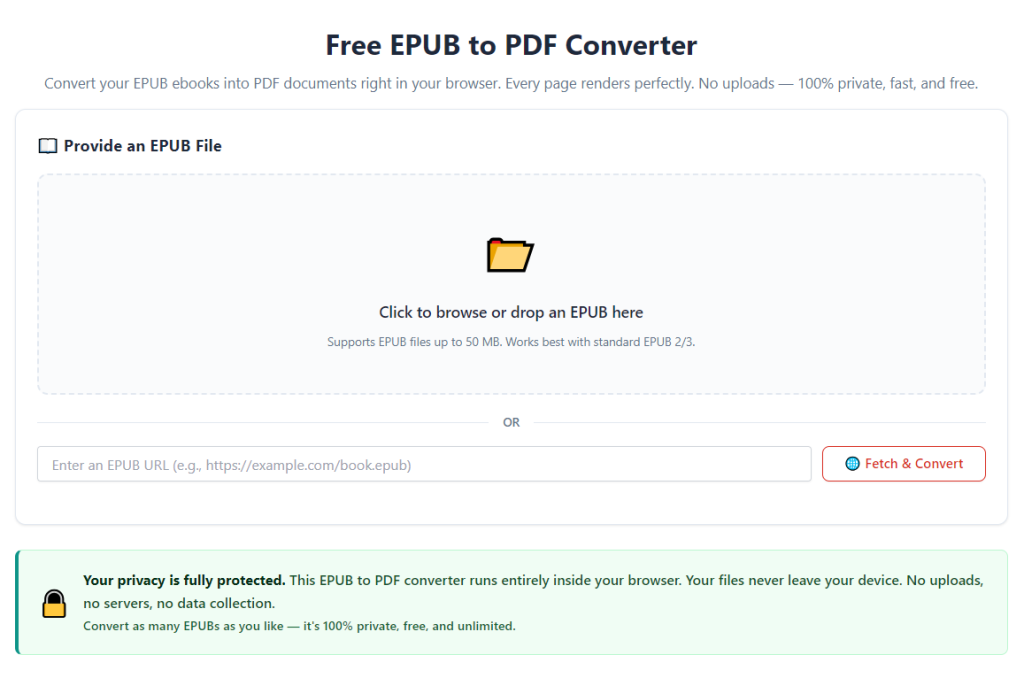
After learning the operation method, click the link below to enter the tool page for immediate use.