Buying a home is the largest financial decision most people will ever make. Before browsing property listings or contacting lenders, every buyer needs a clear picture of how much house they can truly afford each month.
Many first-time home shoppers make a critical mistake: they only factor in monthly mortgage payments and ignore their existing recurring debt obligations. Lenders heavily weigh debt-to-income, or DTI ratio, to approve loans and set borrowing limits.
Guessing your qualifying budget without accounting for DTI leads to unrealistic expectations, wasted house hunting time, and loan application denials down the line. Manual spreadsheet math is error-prone and confusing for buyers unfamiliar with mortgage industry calculations.
Learning how to use house affordability calculator with DTI ratio removes all guesswork. This specialized financial tool builds debt obligations directly into every affordability estimate, matching the exact criteria mortgage lenders follow for loan approvals.
This comprehensive guide breaks down why DTI matters for home buyers, flaws of manual budget math, core tool benefits, non-negotiable calculator features, real buyer use cases, and a detailed step-by-step workflow to run precise affordability estimates every single time.
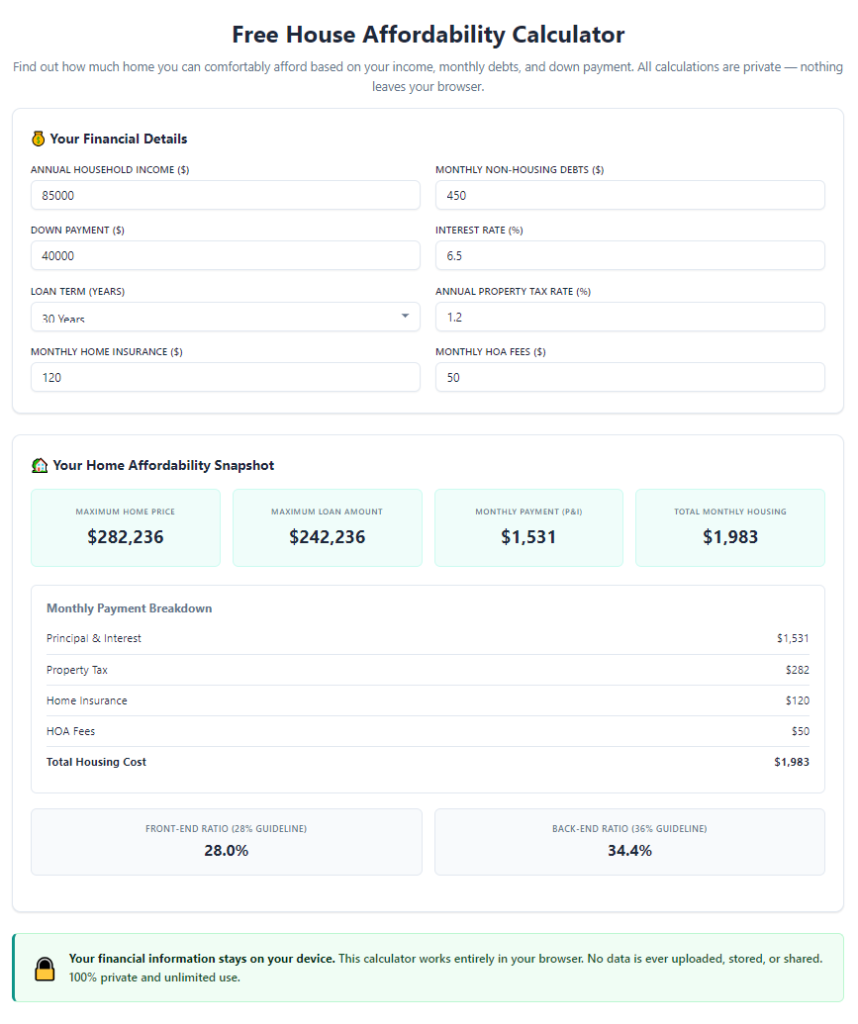
Common Pitfalls of Calculating Home Affordability Without DTI Input
Most generic home budget calculators skip detailed DTI breakdowns, and manual math creates consistent blind spots that mislead home buyers throughout their search process.
Ignoring recurring monthly debt obligations
Basic affordability tools only pull your gross monthly income and estimated mortgage cost. They fail to include car loans, student debt, credit card minimum payments, personal loans, and monthly alimony expenses.
Lenders combine all recurring debt payments against your income to measure risk. Leaving these numbers out creates an inflated, unrealistic maximum home price that banks will never approve.
Confusing front-end and back-end DTI rules
Two separate DTI benchmarks guide mortgage underwriting: front-end housing ratio and back-end total debt ratio. Casual buyers rarely understand the difference without guided calculator inputs.
Manual calculations often mix these two metrics, leading to miscalculated maximum monthly housing costs and skewed total home purchase budgets.
Human math errors on multi-line spreadsheets
Tracking income, debt, taxes, insurance and loan terms across separate spreadsheet rows creates easy arithmetic mistakes. A single miscalculation on monthly debt payments shifts your total affordable home price by tens of thousands.
No customized loan term adjustment
Mortgage calculators without DTI functionality rarely let users toggle loan lengths, interest rates, and loan types alongside debt figures. Buyers cannot test how higher student loan payments shrink their 30-year versus 15-year mortgage budgets.
Failure to separate gross vs net monthly income
Many buyers accidentally plug take-home net pay into budget estimates instead of pre-tax gross income, the number all mortgage lenders use to calculate DTI ratios. This simple error completely invalidates every affordability projection.
Lack of personalized loan qualification context
Without DTI integration, calculators cannot flag when your debt load pushes you over standard lender DTI caps. Buyers walk into pre-approval appointments unaware their debt profile limits their borrowing power.
Core Advantages of Mastering How to Use House Affordability Calculator With DTI Ratio
Once you fully understand how to use house affordability calculator with DTI ratio, every stage of your home search becomes more efficient, realistic, and aligned with mortgage lending standards.
Matches exact lender underwriting logic
Every major mortgage program relies on DTI ratio thresholds to set borrowing limits. This specialized calculator mirrors lender math, so your estimated maximum home price closely aligns with what a loan officer will approve during pre-qualification.
Generates two critical DTI metrics automatically
The tool computes your front-end housing DTI (mortgage, tax, insurance only) and back-end total debt DTI (all monthly debt plus housing costs) in one instant report. No separate manual math required for each ratio.
Adjusts maximum home price based on all recurring debt
Input car payments, student loans, credit card minimums, and other monthly liabilities, and the calculator immediately lowers or raises your affordable budget to reflect real lender risk rules. You avoid falling in love with homes outside your qualifying range.
Saves hours of manual financial planning
Instead of cross-referencing multiple spreadsheets and online calculators to combine income, debt, taxes and loan terms, all variables live inside one single tool interface. Budget estimates finish in under a minute.
Lets buyers test "what-if" debt scenarios
Users can simulate paying off credit cards, refinancing auto loans, or consolidating student debt to see exactly how lowering monthly debt payments raises their maximum affordable home value. This empowers strategic financial planning before house hunting begins.
Accounts for all housing-related monthly costs
Beyond principal and interest payments, the calculator folds property taxes, homeowners insurance, PMI and HOA dues into monthly housing expenses. Every cost feeds directly into accurate DTI ratio calculations for complete visibility.
Works for first-time buyers, refinancers and move-up homeowners
Whether you are purchasing your first starter home, upgrading to a larger family property, or refinancing an existing mortgage, the DTI-integrated calculator adapts inputs to match your unique income and debt profile.
Must-Have Features in a Quality House Affordability Calculator With DTI Ratio
Not all mortgage budget tools include robust DTI functionality. When selecting a tool and learning how to use house affordability calculator with DTI ratio, prioritize these buyer-focused, lender-aligned core features.
Separate input fields for gross monthly income
Dedicated boxes for primary wage income, secondary side hustle pay, rental income and alimony ensure accurate gross income aggregation, the baseline for all DTI math.
Individual monthly debt entry categories
Clear labeled fields for auto loans, student loans, credit card minimum payments, personal loans, child support and recurring monthly debt prevent users from missing debt obligations that impact back-end DTI.
Real-time front-end and back-end DTI output display
The tool must prominently show both DTI ratio results after submitting all financial data. Clear visual markers highlight if your ratios exceed standard conforming loan limits.
Adjustable mortgage term and interest rate sliders
Togglable settings for 10, 15, 20 and 30-year loan lengths plus variable interest rate inputs let buyers test how rate changes shift monthly housing costs and overall DTI percentages.
Built-in tax, insurance and PMI calculators
Automated regional property tax estimates, homeowners insurance cost projections and private mortgage insurance calculations eliminate manual lookups and feed accurate housing expenses into DTI formulas.
What-if scenario duplicate function
A feature to save or duplicate your base financial inputs lets users tweak single variables (such as paying down credit card debt) to compare before-and-after affordability and DTI results side by side.
Plain-language DTI interpretation breakdown
Instead of only showing raw percentage numbers, the tool includes simple explanations of what your DTI score means for loan approval chances, ideal home price ranges, and steps to lower excessive debt ratios.
No hidden fine-print calculations
Transparent breakdowns of every component that feeds your final affordable home price. Users can expand a detailed report to view each individual number used to compute DTI and maximum mortgage limits.
Real-World Use Cases for House Affordability Calculator With DTI Ratio
The skill of understanding how to use house affordability calculator with DTI ratio applies to every stage of the home buying and mortgage planning journey across all buyer profiles.
First-time home buyer pre-qualification prep
New buyers with student loan debt, auto payments and credit card balances can run self-checks before contacting lenders. The calculator shows exactly how their existing debt caps their maximum home budget and flags DTI issues to resolve before loan applications.
Dual-income household joint mortgage planning
Couples combining two incomes and two sets of individual recurring debt can input all combined monthly liabilities. The tool computes joint DTI ratios to set a shared realistic home shopping budget for co-borrowers.
Move-up homeowners selling an existing property
Homeowners carrying remaining mortgage debt on their current home can add that monthly payment to debt inputs. The calculator demonstrates how overlapping housing costs push DTI higher and limit new home purchase budgets.
Freelance and variable income borrowers
Self-employed buyers with fluctuating annual earnings can input verified average gross monthly income, then layer in all business and personal debt obligations to generate lender-compliant DTI and affordability figures.
Debt consolidation planning prior to home purchase
Buyers exploring balance transfers, loan payoffs or credit card consolidation can run comparative calculator scenarios. They see the exact dollar increase in affordable home value after cutting monthly recurring debt payments.
Refinance mortgage budget analysis
Homeowners exploring rate refinances or cash-out refinances input their current mortgage payment alongside other debt to calculate updated DTI ratios and determine if refinancing creates more sustainable monthly housing costs.
Low-DTI investment property buyer forecasting
Real estate investors calculating rental property mortgages can separate personal consumer debt from property-related monthly expenses to compute accurate investor DTI limits set by rental loan underwriting rules.
Step-by-Step Complete Guide: How to Use House Affordability Calculator With DTI Ratio
Follow this structured, beginner-friendly workflow to operate the tool accurately and generate lender-aligned affordability estimates with complete DTI ratio breakdowns.
Step 1: Gather all required financial documentation
Pull every document containing consistent monthly income and recurring debt figures before opening the calculator.
- Monthly gross pay stubs for all wage earners on the loan application
- Monthly minimum payment statements for credit cards, auto loans, student loans and personal loans
- Current monthly child support, alimony or other mandatory recurring debt obligations
- Estimated local property tax rates, average homeowners insurance costs and HOA fees for target neighborhoods
- Target mortgage interest rate range and preferred loan term length (15 or 30 years)
Separate gross pre-tax income from take-home net pay; lenders exclusively use gross income for all DTI ratio calculations.
Step 2: Launch the affordability calculator tool and locate core input panels
Open the calculator and navigate to two primary sections: total monthly gross income inputs and recurring monthly debt entry fields. Locate adjustable sliders for loan term, interest rate, tax and insurance estimates.
Spend 30 seconds reviewing output panels that display front-end DTI, back-end DTI, maximum monthly housing payment and total affordable home price to understand what data the tool generates after submission.
Step 3: Input all household gross monthly income
Enter every source of pre-tax monthly household income into designated fields: primary full-time wages, secondary part-time income, freelance average monthly earnings, rental passive income and spousal support income.
Add all co-borrower income separately if purchasing a home with a partner or spouse. The tool aggregates all gross monthly earnings as the denominator for DTI ratio formulas. Double-check all numerical entries for typos that skew final percentages.
Step 4: Enter every recurring monthly debt payment
This critical DTI step separates specialized calculators from generic mortgage tools. Input every mandatory minimum monthly debt obligation without exception:
- Auto loan monthly minimum payments
- Student loan scheduled monthly installments
- Credit card statement minimum required balances
- Personal loan and unsecured line of credit payments
- Court-ordered child support or alimony monthly amounts
Do not include discretionary monthly spending like groceries, entertainment or utility bills; lenders exclude these variable expenses from official DTI back-end calculations.
Step 5: Adjust housing cost customization settings
Tweak all variables that impact your monthly housing payment, which feeds directly into front-end DTI ratio math:
- Select your target mortgage loan term (15-year or 30-year fixed rate)
- Input your expected current mortgage interest rate
- Enter local property tax percentage or annual tax dollar estimates
- Toggle homeowners insurance average monthly cost
- Add monthly HOA dues if shopping for condos, townhomes or planned communities
- Input expected PMI percentage if your down payment will fall below 20% of the home purchase price
Each adjustment modifies your total monthly housing expense and shifts both front-end and back-end DTI results in real time.
Step 6: Submit all inputs to generate full DTI and affordability report
Click the calculate button to trigger the tool’s lending-aligned formulas. Within seconds the page populates a complete breakdown including four core results:
- Maximum monthly housing payment your DTI ratios qualify for
- Total estimated affordable home purchase price
- Front-end housing DTI ratio percentage
- Back-end total debt DTI ratio percentage
Read the plain-language interpretation panel to understand whether your DTI falls within standard conforming, FHA or VA loan acceptable thresholds.
Step 7: Run comparative what-if debt payoff scenarios
Duplicate your base input set to test strategic debt reduction plans that lower back-end DTI and raise your maximum affordable home price.
- Test paying off a single credit card to remove its monthly minimum debt payment
- Simulate refinancing a high-interest auto loan to cut monthly liability costs
- Calculate the budget boost after eliminating student loan monthly installments entirely
Compare original and revised maximum home price outputs to quantify exactly how reducing monthly debt expands your home buying budget.
Step 8: Cross-reference DTI limits with mortgage program guidelines
Use the tool’s DTI explanation text to match your calculated ratios to popular loan program caps:
- Conventional conforming loans typically cap back-end DTI at 36%
- FHA loan programs allow slightly higher back-end DTI up to 43% with strong credit
- VA home loans offer flexible DTI rules for eligible military borrowers
If your back-end DTI exceeds preferred program limits, use the scenario tool to identify which debt payments to eliminate for loan eligibility.
Step 9: Save your full financial input report for lender pre-qualification
Export or copy your complete calculator breakdown including income totals, all debt monthly payments, full DTI percentages and maximum affordable home price. Bring this data to your mortgage pre-qualification appointment to align your expectations with official lender calculations.
Step 10: Refresh inputs as your financial profile changes
Re-run the calculator every time your income or monthly debt obligations shift: receiving a raise, paying down revolving credit, refinancing loans or adding new recurring debt obligations. Updated DTI figures keep your home shopping budget accurate through every phase of your property search.
Common Costly Mistakes When Using House Affordability Calculator With DTI Ratio
Even when learning how to use house affordability calculator with DTI ratio, these frequent input errors and misinterpretations produce misleading home budget estimates and derail mortgage planning.
Plugging net take-home pay into gross income fields
This is the most widespread buyer error. Lenders calculate all DTI ratios on pre-tax gross income. Using after-tax paycheck amounts artificially lowers your calculated DTI and inflates your maximum affordable home price far beyond lender approval limits.
Omitting small recurring monthly debt payments
Buyers frequently skip low-balance credit card minimums or small personal loan installments because the payment feels insignificant. Every recurring debt payment counts toward back-end DTI, and missing even one shifts your qualifying budget downward.
Ignoring HOA and PMI monthly housing costs
Skipping HOA fees or private mortgage insurance from housing expense inputs understates your total monthly housing payment. This creates an artificially low front-end DTI percentage and overestimates how much house you can comfortably afford.
Running only one static calculation without what-if testing
A single base calculation only shows your current financial position. Failing to test debt payoff scenarios prevents buyers from unlocking a larger home budget by reducing their back-end DTI ratio ahead of loan applications.
Confusing front-end and back-end DTI limits
Many buyers only review the housing front-end ratio and ignore the stricter total debt back-end DTI cap. Lenders prioritize back-end DTI for loan approval, making this the more critical metric to monitor in calculator outputs.
Using outdated interest rate estimates
Inputting old, lower market interest rates skews monthly mortgage payment calculations. Higher rates increase housing expenses, raise front-end DTI, and shrink your total maximum home purchase budget.
Treating calculator results as a formal loan pre-approval
The tool delivers self-planning estimates aligned with lender math, but it cannot replace official lender underwriting. Credit score, employment history and asset reserves still impact final loan approval separate from DTI ratio figures.
Pro Tips to Maximize Accuracy When Using House Affordability Calculator With DTI Ratio
Implement these actionable strategies to refine your calculations, improve DTI positioning, and generate hyper-realistic home buying budgets every time you operate the tool.
- Compile a full list of every monthly debt payment before opening the calculator to avoid missing any recurring liabilities that impact back-end DTI.
- Round all monthly income and debt figures to exact dollar amounts; rough estimates create minor DTI percentage shifts that add up to large home price miscalculations.
- Run separate calculator sessions for short-term and long-term loan terms to compare DTI differences between 15-year and 30-year mortgage payment structures.
- If your back-end DTI sits near program maximum limits, build a 6-month debt payoff plan and model incremental payment elimination in sequential tool scenarios.
- Update property tax and insurance estimates annually; local tax reassessments increase monthly housing costs and push your front-end DTI ratio higher over time.
- For variable freelance income, use a 24-month average gross monthly earning figure instead of single month peak income to match lender self-employment DTI standards.
- Run the calculator again after receiving pre-qualification numbers from a lender to cross-check their official DTI math against your self-generated tool results for alignment.
- Share your saved calculator report with your real estate agent to narrow property search listings to homes that fit your DTI-aligned maximum budget range.
Final Closing Thoughts
Debt-to-income ratio is the single most important metric mortgage underwriters use to judge borrower repayment risk. Generic affordability tools that ignore DTI produce useless, overinflated home price estimates that set buyers up for disappointment during loan pre-qualification.
Mastering exactly how to use house affordability calculator with DTI ratio empowers every home shopper to plan realistically, identify costly debt barriers early, and shop for properties within lender-approved budget limits. The tool condenses hours of complex mortgage math into quick, readable reports that separate wishful home shopping from financially responsible purchasing decisions.
Whether you are a first-time buyer, dual-income co-borrower, self-employed investor or existing homeowner refinancing property, integrating full DTI breakdowns into your affordability calculations eliminates guesswork and streamlines every stage of your mortgage journey. By following the complete step workflow, avoiding common input mistakes, and leveraging comparative what-if scenarios, you will generate precise, lender-aligned budget projections that keep your home search focused, efficient, and financially sustainable long after closing day.
After learning the operation method, click the link below to enter the tool page for immediate use.