Every day, professionals, students, freelancers and business teams share PDF files for collaboration, client delivery and internal communication. Many of these documents carry hidden confidential data that must be removed before distribution.
Confidential content ranges from personal IDs, bank records, client contact lists, internal financial metrics, proprietary research notes and private employee information. Leaving these pages intact creates major data breach risks once the PDF gets forwarded or posted online.
Most basic PDF tools only offer simple cropping or text blurring. Blurring text does not fully erase underlying data, and hidden layers can still be extracted with basic recovery software. Manual desktop PDF editors require paid software licenses and complicated installation steps.
A reliable PDF page remover to erase confidential pages online eliminates all these security and workflow headaches. This cloud-based tool fully deletes entire sensitive pages from PDFs without leaving recoverable traces, all through a standard web browser with no bulky software installs.
This detailed hands-on guide breaks down the hidden risks of unredacted PDFs, limitations of outdated editing methods, core advantages of web-based confidential page removers, non-negotiable safety features, real-world professional use cases, and an ethical, secure step-by-step workflow to permanently erase private PDF pages online.
Common Security Risks When Sharing Unedited Confidential PDFs
Many users underestimate how easily hidden confidential data can leak out of incomplete PDF files. Standard quick fixes like highlighting or black text overlays do not solve root security problems.
Partial redaction leaves recoverable confidential data
Basic blur or black box tools only cover text visually. The original confidential words, numbers and addresses remain embedded in the PDF’s code. Anyone with free PDF extraction software can highlight and copy the supposedly hidden information in seconds.
Desktop software creates local residual file traces
If you edit PDFs on a laptop or desktop, temporary cache files, autosave drafts and deleted file fragments linger on the hard drive. These leftover copies store full confidential pages even after you delete the main document file.
Printing and scanning reintroduce confidential content
If you print a PDF with unremoved secret pages to scan a new copy, small metadata artifacts still retain page data. Shared scanned PDFs uploaded to messaging apps or cloud drives expose confidential details to third-party storage systems.
Manual page deletion takes excessive time for multi-page files
Long business reports, legal packets and research manuscripts can hold dozens of confidential pages scattered across chapters. Manually splitting, extracting and recombining PDFs via desktop tools takes hours of repetitive work with high human error risk.
Generic online PDF tools store uploaded documents long-term
Most low-quality web PDF editors save every uploaded file to permanent cloud storage. Confidential client records or personal identity pages sit on external servers indefinitely, creating permanent data leakage liability for individuals and small businesses.
Why Desktop PDF Editors Fall Short for Erasing Confidential Pages
Traditional offline PDF software seems convenient at first glance, but it carries consistent downsides that make it unsafe for handling sensitive confidential document content.
High cost barrier for full page removal features
Most premium desktop PDF suites lock permanent page deletion behind expensive monthly or yearly subscriptions. Casual users who only need occasional confidential page removal cannot justify recurring software fees.
Complicated learning curve for secure redaction workflows
Desktop editors separate page organization tools and confidential redaction functions into disjoint menus. New users often miss critical settings that leave residual page data intact after editing.
Local storage risks for sensitive uploaded files
All PDF drafts, temporary edits and original confidential source files save directly to your device storage. Lost or stolen laptops expose every unredacted PDF copy stored locally on the hard drive.
No cross-device instant access for urgent document edits
If you receive a confidential PDF while traveling or working from a secondary device, desktop software cannot be accessed remotely. You have to wait until returning to your main computer to erase private pages before sharing.
Cumbersome file recombination after page splitting
After deleting confidential pages offline, users must manually merge remaining PDF sections back into one unified document. Splitting and merging multi-page files frequently disrupts formatting, page numbering and embedded hyperlinks.
Core Key Benefits of a PDF Page Remover to Erase Confidential Pages Online
Switching to a dedicated PDF page remover to erase confidential pages online reshapes your secure document sharing workflow, balancing speed, privacy and consistent data protection for all sensitive file types.
Permanent, unrecoverable full page elimination
Unlike superficial text masking tools, this web-based remover completely strips selected confidential pages from the PDF file structure. No hidden metadata, text layers or residual page code stays embedded in the final downloaded file, eliminating data recovery risks entirely.
Zero software downloads or mandatory installs
The entire tool runs inside any standard web browser on phones, tablets, laptops and desktop PCs. You avoid large setup files, license activation prompts and storage space taken up by offline PDF editing suites.
Temporary file processing with automatic data purging
Secure versions of this online PDF page remover delete all uploaded source PDFs immediately after you finish downloading your redacted final copy. No confidential document copies get archived to long-term cloud storage servers, complying with standard data privacy guidelines.
Full support for long multi-page confidential documents
Whether you work with 5-page personal statements or 200-page business audit reports, the tool processes large PDF volumes without slowdowns. You can mark dozens of scattered confidential pages for bulk simultaneous deletion in one single session.
Preserves original PDF formatting after page removal
After erasing selected confidential pages, the tool automatically reorders remaining pages, fixes page number sequencing and retains original fonts, images, charts and hyperlinks. No manual reformatting is required post-editing.
Accessible for all user skill levels with minimal learning curve
The interface uses simple visual page thumbnails to let users click and mark confidential pages for removal. No advanced technical knowledge of PDF coding or document structuring is needed to complete secure edits.
Works for every industry’s confidential document types
Legal contracts, financial statements, healthcare patient summaries, freelance client briefs, internal corporate strategy docs and student research files all receive the same secure full-page deletion treatment before external sharing.
Must-Have Security & Functional Features in a Trusted PDF Page Remover to Erase Confidential Pages Online
Not all web PDF deletion tools meet strict confidential data protection standards. When selecting your PDF page remover to erase confidential pages online, prioritize these critical safety and usability features to avoid accidental data leaks.
Instant visual page thumbnail preview panel
A clear grid of small PDF page previews lets you scan every page quickly to spot all confidential sections. You can tick checkboxes next to each sensitive page number to queue bulk deletion without opening each page individually.
One-click bulk page select and deselect controls
For documents with scattered confidential pages spread across multiple chapters, bulk selection tools cut editing time drastically. You can clear all marked pages in a single click if you accidentally flag non-confidential content.
Local browser-only file processing
Top-tier confidential PDF removers handle all page deletion calculations directly within your browser instead of transferring full file data to external remote servers. This eliminates third-party server interception risks during processing.
Post-edit PDF integrity validation
After erasing confidential pages, the tool runs an automatic file scan to confirm no residual hidden data layers remain in the exported document. It alerts users if any embedded confidential metadata requires extra clearing.
Universal PDF format compatibility
The remover supports every standard PDF variant, including scanned image-based PDFs, fillable form PDFs, password-locked documents and large high-resolution graphic-heavy reports common in corporate and legal workflows.
Quick clean download button with lightweight output files
Once confidential page removal finishes, the edited PDF compresses moderately without losing visual quality. The download function delivers the redacted file straight to your device with no mandatory account sign-ups to unlock exports.
Metadata wiping supplementary function
Beyond full page deletion, premium tools include a one-tap metadata eraser that strips hidden author names, creation timestamps, original file paths and embedded comment threads that may hold confidential background information.
Mobile responsive interface for on-the-go confidential edits
The page marking and preview layout adapts seamlessly to small smartphone screens. You can securely erase confidential PDF pages while commuting or working remotely without access to a desktop workstation.
Real-World Use Cases for Online Confidential PDF Page Remover
A versatile PDF page remover to erase confidential pages online fits nearly every professional, academic and personal scenario that requires secure PDF redaction before sharing files externally.
Small business client report distribution
Agencies, accountants and consulting teams prepare financial performance PDFs for customers. Internal pricing sheets, staff salary breakdowns and unreleased strategy drafts stored on separate pages get fully erased before sending finalized deliverables to clients.
Legal document packet preparation
Lawyers compile case files containing sensitive witness statements, private settlement figures and personal identifying information of involved parties. These confidential pages are permanently removed before sharing redacted case copies with opposing counsel or third-party administrative bodies.
Student and academic research sharing
Graduate and undergraduate research papers may include raw survey participant contact data, restricted institutional records or unpublished proprietary lab findings on separate pages. Students erase these confidential sections before submitting condensed versions for class peer review.
Healthcare administrative file redaction
Medical offices generate patient summary PDFs that hold full legal names, birth dates, medical history details and insurance identifiers. Confidential pages with protected health information get deleted before sharing anonymized case examples for internal team training.
Freelance creative and design client handoffs
Graphic designers, copywriters and video producers deliver project packets with internal pricing breakdowns, unused draft concepts and private client reference contacts. Confidential pages are stripped out to create public-facing portfolio samples and final client handoff files.
Corporate internal memo external sharing
Company internal memos often include confidential revenue forecasts, unannounced product launch timelines and employee performance evaluations. When repurposing memos for public blogs or industry presentations, sensitive pages get fully erased online in seconds.
Personal financial document redaction
Individuals generate tax records, loan application PDFs and bank statement files with full account numbers, residential addresses and social identification numbers. Users erase confidential pages before uploading documents to third-party platforms for loan applications or tax filing assistance.
Real estate listing packet editing
Property agents compile full disclosure packets with confidential seller debt information, personal contact details and previous offer records. These private pages are deleted online before distributing cleaned PDF packets to prospective property buyers.
Step-by-Step Secure Workflow: Use PDF Page Remover to Erase Confidential Pages Online
Follow this privacy-first, beginner-friendly process to safely remove all confidential PDF pages via web-based tools and download fully redacted, leak-proof documents ready for external sharing.
Step 1: Sort and review your original confidential PDF file locally
First, open the source PDF on your device to manually note all page numbers that hold confidential private data. Flag pages with IDs, financial numbers, client records, proprietary research or personal identifying information for targeted deletion later.
Separate any password-protected confidential PDFs and complete password unlocking locally before uploading to the online remover tool. Note: Only unlock files on your trusted personal device to avoid exposing passwords to unknown third-party software.
Step 2: Open the secure online PDF page remover in your browser
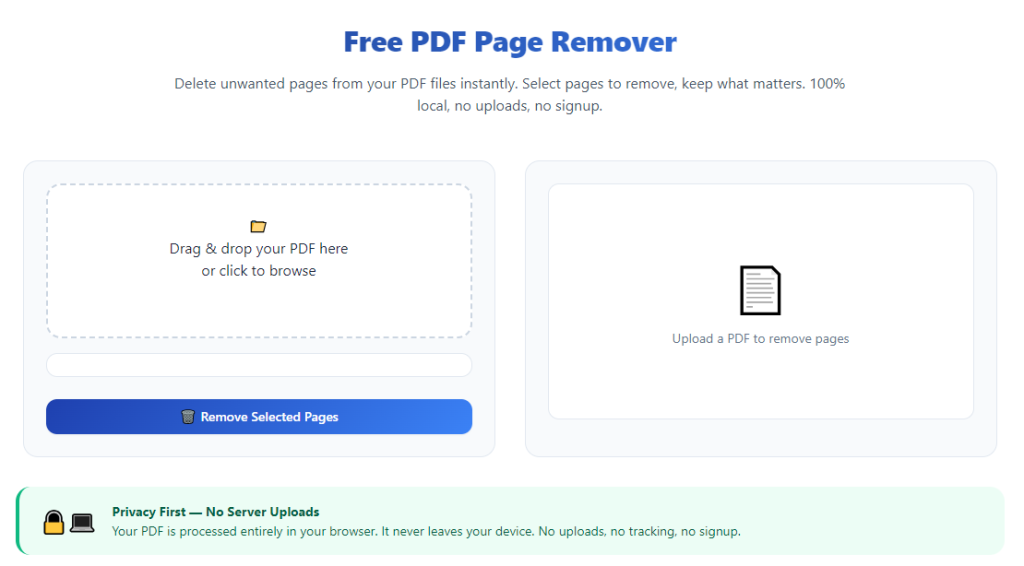
Launch your preferred web browser and navigate to the dedicated PDF page remover tool built for erasing confidential pages online. The main landing page will display a prominent file upload zone with no mandatory login or account creation pop-ups blocking access to core deletion functions.
Spend 10 seconds scanning the tool’s core interface: locate the upload box, thumbnail preview panel, page selection tickboxes, process button and final download button to map out your editing workflow in advance.
Step 3: Upload your source PDF file securely to the browser processor
Drag and drop your confidential PDF directly into the marked upload area, or use the file browse button to select the document from your device storage.
Confirm the upload completes fully before proceeding. Reliable confidential removers process file data entirely within your browser instead of transmitting full document copies to outside cloud servers, cutting data interception risks during upload.
Step 4: Mark all confidential pages for permanent erasure
Once the PDF loads, the tool generates a grid of small page thumbnails with matching numerical page labels. Scroll through the full preview list and tick the checkbox next to every page containing confidential sensitive content you need to erase completely.
Use bulk select controls if dozens of scattered confidential pages require deletion. Double-check each marked page thumbnail to avoid accidentally flagging non-confidential content for removal, which would disrupt your final document structure unnecessarily.
Step 5: Apply supplementary metadata wiping (recommended for high-sensitivity files)
For legal, financial or healthcare PDFs carrying extremely restricted confidential data, activate the tool’s metadata clear feature before processing page deletion. This supplementary step strips hidden embedded confidential details like original file paths, author notes and internal comment threads that visual page removal alone cannot eliminate.
Skip this step only if your document holds no hidden background confidential metadata and you only need full visible page elimination.
Step 6: Start permanent confidential page removal processing
Click the core process button labeled to erase selected pages from your PDF file. The browser will run the deletion sequence locally within seconds, even for multi-hundred-page confidential documents.
Do not close the browser tab mid-processing, as this can corrupt the edited PDF and force you to reupload your original confidential source file and restart the entire workflow.
Step 7: Verify the redacted PDF to confirm all confidential pages are gone
Once processing finishes, the tool displays a preview of your newly edited PDF. Scroll through every remaining page one more time to cross-check that all previously marked confidential sections have been fully removed from the file sequence.
Confirm page numbering flows logically with no gaps or broken formatting from deleted confidential pages. If any sensitive page was missed, repeat the upload and selection workflow with your original unedited source file.
Step 8: Download the clean, confidential-data-free final PDF
After full validation of your redacted document, click the download button to save the edited PDF directly to your local device storage. The exported file contains zero recoverable traces of the erased confidential pages or their embedded content layers.
Avoid saving the edited PDF to public shared cloud drives immediately; store it on your secure local device first before uploading to collaborative platforms for client or team sharing.
Step 9: Delete the original unredacted confidential source file
Once you confirm the downloaded edited PDF is complete and secure, permanently delete the original full confidential PDF from your device storage. Empty your device’s trash or recycle bin to eliminate local residual cache copies of the unredacted sensitive document.
Step 10: Distribute the clean redacted PDF safely to intended recipients
You can now share the downloaded PDF via email, messaging apps, cloud storage or public portfolio platforms with no risk of confidential data leakage. All previously sensitive pages have been irreversibly erased, and no hidden embedded confidential text or metadata remains recoverable in the distributed file.
Critical Common Mistakes to Avoid When Using PDF Page Remover to Erase Confidential Pages Online
Even with a high-security web-based PDF page remover, these frequent user errors create hidden confidential data leakage risks and ruin the integrity of your redacted documents.
Relying solely on visual blur instead of full page deletion
Many users opt to black out confidential text rather than erase entire sensitive pages. Visual masking does not delete embedded source text code, allowing third parties to extract supposedly hidden confidential numbers and words easily. Always remove full confidential pages entirely instead of partial text overlay fixes.
Skipping the post-processing PDF validation preview
After running page deletion, some users download the edited file without scanning the preview panel. Accidental missed confidential pages remain in the final distributed PDF, creating costly compliance breaches for businesses and legal teams.
Uploading confidential PDFs to generic unsecure all-in-one PDF tools
Low-quality multipurpose web PDF editors store every uploaded file on permanent external cloud storage. Confidential client, personal or corporate data stays archived on remote servers indefinitely, violating standard privacy protection guidelines. Only use specialized removers designed exclusively to erase confidential pages online with instant local file purging.
Leaving original unredacted confidential files stored on shared devices
After downloading the clean edited PDF, users often keep the full confidential source document saved on office shared laptops or public cloud folders. Lost or shared storage access exposes all unremoved private page content to unauthorized third parties.
Bulk uploading multiple unrelated confidential PDFs in one session
Mixing different client, patient or business confidential documents in a single upload session increases human error risk. You may accidentally mark pages from separate files for deletion or distribute the wrong redacted PDF to unintended recipients. Process one confidential document per editing session for maximum organization and safety.
Forgetting metadata clearing on legal and financial confidential files
Hidden embedded metadata often carries confidential background information even after sensitive pages get erased. Skipping metadata wiping leaves subtle data traces that advanced PDF extraction software can recover from your final exported document.
Closing the browser tab mid-file processing
Interrupting the confidential page deletion workflow corrupts PDF file structure. You will need to reupload the full unredacted confidential source file and repeat all page marking steps from scratch, extending exposure time of sensitive data online.
Pro Expert Tips to Maximize Security & Efficiency With PDF Page Remover to Erase Confidential Pages Online
Use these industry-backed strategies to streamline your confidential PDF redaction workflow and eliminate all potential data leakage points every time you erase sensitive pages via web-based tools.
- Bookmark your trusted confidential PDF page remover tool for one-click instant access. This avoids searching unvetted generic PDF editors when you need urgent secure page deletion for time-sensitive confidential documents.
- Create a simple numbered checklist template for multi-page confidential reports. Jot down all page numbers holding private data before uploading the PDF to guarantee zero missed confidential sections during selection.
- Always process confidential PDFs on your personal private browser profile, not shared office browser accounts. Shared profiles retain upload history cache that can expose traces of your sensitive document uploads to other device users.
- Rotate between bulk full-page deletion and single-page marking based on document layout. Use bulk tick tools for grouped confidential chapters and single selection for isolated scattered sensitive pages to balance speed and accuracy.
- Test the recovery resistance of your downloaded redacted PDF once monthly with free PDF extraction software. This quick spot check confirms erased confidential pages cannot be restored from your exported final files.
- Separate personal confidential PDFs (tax forms, ID documents) and business confidential PDFs (client reports, legal packets) into distinct device folders. This prevents mixing unredacted personal and corporate sensitive files during upload sessions.
- Avoid connecting to public unencrypted Wi-Fi networks when uploading confidential PDFs to online remover tools. Unsecure public internet connections create interception risks during browser-based file processing.
- Build a post-sharing cleanup routine: after sending redacted PDFs to recipients, delete both the original confidential source file and the edited download copy from your device to minimize long-term storage of sensitive document versions.
Final Thoughts
Confidential data leakage from unredacted PDF documents creates costly compliance penalties, reputational damage and personal privacy violations for individuals, small businesses and legal/medical teams alike. Manual desktop PDF editing and superficial text masking tools cannot deliver fully secure removal of sensitive page content before file sharing.
A dedicated PDF page remover to erase confidential pages online solves every core pain point of traditional PDF redaction workflows. It delivers permanent, unrecoverable full-page deletion, browser-local secure file processing, cross-device instant access and automatic metadata clearing without expensive software subscriptions or complicated installation procedures.
Whether you handle legal case files, client financial reports, personal identity documents or corporate internal strategy packets, this web-based tool delivers consistent, privacy-compliant confidential page erasure for every PDF format and document length.
By following the step-by-step secure editing workflow, avoiding common security mistakes and implementing expert efficiency tips outlined in this guide, you can reliably produce fully redacted, leak-proof PDF files ready for safe external distribution while eliminating all hidden confidential data recovery risks entirely.
After learning the operation method, click the link below to enter the tool page for immediate use.