Global scheduling has one persistent, overlooked flaw: most standard time zone tools ignore daylight saving time changes, leading to consistent timing errors that disrupt personal plans, remote work operations, and international communication. Many people rely on basic world clocks and simple converters that display fixed hour offsets, failing to account for seasonal clock shifts implemented across dozens of countries each year. These outdated static calculations cause users to schedule meetings at the wrong hour, miss important overseas calls, or show up early or late for cross-border virtual events—issues easily avoided with a reliable time zone converter with DST adjustment.
When regions spring forward or fall back, regular time zone converters become inaccurate overnight, creating confusing time gaps that are nearly impossible to track manually. Trying to memorize DST start and end dates for multiple countries is impractical and error-prone, especially for professionals who coordinate with global teams across Europe, North America, Australia, and other DST-compliant regions. This is where a time zone converter with DST adjustment becomes an indispensable daily tool. Unlike basic static converters, this smart tool automatically detects, updates, and applies daylight saving time rules for every supported location. In this in-depth, practical guide, we will explain why DST adjustments break regular time tools, how a time zone converter with DST adjustment fixes these critical issues, outline key tool features, and share step-by-step methods to achieve flawless year-round global time accuracy for all your scheduling needs.
Why Standard Time Converters Fail During DST Transitions
Most free online time zone converters operate on fixed UTC offset math. They store permanent hour differences between time zones and display static results without any dynamic seasonal updates. While this works during standard time periods, it completely breaks down once daylight saving time begins or ends. DST shifts add or subtract one full hour of local time for millions of users worldwide, altering active UTC offsets and rewriting real-world local clock times.
The biggest problem with generic tools is their inability to adapt to regional DST rules. Not all countries observe daylight saving time, and those that do follow completely different start and end schedules. North American regions switch at different times than European countries, while Australian DST seasons fall during opposite calendar months due to hemispheric differences. Manual tracking of these disjointed schedules is nearly impossible for anyone managing multiple international connections.
Using outdated static offsets leads to serious real-world consequences. Remote workers miss critical team meetings, business professionals schedule client calls during off-hours, and individuals disrupt overseas family communications due to preventable one-hour timing mismatches. A dedicated time zone converter with DST adjustment eliminates all these risks by programming global DST rules directly into its core algorithm, ensuring every time display reflects current, real-world local time whether it is standard time or daylight saving season.
What Makes a Time Zone Converter With DST Adjustment Unique
A premium time zone converter with DST adjustment stands apart from basic time tools thanks to its dynamic, seasonally adaptive technology. Instead of relying on rigid fixed offset values, this advanced converter pulls updated daylight saving rules for every global location and adjusts time calculations in real time. This key difference delivers unmatched accuracy for personal travel, daily life, and professional global scheduling all year long, making a time zone converter with DST adjustment far more reliable than any static time tool.
The most valuable feature of a time zone converter with DST adjustment is its automatic seasonal switching capability. The tool recognizes exactly when each region enters or exits daylight saving time and updates local clocks instantly. Users never need to manually toggle settings or verify DST status for individual countries, as the system handles all background adjustments autonomously for seamless, error-free time conversion.
Additionally, quality converters clearly label DST-active regions, letting users visually distinguish between standard time and daylight saving time zones at a glance. This transparency helps users understand why certain time offsets shift throughout the year and builds greater confidence when scheduling critical international events. For businesses that operate globally, this level of precision eliminates costly scheduling errors caused by seasonal time changes.
Key Core Features of a Premium Time Zone Converter With DST Adjustment
Not every tool claiming DST support delivers consistent, reliable results. The best time zone converter with DST adjustment includes a full suite of adaptive features designed to maintain perfect time accuracy across all seasonal transitions and global regions, setting it apart from generic, static time zone tools:
- Automatic daylight saving time detection: The tool independently identifies active DST periods for every city and country, applying correct clock shifts without any manual input from users.
- Real-time offset synchronization: It updates UTC time offsets dynamically throughout the year, ensuring displayed time differences always match current regional standard or daylight saving rules.
- DST status visual indicators: Clear labels show whether a target location is currently observing daylight saving time or standard time, adding full transparency to every conversion.
- Multi-region simultaneous conversion: Compare unlimited global locations at once, with each individual zone applying its own unique DST schedule independently for grouped meeting planning.
- Future time simulation with DST awareness: When scheduling upcoming events, the tool predicts future DST transitions and adjusts scheduled times accordingly, preventing future scheduling conflicts.
- Cross-date time correction: It automatically fixes date discrepancies caused by DST shifts and long-distance time zone gaps, eliminating midnight crossover errors.
- Zero static offset errors: Unlike basic tools that use permanent fixed math, this adaptive converter refreshes calculations seasonally to avoid outdated time data.
Real-World Benefits of Using DST-Aware Time Conversion Tools
Integrating a reliable time zone converter with DST adjustment into your daily workflow delivers powerful practical benefits that protect your schedule, professional reputation, and global communication efficiency. Most users do not realize how frequently DST shifts disrupt their daily routines and work plans until they start using an adaptive time zone converter with DST adjustment for regular scheduling.
First, it eliminates seasonal scheduling failures. The transition into and out of daylight saving time is the most common period for international scheduling mistakes. Static converters produce wrong time offsets for weeks during transition seasons, creating repeated errors. A time zone converter with DST adjustment removes this seasonal vulnerability entirely, maintaining stable accuracy 365 days a year for all global scheduling tasks.
Second, it builds consistent global professionalism. For remote employees, international consultants, and cross-border sales teams, showing up on time for global meetings is non-negotiable. Avoiding DST-related timing mistakes preserves professional credibility and strengthens client and teammate relationships over time.
Third, it simplifies complex multi-region planning. When coordinating teams across North America, Europe, Asia, and Australia, DST schedules rarely align. Some regions shift forward while others remain unchanged, creating unique temporary time gaps. A DST-adjusted converter processes all these independent variables simultaneously, making complex global scheduling effortless.
Lastly, it reduces personal stress and uncertainty. No more double-checking DST dates, manually calculating one-hour shifts, or second-guessing scheduled call times. The tool handles all technical adjustments in the background, letting users plan events with complete confidence.
Step-by-Step Guide: How to Use a Time Zone Converter With DST Adjustment
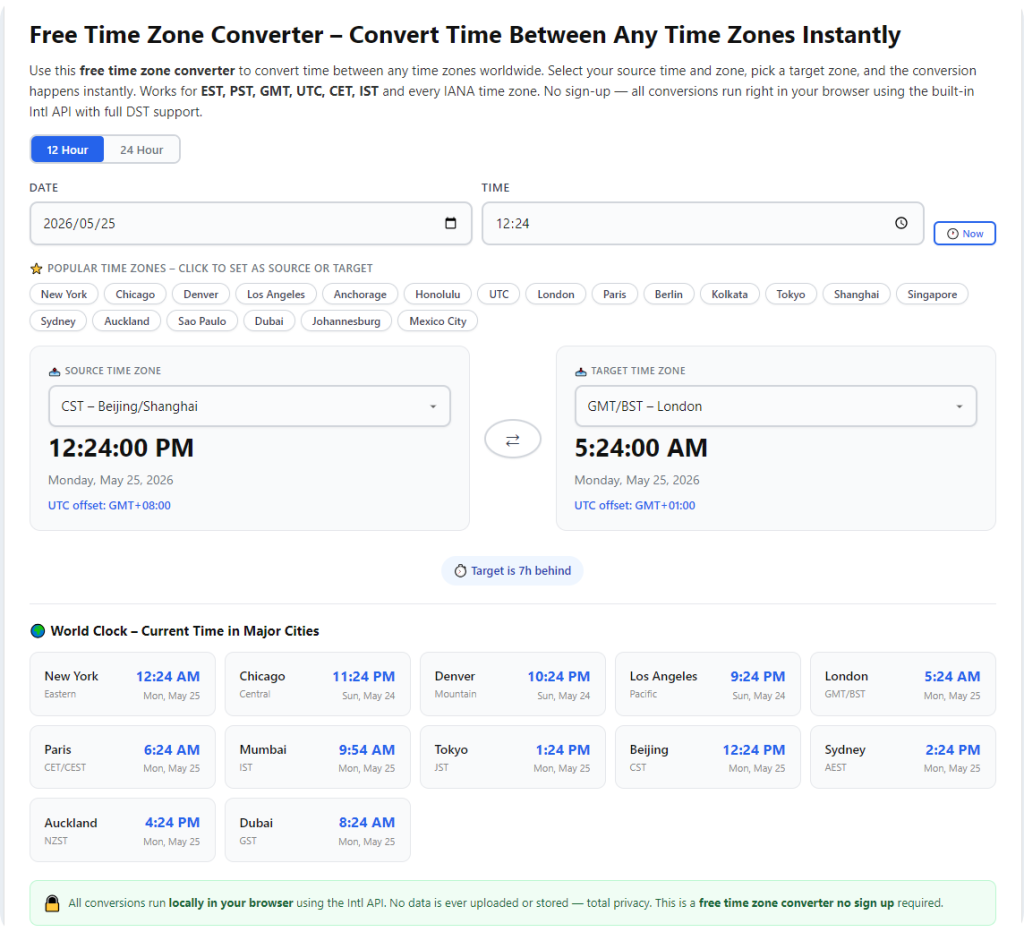
This simple, foolproof workflow works for all high-quality time zone converter with DST adjustment platforms. It requires no technical knowledge and delivers fully accurate, DST-verified time conversions in seconds for every global scheduling scenario:
Step 1: Select Your Primary Reference Time Zone
Begin by choosing your local city or current resident time zone as your base reference point. This anchors all subsequent conversions. The tool will automatically detect whether your local region is currently observing standard time or daylight saving time to establish a correct baseline.
Step 2: Add Your Target Global Locations
Add all international cities, countries, or time zones you need to compare. Whether you are scheduling a single overseas call or a global team meeting with multiple participants, the tool applies independent DST adjustment rules to every individual location for precise, customized results.
Step 3: Review DST Status and Live Time Offsets
Check the on-screen indicators to view active daylight saving status for each region. You will clearly see which locations are on DST and which remain on standard time, explaining any unusual or temporary time offsets between your selected zones.
Step 4: Simulate Current or Future Event Times
Input your intended meeting, call, or event time to generate converted global times. If scheduling weeks or months in advance, the tool automatically accounts for upcoming DST transitions, adjusting future times before seasonal shifts occur.
Step 5: Confirm Final Scheduling Windows
Verify all converted times and cross-check date alignment. With DST-adjusted accuracy, you can finalize event times, share schedules with global contacts, and lock in plans with zero risk of seasonal timing errors.
Most Common DST Time Conversion Mistakes to Avoid
Even with advanced tools, many users fall victim to preventable DST-related errors. Understanding these common pitfalls helps you maximize the accuracy of your time zone converter with DST adjustment and enjoy consistent, error-free scheduling all year round.
The most frequent mistake is assuming all regions follow identical DST schedules. Many users apply regional DST habits globally, not realizing that dozens of countries skip daylight saving time entirely or transition on different months and dates. This false assumption creates consistent offset errors when using static tools.
Another critical error is ignoring future DST transitions. Scheduling events far in advance without accounting for upcoming clock shifts often results in wrong meeting times once seasons change. Premium DST converters solve this by forecasting future adjustments automatically.
Users also commonly overlook minor regional exceptions within the same country. Some large nations contain multiple time zones where only certain regions observe DST. A precise time zone converter with DST adjustment accounts for these micro-exceptions, while generic tools generalize incorrectly and produce inaccurate conversion results.
Expert Tips to Maximize DST Time Converter Accuracy
Use these professional tips to unlock the full potential of your time zone converter with DST adjustment and maintain perfect scheduling accuracy through every seasonal time change:
- Verify DST status before major global events: Always double-check active daylight saving status for all participant regions before high-priority meetings, interviews, or international conferences.
- Save frequently used global locations: Store regular business and personal zones to quickly access DST-adjusted times without repeated manual searching.
- Use future simulation for long-term scheduling: Leverage the tool’s predictive DST features when planning events months ahead to avoid seasonal timing shifts.
- Abandon fixed offset charts entirely: Replace static time difference tables with your dynamic converter, as printed charts become obsolete during DST transition seasons.
Final Thoughts
Daylight saving time transitions create hidden scheduling chaos that generic time zone tools cannot resolve. Fixed-offset converters produce inaccurate results for months every year, leading to missed opportunities, unprofessional scheduling errors, and unnecessary personal frustration. A trusted time zone converter with DST adjustment eliminates all seasonal timing uncertainty with dynamic, intelligent time calculations built for real-world global conditions.
Whether you manage remote international teams, conduct cross-border business, coordinate overseas travel, or maintain long-distance personal relationships, this DST-aware tool delivers consistent, reliable accuracy in every season. It auto-detects regional daylight saving rules, updates time offsets in real time, predicts future seasonal shifts, and provides full transparency for every global time comparison. Stop letting outdated static time tools ruin your global schedule. Use a time zone converter with DST adjustment to achieve perfect, year-round time accuracy for all your international planning.
After learning the operation method, click the link below to enter the tool page for immediate use.