Anyone who dines out regularly knows how tricky final meal math can be. After finishing a great meal, the last thing you want to do is struggle with confusing percentages, separate sales tax figures, and uncertain tip amounts. Most people either calculate tips alone and forget to factor in tax, estimate roughly and overspend, or under-tip accidentally and leave awkward social tension behind. Standard phone calculators force you to do multiple separate equations, track subtotals, compute tax rates manually, and add gratuity on your own—a process that’s slow, stressful, and prone to silly arithmetic errors.
This is exactly why a tip calculator with tax included calculation is one of the most practical everyday tools for American diners. Unlike basic tip-only calculators that ignore sales tax totals, this all-in-one tool computes your pre-tax tip, adds local sales tax, and outputs your final grand total in one simple step. It eliminates guesswork, removes manual math errors, and ensures you always pay the exact right amount for every meal. In this detailed, beginner-friendly guide, we’ll break down how tip and tax calculation works, why combined tools are far more reliable, and how to use a tip calculator with tax included calculation for flawless results every single time you dine out.
Why Combined Tip and Tax Calculation Is Critical for Accurate Dining
A lot of casual diners make a common, costly mistake: separating tip math from sales tax math. Basic tip calculators only generate a gratuity amount based on your subtotal, leaving you to manually calculate and add your local sales tax on your own. This fragmented process creates multiple opportunities for error, especially if you’re dining in a new city with unfamiliar tax rates or rushing to pay your bill quickly.
Many people also confuse pre-tax and post-tax tipping, which is the biggest source of overpaying at restaurants. Proper US dining etiquette requires calculating tips on your pre-tax subtotal, not your final taxed amount. If you calculate your tip after adding tax, you end up tipping on government sales tax—a completely unnecessary expense that adds up meal after meal. Standard standalone calculators don’t protect you from this mistake, but a dedicated tip calculator with tax included calculation follows official etiquette rules automatically.
These specialized tools are programmed to handle the correct order of operations every time: first compute the fair tip on your pre-tax meal subtotal, then calculate sales tax separately, and finally combine everything for your accurate final checkout price. This automated workflow removes human error, ensures etiquette compliance, and gives you a transparent breakdown of exactly what you’re paying for in food, tax, and gratuity.
Top Benefits of a Tip Calculator With Tax Included Calculation
Mastering a tip calculator with tax included calculation transforms your entire dining experience, turning stressful post-meal math into a quick, effortless task. These are the key advantages every diner should take full advantage of:
- All-in-one accurate results: No more switching between separate calculator functions. This tool computes tip amount, sales tax fee, and final total in one go, so you get a complete, itemized breakdown instantly.
- Prevents over-tipping on tax: The tool strictly calculates gratuity on your pre-tax subtotal, stopping you from wasting money by tipping on sales tax that does not benefit restaurant staff.
- Adapts to any local tax rate: Whether you’re dining in your hometown or traveling across states, you can input your exact local tax percentage for hyper-accurate checkout totals every time.
- Eliminates manual arithmetic errors: Multi-step manual math often leads to typos and miscalculations. The automated system handles every percentage formula precisely, down to the exact cent.
- Speeds up checkout: Instead of lingering at the table doing math, you can generate your final payment amount in seconds, keeping your dining experience smooth and efficient.
- Perfect for solo and group meals: The tool works equally well for individual checks and can support group bill splitting while factoring in both tax and proportional tip shares.
Standard US Tipping & Tax Rules Every Diner Should Know
To get the best results from your tip calculator with tax included calculation, it helps to understand the core rules that power accurate dining math. In the United States, tipping percentages follow consistent service-based standards, while sales tax rates vary by state, county, and city.
For standard casual lunch service, a 15% to 18% tip is appropriate. Regular dinner service with attentive staff warrants 18% to 20%, while exceptional fine dining service deserves 20% to 25%. Minimal buffet or counter service typically calls for 10% to 15%. Regardless of the service level, tips always apply to your pre-tax meal subtotal. Sales tax is a separate government charge and should never factor into your gratuity calculation.
Sales tax, on the other hand, is applied to your entire pre-tax meal cost and varies drastically by location. Some regions have low tax rates, while urban areas carry higher percentages. Trying to memorize every local rate is impossible, which is why a flexible tip calculator with tax included calculation is so valuable. You can always input the exact current rate for your location to guarantee precise final totals.
Step-by-Step Guide: Use Tip Calculator With Tax Included Calculation
This simple, foolproof workflow works for every reliable tip calculator that includes built-in tax calculation features. It requires no math skills, takes only seconds, and delivers 100% accurate, etiquette-friendly results every time.
Step 1: Retrieve Your Pre-Tax Meal Subtotal
Start by checking your restaurant bill for the official pre-tax subtotal. This number represents the total cost of your food and drinks before any sales tax is added. This is the only figure you need to begin your calculation. Avoid using the final taxed total as your starting point, as this will skew both your tip and tax math. Double-check the subtotal to ensure there are no typos before moving forward.
Step 2: Open Your Tip Calculator With Tax Included Calculation
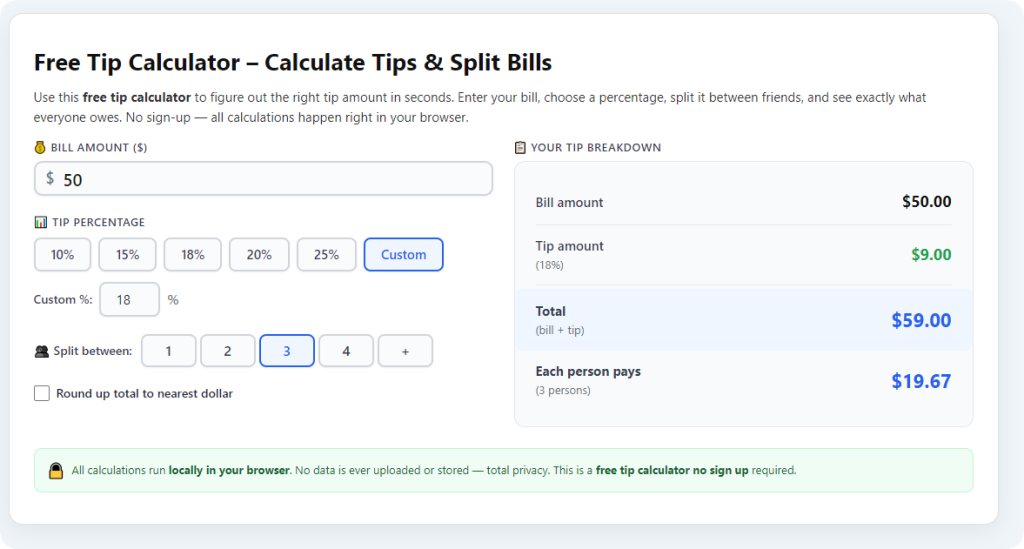
Launch your trusted tip calculator with tax included calculation tool. You’ll see simple, clearly labeled fields for meal subtotal, tip percentage, and sales tax rate. The interface is intentionally streamlined for fast, on-the-spot dining use, with no complicated settings or confusing menus to navigate.
Step 3: Input Subtotal and Select Appropriate Tip Percentage
Enter your verified pre-tax subtotal into the designated field. Next, choose your tip percentage based on your dining experience quality and service type. Stick to standard US tipping ranges to ensure fair staff compensation. The tool will immediately prepare your gratuity calculation based purely on your pre-tax amount, following proper dining etiquette.
Step 4: Enter Your Local Sales Tax Rate
Input your current local sales tax percentage. If you’re unsure of the exact rate, you can quickly confirm standard local tax numbers for your dining location. The calculator will separate the tax calculation from the tip calculation, ensuring both figures are computed correctly and independently.
Step 5: Calculate and Review Your Full Final Total
Tap the calculate button to generate your complete itemized results. Your tip calculator with tax included calculation will display three clear figures: your exact tip amount, your calculated sales tax fee, and your final grand total due at checkout. Every value is precise, transparent, and formatted to match real-world restaurant billing standards.
Step 6: Adjust for Group Splitting (If Needed)
If you’re splitting a bill with friends, use the tool’s group split feature after generating your main total. The calculator will divide the tip and tax proportionally across every person in your party, ensuring everyone pays a fair and equal share of all additional fees.
Common Mistakes to Avoid With Tip and Tax Calculations
Even with a premium tool, small user errors can compromise your accuracy. Avoid these common pitfalls to maximize the value of your tip calculator with tax included calculation on every dining occasion.
The biggest mistake users make is calculating tips on the taxed final total. This error leads to consistent over-tipping and unnecessary extra charges on every meal. Always trust your calculator’s built-in pre-tax logic to avoid this costly habit.
Another frequent issue is using outdated or incorrect local tax rates. Tax policies update occasionally, and regional rates vary widely. Failing to input the correct current rate will create minor discrepancies in your final total.
Many diners also rely on rough mental rounding instead of precise calculator figures. Rounding percentages manually leads to inconsistent tip amounts and uneven billing totals, while the tool delivers exact cent-perfect math every time.
Pro Tips to Get the Most Accurate Calculations
Use these quick expert tips to perfect your workflow whenever you use a tip calculator with tax included calculation:
- Verify automatic gratuities first: For large parties, many restaurants add built-in gratuity. Use your calculator to cross-check the pre-added tip and avoid double-tipping accidentally.
- Save your local tax rate: Most quality tools let you save frequent tax rates, speeding up future calculations for local dining trips.
- Round cash totals politely: For cash payments, round your final calculated total slightly upward to keep transactions clean and professional for staff.
- Recalculate for travel dining: Always update your tax rate when dining out of state to maintain perfect calculation accuracy.
Final Thoughts
Dining math doesn’t have to be confusing, time-consuming, or error-prone. A reliable tip calculator with tax included calculation simplifies every part of post-meal billing, combining accurate gratuity estimates and precise sales tax math in one streamlined tool. It protects you from common etiquette mistakes, prevents overpaying, and removes all the guesswork from your final checkout total.
Whether you’re grabbing a quick solo lunch, enjoying a fine dining experience, or splitting bills with a group of friends, this tool delivers consistent, trustworthy results every time. Stop relying on unreliable mental math and fragmented basic calculators. Use a tip calculator with tax included calculation to make every dining experience faster, fairer, and completely stress-free.
After learning the operation method, click the link below to enter the tool page for immediate use.