Developers often pull raw JSON data from live APIs, database exports and third-party platform returns. Tiny slip-ups like missing commas or misplaced quotes turn valid data into broken code that refuses to load inside development environments.
Spotting JSON syntax faults manually takes hours of tedious line-by-line scanning. New coders waste massive working time hunting small formatting mistakes that block project testing and data import progress entirely.
Most premium desktop code editors lock built-in JSON validation behind expensive subscription plans. Casual developers and programming learners cannot afford dedicated software only for occasional syntax repair tasks.
Learning How to use online JSON formatter to fix syntax errors solves these common coding hurdles effortlessly. Users locate and mend corrupted JSON structure straight from regular web browsers in just a few quick operations.
This detailed practical guide covers common troubles caused by unfixed JSON syntax mistakes, core advantages once you master how to use online JSON formatter to fix syntax errors, indispensable tool core functions, real-world usage scenarios and full step-by-step operating instructions for all skill-level coders.
Common Troubles Triggered by Unfixed JSON Syntax Errors
Ignoring minor JSON syntax flaws leads to cascading technical issues across backend development, data analysis and frontend configuration work.
Application crashes during JSON data parsing
Even a single misplaced colon or missing closing bracket makes programming applications terminate abruptly when trying to read imported JSON datasets from external sources.
Failed data import into spreadsheets and database tables
Corrupted syntax stops bulk JSON content from being recognized by spreadsheet tools and SQL databases, halting regular data sorting and statistical analysis workflows.
Frontend website configuration loading failure
Faulty setting JSON breaks plugin parameters and site layout configurations, triggering blank page rendering or abnormal feature shutdown on live online projects.
Wasted development hours on blind manual error searching
Without automated checking tools, developers scroll through thousands of code lines manually, wasting precious working hours on avoidable syntax troubleshooting work.
Delayed project delivery due to unresolved data formatting bugs
Stacked unfixed JSON errors slow down iteration cycles for software development, pushing back scheduled testing and official project release timelines repeatedly.
Core Benefits After Mastering How to Use Online JSON Formatter to Fix Syntax Errors
After fully understanding How to use online JSON formatter to fix syntax errors, coding professionals and new learners cut down error repair time dramatically during daily development tasks.
Instant automated error scanning without manual line checking
The online tool scans full JSON content within seconds, pinpointing exact line positions where syntax mistakes appear to skip inefficient manual code browsing entirely.
Zero software installation or local storage occupation
All validation and formatting processes run on regular web pages, no bulky editor installation packages needed to occupy computer or smartphone disk space.
Free unlimited syntax checking and repair rounds every day
No daily usage caps, trial restrictions or hidden upgrade fees exist. Users submit unlimited broken JSON snippets for error detection and code fixing all year round.
Cross-device compatible for on-site emergency code repair
Whether working on desktop office equipment or portable mobile devices outdoors, the same online formatter delivers consistent syntax error identification results anytime needed.
Combined code beautification alongside syntax correction
After fixing invalid syntax, the tool automatically arranges neat indent layout, turning messy single-line broken JSON into structured readable code in one single operation.
No mandatory account registration or private info submission
Most reliable online JSON error fix tools skip signup steps, keeping user’s source code data processed locally inside browsers to protect sensitive project information.
Must-Have Core Features of Qualified Online JSON Formatter for Syntax Fixing
When selecting a dependable tool to practice How to use online JSON formatter to fix syntax errors, confirm these core functional modules come equipped on the platform.
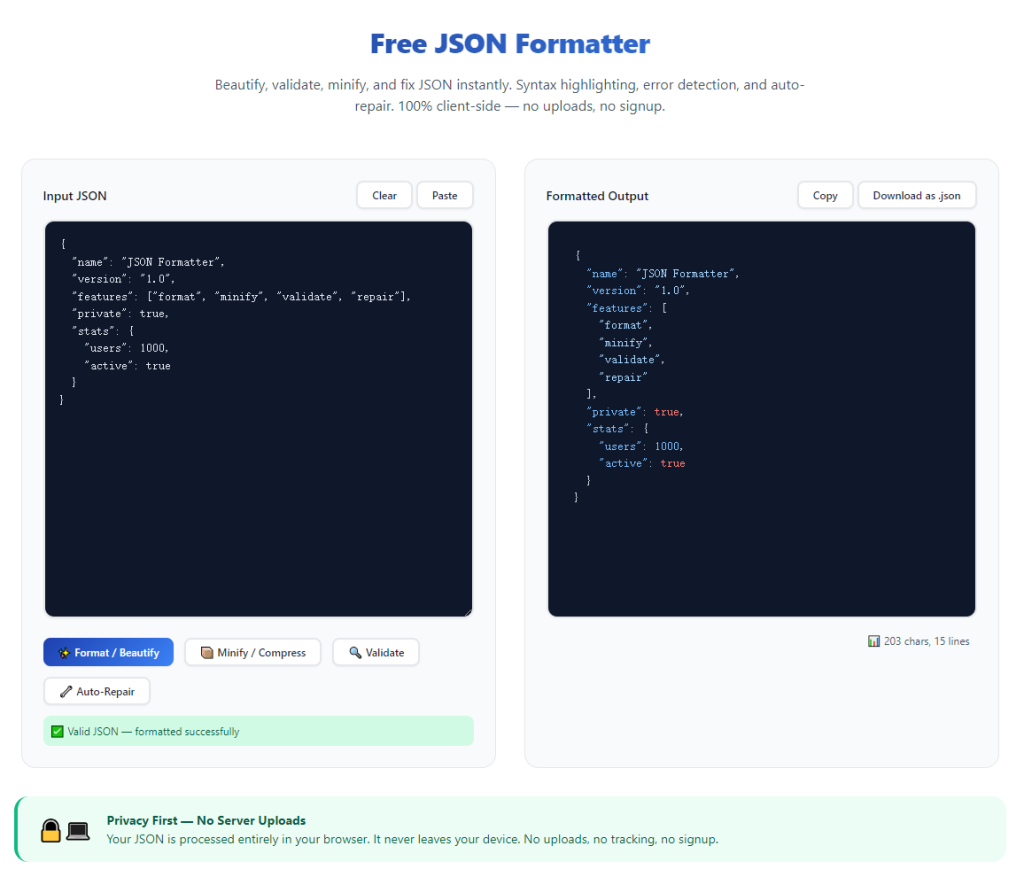
Large multi-line input field for bulk broken JSON pasting
Spacious text box supports full paste of long corrupted JSON copied from debug logs, API response dumps and incomplete configuration document files.
Precise error positioning with exact line number marking
Top-tier tools mark down the specific row where missing quotes, wrong commas or mismatched brackets occur to guide targeted manual correction efficiently.
Plain text error description for beginner-friendly troubleshooting
Instead of obscure technical codes, readable text explains each fault type so new coders quickly learn what syntax rules got broken in their JSON content.
One-click auto format after syntax problem correction
Once invalid code gets repaired, users trigger instant indent beautification to standardize layout matching common industry coding styles.
Independent output panel separating fixed JSON from original broken code
Split screen layout lets users compare raw faulty content against fully repaired structured JSON for direct content verification after error fixing completes.
Quick copy function for finalized valid JSON content
Built-in copy shortcut saves corrected code directly to clipboard for fast insertion back into development projects and configuration files.
Diverse Real-World Scenarios to Fix JSON Errors With Online Formatter
Mastering How to use online JSON formatter to fix syntax errors resolves code breakdown issues across development, data analysis, education and hardware debugging fields.
Backend engineer API response error troubleshooting
Backend developers copy faulty unformatted API return JSON, run online validation to locate missing symbols and repair code before connecting interface with front-end programs.
Data analyst corrupted database export repair
When exported JSON from database gets damaged during file transfer, analysts use online formatter to fix syntax and restore data ready for spreadsheet import and statistical analysis.
Frontend developer website configuration recovery
After accidental editing mistakes ruin site plugin JSON, frontend coders paste broken content online to fix syntax and recover normal webpage running status quickly.
Programming student homework code revision
New coding learners fix assignment JSON syntax faults via online tools to meet teacher’s code validity requirements without buying premium desktop editing software.
Freelance developer cross-client urgent bug repair
Independent IT contractors fix unexpected JSON syntax issues for multiple client projects anytime without carrying pre-installed professional editing software.
IoT engineer equipment configuration file debugging
Hardware technicians mend corrupted device setup JSON syntax to restore normal parameter reading and stable running of connected IoT hardware devices.
Full Step-by-Step User Guide: How to Use Online JSON Formatter to Fix Syntax Errors
Follow this beginner-focused step guide to master how to use online JSON formatter to fix syntax errors and restore valid JSON structure in minutes.
Step 1: Copy all broken original JSON content
Open your source debug log, configuration file or API test page then fully select and copy every piece of faulty JSON code from its original storage location.
Clear extra random spaces or stray invalid characters attached at the start and end of copied code before opening the online formatting tool.
Step 2: Open trusted online JSON formatter inside regular browser
Launch your daily used desktop or mobile web browser and access the free online JSON formatting and validation tool directly.
Check no forced signup popups or paid feature lock prompts appear right after the webpage finishes complete loading on screen.
Step 3: Paste broken JSON into dedicated input text area
Insert your pre-copied corrupted JSON code into the large blank input box specially prepared for raw faulty source content on the tool interface.
Double check full content gets fully pasted with no missing code segments caused by accidental clipboard copy failure.
Step 4: Launch syntax scan and error detection process
Click the validate or format control button to start backend automatic syntax scanning across your entire submitted JSON content block.
Wait less than one second for the tool to list all detected faults with clear line numbers and plain-language error explanations on the page.
Step 5: Revise code following displayed error hints
Refer to marked error positions and descriptive prompts to manually add missing brackets, correct misplaced commas or fix mismatched quotation marks in input content.
Re-trigger scan repeatedly until the tool returns zero syntax error alerts to confirm full code structural validity.
Step 6: Generate neatly formatted final valid JSON
After clearing all syntax mistakes, run full formatting to produce clean properly indented JSON displayed inside the separated output panel on screen.
Use built-in copy option to save fixed structured JSON into clipboard for later usage inside your programming project folders.
Step 7: Reset panel and bookmark for future error fixing
Tap available reset button to wipe old input and output data, clearing workspace ready for next round of JSON syntax troubleshooting tasks.
Save the tool webpage into browser bookmark list for instant access during sudden emergency JSON error repair needs later.
Common Mistakes to Avoid While Using Online JSON Formatter to Fix Syntax Errors
Even with convenient online validation tools available, careless operating habits slow down JSON syntax repair and lead to repeated invalid code results.
Rely only on manual line-by-line error searching unnecessarily
Manual checking wastes massive development time; learn how to use online JSON formatter to fix syntax errors for all regular JSON fault repair work.
Paste incomplete cut-off JSON leading to misleading error alerts
Truncated source code creates random false syntax warnings, forcing users to re-fetch full original JSON content and restart entire scanning workflow again.
Ignore line-numbered error prompts and edit random code sections
Blind unguided editing introduces brand-new syntax mistakes, expanding original code damage and prolonging overall debugging duration heavily.
Close browser page before copying fully fixed valid JSON results
Unexpected tab shutdown erases all corrected code data, requiring full repeated copy-paste and syntax fixing cycles from scratch once more.
Overlook subtle hidden syntax issues after single successful scan
Some tiny symbol mismatches only show after full formatting; always double-check final output to confirm zero remaining hidden structural flaws.
Practical Pro Tips to Improve JSON Error Fixing Efficiency
These actionable expert suggestions help users optimize efficiency every time they learn how to use online JSON formatter to fix syntax errors for daily coding tasks.
- Depend on free online JSON validation tools to skip expensive paid editor subscriptions for occasional syntax troubleshooting and JSON repair jobs.
- Store your preferred online formatter link inside browser bookmarks to launch instant error checking amid urgent project debugging scenarios.
- Split extremely large JSON files into smaller fragments during scanning to avoid browser lag and get more precise per-section syntax error feedback.
- Fix listed errors one by one following displayed line order to prevent cascading new syntax faults from unordered random code edits.
- Compare fixed output JSON with original source content regularly to make sure core data values stay unchanged after syntax correction completes.
- Build personal note of frequently recurring JSON syntax mistakes to reduce similar coding errors during future project writing phases.
Final Thoughts
Valid standard JSON syntax acts as fundamental guarantee for smooth data transmission, program parsing and stable configuration loading across all digital development fields.
Tedious manual error hunting and costly premium editing software create avoidable development barriers, while mastering How to use online JSON formatter to fix syntax errors delivers zero-cost fast code recovery for all user groups.
Whether you work as professional backend developer, part-time data analyst or entry-level coding student, browser-based JSON error fixing cuts down debugging overhead and improves overall project progress speed.
Sticking to the detailed step-by-step tutorial above lets you quickly spot, amend and beautify broken JSON, eliminate syntax-related project delays and keep all your development data fully functional long term.
After learning the operation method, click the link below to enter the tool page for immediate use.