Every business, remote team, hourly employee, and payroll manager relies on accurate timesheet data to process pay correctly. Calculating total work shift durations by hand opens the door to costly, avoidable mistakes.
Manual math with start and end clock times eats up hours of administrative labor each week. Many office staff and small business owners spend extra overtime just adding up daily shifts, breaks, and partial work hours for every team member.
Simple subtraction on paper or basic spreadsheets often miscalculates overnight shifts, split schedules, and unpaid meal breaks. Small calculation gaps add up to payroll disputes, overpayments, or underpaid staff over the course of a pay cycle.
Mastering how to use time duration calculator for work timesheets eliminates all these persistent payroll headaches. This specialized tool automates hour and minute math built exclusively for tracking employee shift data on standard timesheet documents.
This all-in-one tutorial breaks down the flaws of manual timesheet calculation, key tool advantages, non-negotiable core features, real-world business use cases, and a detailed step-by-step workflow for flawless timesheet hour tracking.
H2: Hidden Drawbacks of Manual Work Timesheet Duration Calculation
Calculating work hour durations without a dedicated digital calculator creates consistent administrative and financial risks for every size of workplace team.
Human math errors during shift subtraction
Most admin staff juggle dozens of employee timesheets each pay period. Repeating start time minus end time calculations dozens of times creates accidental addition and subtraction errors every single week.
Slow, repetitive administrative labor
Adding daily shifts, subtracting unpaid break minutes, and tallying weekly totals manually is extremely time-consuming. This work pulls HR and office managers away from higher-value core business tasks.
Confusion with cross-midnight work shifts
Employees who work overnight schedules break simple paper math logic. Manually splitting hours across two calendar dates leads to wildly inaccurate total work duration tallies on timesheets.
Inconsistent break deduction standards
Different staff take varying meal and rest break lengths. Remembering to subtract unique break times for every employee on every shift creates uneven, inconsistent payroll math results.
Payroll disputes stemming from wrong hour totals
When timesheet hour counts contain mistakes, team members raise formal payroll inquiries. Resolving these conflicts requires rechecking every paper shift log and recalculating all duration data from scratch.
No standardized tracking format across teams
Without a dedicated calculation tool, different admins use different handwritten math methods. This creates mismatched hour-count standards between departments and remote worker groups.
H2: Core Benefits When You Master How to Use Time Duration Calculator for Work Timesheets
Learning and regularly applying how to use time duration calculator for work timesheets streamlines your entire payroll prep process and removes nearly all calculation-related risk for hourly staff payroll.
Zero human math errors on every timesheet entry
The tool executes hour, minute, and break subtraction automatically. There is no room for miscalculations that trigger payroll disagreements or incorrect wage payouts to employees.
Cuts payroll administrative time drastically
Tasks that once took multiple hours of manual tallying finish in minutes. HR and office teams reallocate saved time to employee onboarding, policy updates, and team support work.
Built-in support for overnight and split shifts
Specialized work duration calculators natively handle shifts that cross midnight. The tool automatically splits and combines hours across two calendar dates with no extra manual adjustment needed.
Customizable break deduction functionality
Users input fixed or variable unpaid break minute values. The system subtracts designated rest time from total clocked hours to output net billable work duration instantly.
Uniform hour calculation standards for all team members
Every employee’s timesheet uses identical math logic through the calculator. This eliminates inconsistent hour-count practices between admins, departments, remote workers, and on-site staff.
Clear, exportable duration totals for payroll reporting
Final calculated work hour totals copy directly into payroll spreadsheets, HR software, or printed timesheet forms. Clean, verified numbers simplify tax filing and wage record-keeping requirements.
Accessible for small business owners with no HR background
You do not need formal payroll training to operate the tool. Following the simple workflow for how to use time duration calculator for work timesheets lets solo business owners manage hourly staff payroll independently.
H2: Must-Have Functional Features of a Reliable Time Duration Calculator for Work Timesheets
Not all time calculators are built to handle official payroll timesheet data. The ideal tool for mastering how to use time duration calculator for work timesheets includes these payroll-focused core functions.
Dual start time and end time input fields
Separate dedicated boxes for clock-in and clock-out timestamps support daily shift logging. Users enter standard HH:MM formatted times for consistent, readable duration calculations.
Custom unpaid break minute deduction controls
Adjustable break sliders or number entry boxes let users subtract meal breaks, rest periods, and unpaid off-clock time from gross shift hours to generate net work duration values.
Cross-midnight shift automatic conversion
Top-tier tools recognize when end times fall on the following calendar day. The calculator splits overnight hours and combines them into a single accurate total work hour count.
Daily, weekly, and biweekly total tally modes
Toggleable calculation modes match standard payroll cycles. Generate single-day shift totals, seven-day weekly sums, or two-week biweekly totals aligned with common business pay schedules.
Decimal hour conversion for payroll wage math
Payroll systems often use decimal-format hours for hourly rate multiplication. The tool outputs both standard HH:MM time and decimal hour equivalents for seamless wage computation.
One-click copy for calculated duration results
Copy full total hour values directly to clipboard with a single click. Paste verified totals straight into digital timesheets, spreadsheets, or printed payroll document templates.
Multi-employee batch calculation support
Process multiple individual employee shift logs in one session. Save separate duration totals for each team member to assemble full department timesheet batches quickly.
Clean, ad-free interface focused on payroll tasks
Distraction-free layouts prioritize time entry and calculated results. No irrelevant extra features clutter the screen during high-volume payroll prep periods.
H2: Common Business Use Cases for a Time Duration Calculator for Work Timesheets
A tool designed around how to use time duration calculator for work timesheets serves every type of hourly workforce and payroll setup across all industry verticals.
Small retail business hourly staff payroll
Shop owners calculate cashier, stock, and floor associate shift hours for weekly or biweekly pay cycles. Quick duration math removes the stress of end-of-week payroll preparation for small teams.
Remote and freelance contractor timesheet tracking
Remote hourly contractors, virtual assistants, and freelance labor submit digital timesheets. The calculator verifies logged work durations to match client billing and contractor wage payments.
Restaurant, hospitality, and shift service teams
Hospitality staff regularly work split, late-night, and overnight shifts. The calculator reliably computes irregular shift durations while subtracting mandatory unpaid meal breaks for servers and kitchen teams.
Warehouse and manufacturing hourly labor payroll
Production and warehouse teams follow rotating day, swing, and night schedules. Bulk timesheet duration calculation speeds up monthly payroll for large on-site labor groups.
Home service and field worker time logging
Plumbers, cleaners, maintenance staff, and delivery crews log variable daily shift start and end times. The tool generates accurate net work hour totals for service business payroll and client billing records.
Nonprofit organization volunteer and staff hour tracking
Nonprofits track both paid employee work hours and volunteer service durations. The calculator separates paid shift totals from volunteer logged time for internal reporting and grant documentation.
Corporate HR department centralized payroll processing
In-house HR teams manage dozens of departmental timesheets per pay cycle. Standardized duration calculation creates uniform, audit-ready hour records for corporate payroll and compliance checks.
H2: Step-by-Step Complete Guide: How to Use Time Duration Calculator for Work Timesheets
Follow this streamlined, payroll-compliant workflow to fully master how to use time duration calculator for work timesheets and eliminate all manual timesheet math errors permanently.
Step 1: Gather all raw employee shift clock data
Collect every employee’s daily clock-in and clock-out timestamps from physical punch logs, digital clock systems, or submitted handwritten timesheet drafts. Separate each team member’s shift records to avoid cross-contaminating time data.
Note all standard unpaid break durations for each staff member’s shift. Jot down fixed meal break minutes that require subtraction from gross clocked hours later in the process.
Step 2: Launch the payroll-focused time duration calculator tool
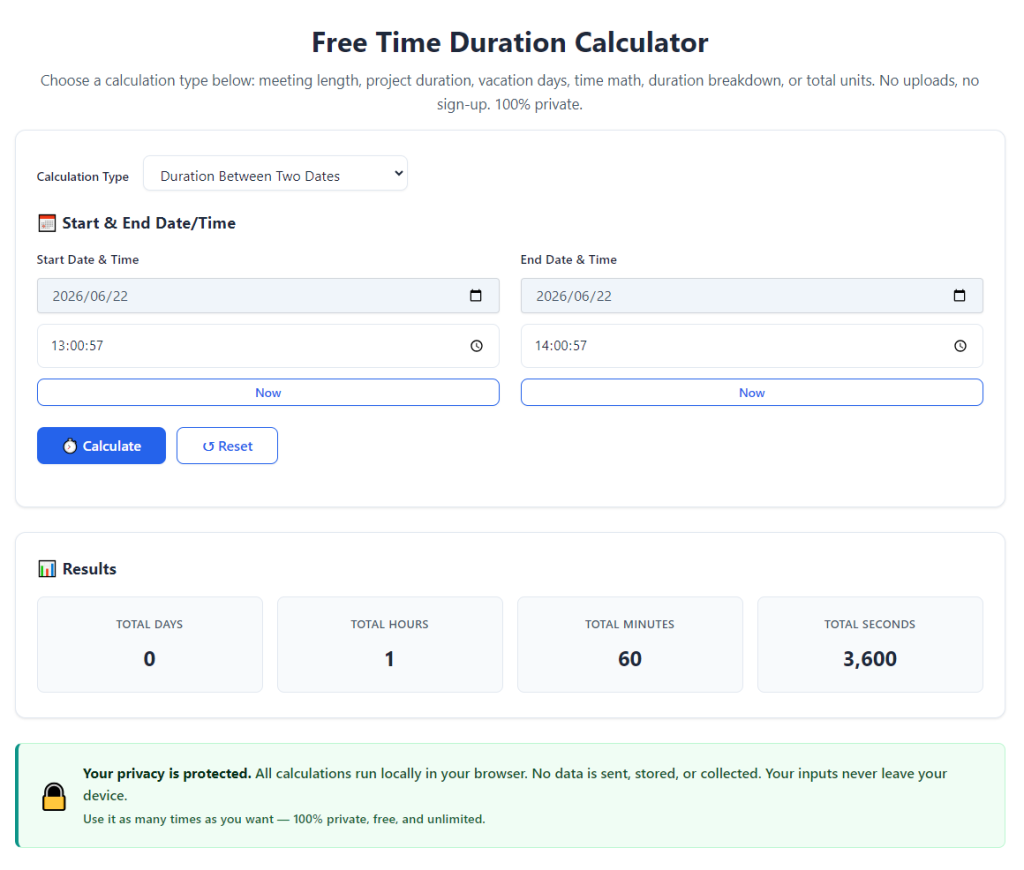
Open the calculator in your browser or desktop application. The primary interface will display labeled input boxes for start time, end time, and break duration values, with no confusing unrelated functions visible.
Spend 30 seconds locating core controls: timestamp entry fields, break adjustment slider, total tally mode selector, and copy result button before entering any shift data.
Step 3: Input the employee’s daily shift start clock time
Enter the exact clock-in hour and minute into the dedicated start time field. Stick to standard HH:MM formatting (for example 08:15 for eight fifteen in the morning) to guarantee accurate duration computation.
Avoid abbreviated time formats or AM/PM mix-ups. Consistent timestamp entry eliminates minor calculation discrepancies on every line item of your timesheet.
Step 4: Enter the matching shift end clock-out timestamp
Type the precise clock-out hour and minute into the end time input box. For overnight shifts that finish the next calendar day, input the following day’s time normally—the tool will auto-adjust cross-midnight math without extra steps.
Double-check the entered end time against the employee’s original punch log to rule out simple typing mistakes before moving to break adjustments.
Step 5: Input total unpaid break minutes for the shift
Locate the break duration adjustment field and type the total number of minutes the employee spent on unpaid meal or rest breaks during their shift. If no breaks apply for a partial short shift, enter zero in this field.
The calculator automatically subtracts this break value from the raw total time between clock-in and clock-out to generate net billable work hours for the timesheet.
Step 6: Select your payroll tally cycle mode
Switch the calculator’s tally mode to match your business pay schedule. Choose single-day for individual shift logging, weekly for seven-day hour sums, or biweekly for standard two-week payroll periods.
If processing a single daily timesheet line item, leave the mode set to daily total to capture accurate individual shift duration numbers first.
Step 7: Generate calculated net work time duration totals
Click the calculate or generate total button to run the time math sequence. Within one second, the tool displays two key outputs: total hours/minutes format and decimal hour format for payroll wage multiplication.
Review the displayed net work duration to confirm break deductions and cross-midnight shift adjustments applied correctly to the entered timestamps.
Step 8: Copy verified duration values to your official timesheet
Use the one-click copy function to save the calculated net work hour total to your clipboard. Navigate to your digital timesheet template, HR spreadsheet, or printable payroll document and paste the verified hour count into the matching employee row.
Label each copied total clearly with the corresponding date to avoid mixing up shift durations across different workdays for the same team member.
Step 9: Repeat the workflow for every daily shift entry
Cycle through each employee’s daily clock log data, repeating steps three through eight for every line item on your full batch of timesheets. Process one team member’s full pay cycle records consecutively to stay organized during payroll prep.
Save separate copied hour totals in a temporary note document if you need to cross-reference multiple shift durations before finalizing the full timesheet packet.
Step 10: Sum all daily durations for full pay cycle grand totals
Once every individual daily shift’s net work duration is calculated and logged on the timesheet, use the calculator’s weekly or biweekly tally mode to combine all single-day totals into one grand pay cycle hour number per employee.
This final grand total becomes the official hour value used to calculate gross wages, overtime pay, and payroll tax deductions for each staff member.
Step 11: Cross-check grand totals for obvious data mismatches
Complete a quick visual review of every employee’s full pay cycle hour tally. Scan for unusually low or extremely high duration numbers that signal mistyped clock-in or clock-out timestamps during data entry.
Recalculate any suspicious line items by re-entering the original punch log timestamps into the calculator to fix data entry errors before submitting timesheets for payroll processing.
Step 12: Finalize and store completed timesheet records
Once all duration totals are verified and error-free, lock your digital timesheet document or print physical copies for payroll filing. Archive all calculated hour records per local labor compliance record-keeping requirements.
You now have fully accurate, calculator-verified work duration data ready to feed directly into wage payment and payroll reporting workflows.
H2: Common Costly Mistakes to Avoid While Using a Time Duration Calculator for Work Timesheets
Even when you fully understand how to use time duration calculator for work timesheets, these frequent user errors create inaccurate timesheet hour totals and subsequent payroll complications.
Mixing up AM and PM timestamps during data entry
Accidentally swapping morning and evening clock times skews entire shift duration calculations. Always cross-reference punch logs to confirm correct AM/PM labeling before running calculations.
Forgetting to subtract unpaid meal break minutes
Skipping break deduction inputs results in overcalculated work hours and overpaid wages to staff. Consistently input all unpaid rest time values for every shift entry without exception.
Ignoring cross-midnight shift auto-calculation logic
Manually splitting overnight shift hours by hand defeats the tool’s core automation purpose. Always input raw clock-in and clock-out times as logged, and let the calculator resolve cross-date math independently.
Processing multiple employees’ shift data in one unlabeled session
Failing to separate individual team member records leads to mixed-up duration totals. Process one employee’s full pay cycle timesheet data completely before moving to the next staff member.
Relying solely on decimal hour outputs without double-checking HH:MM values
Decimal formatted hours simplify wage math but can hide subtle calculation gaps. Always cross-reference the standard hour/minute total against the decimal value to confirm consistent results.
Skipping the final grand total cross-check step
Failing to scan full pay cycle tallies for outliers lets typing errors move forward into official payroll processing. Quick spot checks eliminate avoidable wage payout mistakes.
Using the calculator for volunteer hours without separating paid staff data
Mixing volunteer service durations with paid employee shift hours creates messy payroll reporting. Process volunteer logs and paid timesheet entries in separate calculator sessions to keep records distinct.
H2: Pro Optimization Tips to Maximize Accuracy & Speed With the Tool
Implement these practical strategies to streamline your process for how to use time duration calculator for work timesheets and cut payroll prep time even further each pay cycle.
- Bookmark the calculator tool in your primary browser for instant access at the start of every payroll processing session, eliminating delayed loading and setup steps.
- Create a standardized data entry checklist listing clock-in time, clock-out time, and break minutes to avoid missing critical values on every shift log.
- Process all part-time employee timesheets first, followed by full-time staff batches, to build a consistent, repeatable payroll workflow each pay period.
- Save blank digital timesheet templates pre-formatted with columns for copied calculator duration totals to speed up document assembly after calculation work finishes.
- Compile all overnight shift records into a single batch to process them consecutively, reducing mental switching between regular and cross-midnight timestamp logic.
- Retain a backup copy of all calculated hour totals in a separate note file as you work, so lost or corrupted timesheet documents do not require full recalculation from scratch.
- Train all part-time HR assistants and office admins on this identical step-by-step workflow to guarantee uniform timesheet calculation standards across your business team.
- Run a full recalculation of 10% random employee timesheets as a quick audit check at the end of every payroll cycle to catch rare data entry oversights.
H2: Final Closing Thoughts
Accurate tracking of work shift durations on official timesheets is non-negotiable for compliant, fair payroll operations of every business size. Manual paper-and-pencil math introduces avoidable errors, wasted administrative labor, and costly payroll disputes with hourly team members.
Generic basic calculators lack specialized logic for overnight shifts, break deductions, and payroll-ready decimal hour conversion, leaving most admins stuck halfway through timesheet preparation. A purpose-built time duration calculator tailored for payroll timesheets resolves all these limitations in one streamlined digital solution.
Once you fully learn and consistently apply how to use time duration calculator for work timesheets, every pay cycle’s timesheet prep becomes fast, low-stress, and mathematically error-free. The tool adapts seamlessly for small retail teams, remote contractors, hospitality shift workers, corporate HR departments, and nonprofit volunteer tracking alike.
By following the complete step-by-step tutorial above, avoiding common calculation mistakes, and implementing the pro efficiency tips for batch timesheet processing, you will maintain fully verified, audit-ready work hour records for every payroll cycle while drastically cutting down administrative overtime spent on manual time math.
After learning the operation method, click the link below to enter the tool page for immediate use.