Emails remain one of the most reliable forms of digital communication for personal use, business outreach, marketing campaigns and professional networking. Every message you send relies on valid recipient addresses to reach the right person.
Even small formatting mistakes in an email address can lead to bounced messages, lost leads and missed important connections. Typos, extra spaces and incorrect symbols often slip past manual checks.
Many online validation tools force users to create accounts or log in before accessing basic features. These extra steps slow down quick checks and create unnecessary hassle for casual and frequent users alike.
A reliable email format checker without registration removes all these barriers. It delivers fast, accurate address validation right away, with no personal information required and no hidden restrictions.
This comprehensive guide explains the flaws of manual email checking, core advantages of registration-free tools, key features, common use cases and a full step-by-step workflow for seamless email format verification.
Why Manual Email Format Checks Are Not Reliable
Relying on your own eyes to verify email addresses may seem simple, but it comes with multiple hidden issues that impact communication success.
Easy-to-miss typographical errors
Extra spaces, misplaced dots or swapped letters are hard to spot during quick reviews. These tiny mistakes render an entire email address completely unusable.
Lack of knowledge about standard formatting rules
Email addresses follow strict universal rules for symbols, characters and structure. Most people do not memorize all these guidelines to spot complex format issues.
Fatigue during bulk address reviews
When working with long contact lists, human focus fades quickly. You are far more likely to overlook errors when checking dozens or hundreds of entries one by one.
No clear pass or fail feedback
Manual review can only guess if an address works. You cannot confirm structural compliance or flag problematic sections for correction.
Wasted time on repetitive work
Going through every address line by line takes valuable time. This repetitive work pulls focus away from drafting messages and other important tasks.
Inconsistent checking standards
Your attention level changes throughout the day. An address you check carefully in the morning may get a rushed review later, leading to inconsistent results.
Common Drawbacks of Traditional Registered Email Tools
Most mainstream email validation platforms require account creation, which creates extra obstacles for anyone needing fast format checks.
Mandatory sign-up and login steps
You have to fill out forms, set passwords and confirm accounts just to use basic validation features. This is frustrating for users who only need a quick one-time check.
Privacy concerns with personal data
Registering means sharing your own contact details with third-party services. Many users prefer to keep their personal information private for simple online tasks.
Frequent login interruptions
Saved sessions expire regularly. You will need to log back in repeatedly if you step away or use the tool across different devices.
Core features locked behind paywalls
Some tools limit basic format checks for free registered users. Full analysis and bulk verification often require paid subscriptions or upgrades.
Cluttered interfaces
Registered platforms usually add extra features like contact storage and campaign tools. These elements crowd the screen and slow down simple format checking.
Key Benefits of Email Format Checker Without Registration
Choosing an email format checker without registration streamlines your workflow and delivers consistent results for every type of email verification task.
Instant access with zero setup
Open the tool in your browser and start checking right away. There are no sign-up pages, email verifications or profile settings to complete at all.
Full privacy protection
Since no account is created, none of the email addresses you check are linked to your personal identity. Your contact lists stay confidential and secure.
Strict adherence to standard email rules
The tool follows global formatting standards to scan every character. It reliably flags invalid symbols, incorrect spacing and broken structure instantly.
Saves time for individual and bulk checks
Whether you verify a single address or a long list, the process takes just seconds. You avoid all the delays that come with registered platforms.
Completely free core functionality
All essential format checking features remain free to use. You can run unlimited scans with no usage caps or hidden fees to worry about.
Works across all devices seamlessly
You can use the tool on desktop computers, laptops, tablets and mobile phones. There is no need to sync accounts across multiple devices.
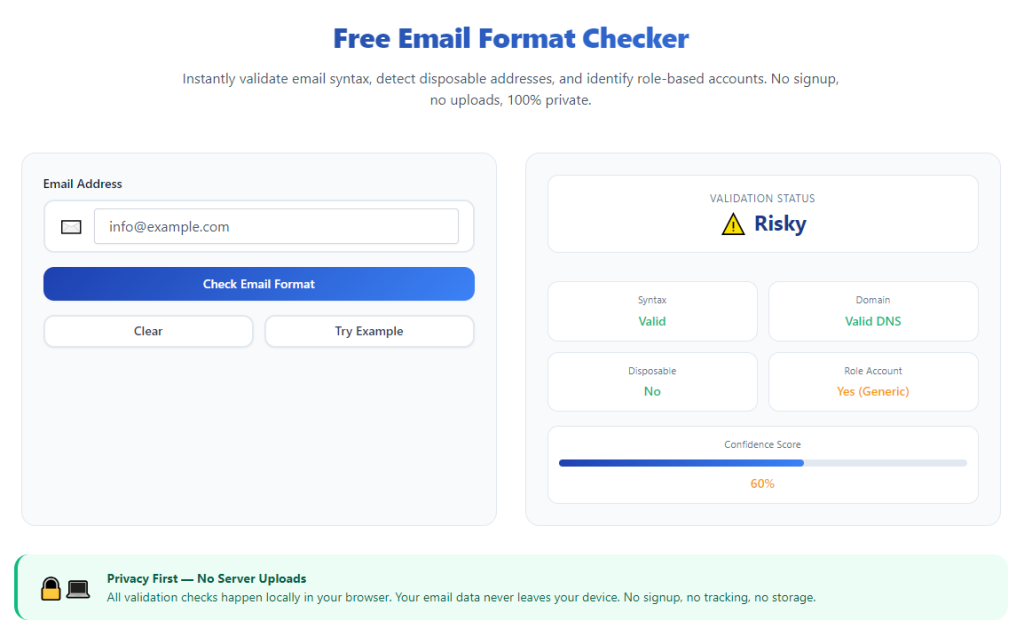
Clear, easy-to-understand feedback
Every scan delivers simple pass or fail results. You also get clear notes explaining exactly which part of the address has formatting problems.
Must-Have Features of a Reliable Email Format Checker Without Registration
Not all registration-free validation tools offer equal performance. The top email format checker without registration includes these practical, user-focused features.
Single address verification
The tool should handle individual email entries perfectly. This is ideal for quick checks before sending personal or one-on-one professional messages.
Bulk list scanning support
For marketing teams and business users, bulk checking saves hours of work. You can paste multiple addresses at once for full format analysis.
Detailed error highlighting
Instead of just marking an address as invalid, the tool points out specific issues such as extra spaces, missing symbols or illegal characters.
Automatic whitespace removal
Unintended spaces at the start, end or middle of addresses are a common issue. Quality tools detect and suggest fixes for these spacing errors.
Standard rule compliance testing
It verifies proper use of the @ symbol, domain structure and allowed special characters. This ensures every address follows widely accepted email guidelines.
Clean and distraction-free layout
The interface focuses only on format checking. You will not see pop-up ads, subscription prompts or unrelated tools cluttering your view.
Fast processing speed
Even with a long list of addresses, scans finish in moments. Speed remains consistent no matter how many entries you submit for review.
Common Use Cases for Registration-Free Email Format Checkers
A versatile email format checker without registration serves personal users, small business owners, marketers and remote teams across many daily tasks.
Personal email communication
Before sending messages to friends, family or new contacts, run a quick check. This prevents failed delivery caused by simple typing mistakes.
Professional outreach and networking
Cold outreach, job applications and client messages depend on valid addresses. Format checks make sure your professional correspondence reaches the intended party.
Email marketing list maintenance
Marketers clean up contact databases regularly. Bulk format checks remove invalid entries and improve overall campaign delivery rates.
Team and internal company communication
HR staff and team leaders verify employee contact details. A no-registration tool lets multiple team members run checks without sharing accounts.
Event and sign-up form review
When collecting emails from online forms, many users make formatting errors. Quick scans filter out bad entries from your sign-up lists.
Customer support correspondence
Support teams rely on customer email addresses to follow up on tickets. Validating formats cuts down on bounced reply messages.
Student and academic communication
Students and educators exchange papers, notices and updates via email. Simple format checks keep academic communication running smoothly.
Step-by-Step Guide: How to Use Email Format Checker Without Registration
Follow this simple workflow to verify single or multiple email addresses using an email format checker without registration, with no extra steps or delays.
Step 1: Gather all email addresses to verify
Collect every address you plan to check. You can work with a single contact or compile a full list for bulk scanning.
Separate entries line by line if you are checking multiple addresses, as this helps the tool process each one individually.
Step 2: Open the tool in your web browser
Launch the email format checker directly from your browser. You will land on the main working page instantly.
There are no login screens, signup forms or welcome prompts to navigate before you start your work.
Step 3: Locate the text input field
Find the main empty box designed for pasting or typing email addresses. This area is clearly marked and easy to locate on the clean interface.
Take a quick moment to note any basic function buttons for scanning or clearing content.
Step 4: Enter or paste your email entries
Type a single address manually, or paste your full prepared list into the input field.
Double-check to make sure all addresses appear completely, with no missing lines or broken text from copying.
Step 5: Start the format analysis scan
Click the check or analyze button to begin the process. The tool will scan every entry against standard email formatting rules.
Wait just a few seconds for the scan to finish, even for longer lists of contacts.
Step 6: Review the scan results
Go through the generated results one by one. Each address will show a clear status of valid or invalid format.
Read the attached notes to understand exactly what formatting error exists on any failed entry.
Step 7: Fix detected formatting issues
Correct typos, extra spaces or misplaced symbols based on the tool’s feedback.
Follow standard email structure rules to rewrite each invalid address properly.
Step 8: Recheck corrected entries
Copy all the fixed email addresses and run a second scan. Confirm that all updated entries now show a valid format status.
Repeat edits and re-scans for any entries that still fail the format test.
Step 9: Organize your final valid list
Once all addresses pass the check, compile them into your contact list, message draft or marketing database.
Remove any permanently invalid entries that cannot be fixed to keep your list clean and reliable.
Step 10: Proceed with sending or storing contacts
Your fully verified email addresses are now ready for use. Compose your messages or save the list for future communication needs.
You can close the tool immediately when finished, with no need to log out or manage account settings.
Common Mistakes to Avoid When Using This Tool
Even with a dependable email format checker without registration, these simple mistakes can reduce the accuracy of your verification work.
Ignoring detailed error notes
Many users only look at the valid or invalid label. Always read the full explanation to fix the root cause of formatting problems.
Leaving accidental line breaks between characters
Broken lines inside a single email address will trigger format errors. Keep each full entry on its own single line before scanning.
Running checks only once
After making edits, skiping a second re-check can leave hidden errors. Always verify corrected addresses a second time for full confidence.
Mixing other text with email addresses
Names, phone numbers or extra notes mixed in with entries can disrupt scanning. Keep the input field limited only to email addresses.
Relying solely on format checks for deliverability
A correct format only means the structure follows rules. It cannot guarantee the address is currently active or monitored by the user.
Overloading the input field with extremely large lists
For massive contact databases, split the list into smaller batches. This keeps scans fast and results easy to review.
Expert Tips to Maximize Tool Performance
Use these practical tips to get the most out of an email format checker without registration and maintain clean email lists long term.
- Bookmark the tool in your browser for one-click access whenever you need to verify email formats quickly.
- Build a habit of running a quick check right after typing new addresses, before adding them to your contact list.
- Clean your full contact database on a regular schedule to remove old or repeatedly invalid formatted entries.
- Train your team to use the same registration-free tool for consistent format checking across all departments.
- Remove extra spaces from copied text before pasting, to cut down on common spacing-related format errors.
- Use the tool to test addresses collected from online forms, as form submissions often contain accidental typing mistakes.
- Combine format checks with basic list sorting to keep your verified contacts organized and easy to manage.
Final Thoughts
Valid email formatting is the foundation of successful digital communication. A single broken address can stop important messages from reaching their target, whether for personal, professional or marketing use.
Manual checks are prone to human error, while traditional registered tools add unnecessary steps and privacy concerns to a simple task.
A well-built email format checker without registration solves all these pain points. It delivers fast, accurate, private and free format verification for every email address you need to review.
This tool fits the needs of casual users, business owners, marketing professionals and educators alike, adapting to both single checks and large bulk list work.
By following the step-by-step process and avoiding common mistakes, you can maintain error-free email lists, reduce bounced messages and ensure all your communications land successfully every time.
After learning the operation method, click the link below to enter the tool page for immediate use.