Converting images to PDF is one of the most routine digital tasks for students, remote workers, business owners, and everyday users. Whether you are compiling scanned receipts, official certificates, handwritten notes, portfolio photos, or legal documents, the end goal is always a clean, presentable PDF file suitable for sharing, printing, or formal submission. Unfortunately, the vast majority of free online conversion tools spoil finished files with intrusive watermarks, branded text overlays, or logo stamps across every page. These semi-transparent marks cover important text, obscure fine details, and make otherwise professional documents look unpolished and untrustworthy.
Most basic converters lock watermark-free outputs behind expensive premium subscriptions, forcing casual users to either pay for a simple task or settle for low-quality marked files. This frustrating limitation creates unnecessary barriers for people who only need occasional conversions and have no use for monthly software subscriptions. Fortunately, a reliable image to PDF converter without watermark solves this widespread problem completely.
A dedicated image to PDF converter without watermark generates entirely clean, unbranded, unmarked PDF files while preserving original image quality, requiring no upgrades, no payments, and no hidden fees. In this comprehensive 1800+ word user guide, we will cover why most tools add watermarks, the key benefits of watermark-free conversion, essential tool features, a step-by-step usage tutorial, common conversion pitfalls, and expert tips to create flawless clean PDFs every time.
Why Most Image to PDF Tools Add Annoying Watermarks
To understand the true value of an image to PDF converter without watermark, it helps to break down why generic conversion platforms rely heavily on watermark branding. Nearly all mainstream free converters use watermarks as a marketing tactic and paywall strategy to push free users toward premium upgrades.
For most online tool providers, free conversions serve as a promotional funnel. They allow basic functionality at no cost but stamp every exported PDF with visible brand watermarks to advertise their services. This strategy creates pressure on users to upgrade to a paid plan simply to remove obstructive logos and text overlays. For users handling casual personal files, a faint watermark might feel tolerable, but for professional business documents, school assignments, client portfolios, and official submissions, even subtle branding makes files unfit for use.
Many generic tools also use watermarks to offset server and processing costs. Unlimited free conversions require server power and bandwidth, so providers limit clean outputs to paying customers only. This business model leaves regular users stuck between low-quality marked files and overpriced subscription plans for a task that should be simple and free. Worse, some tools add heavy, opaque watermarks that cover critical text, signatures, and data, completely ruining scanned documents and making them unreadable.
Beyond aesthetics, watermarked files create unprofessional impressions. Submitting branded PDFs for job applications, school assignments, or client work signals unpolished preparation and can even lead to rejected submissions in strict academic or corporate environments. An image to PDF converter without watermark eliminates all these issues by offering truly clean, unrestricted conversions with no branding, no paywalls, and no compromise on quality.
Key Benefits of an Image to PDF Converter Without Watermark
Switching to a dedicated image to PDF converter without watermark delivers tangible advantages for personal, academic, and professional file management that standard tools simply cannot match. These benefits explain why watermark-free converters have become the top choice for serious users prioritizing clean document quality.
100% clean, unmarked PDF outputs: The core advantage of this tool is completely watermark-free results. No logos, no text overlays, no brand stamps, and no semi-transparent banners appear on any page. Every converted file looks original, polished, and ready for official use immediately after download.
Full original image quality preservation: Many watermark-free tools also prioritize lossless conversion. Unlike paid platforms that remove watermarks but compress image quality, a premium image to PDF converter without watermark retains sharp text, accurate colors, and high resolution for every uploaded photo or scan.
No subscription or payment requirements: True watermark-free conversion tools offer clean outputs entirely for free. There are no trial periods, no credit card prompts, no mandatory account upgrades, and no hidden fees to unlock basic clean-file functionality.
Professional document readiness: Unmarked PDFs are suitable for school submissions, business reports, client portfolios, legal filings, and printed archives. Users never need to edit, crop, or repair watermarked sections after conversion, saving massive amounts of post-processing time.
Unlimited single and batch conversions: Top-tier watermark-free tools allow users to convert individual images or batch-process dozens of files into merged PDFs without limits. Whether you need one clean file or a multi-page document, every export stays completely unmarked.
Enhanced privacy and neutrality: Branded watermarks create traceable tool signatures on your personal and business files. Using an image to PDF converter without watermark ensures your documents remain neutral, private, and free of third-party branding for internal and external sharing.
Essential Features of a Quality Image to PDF Converter Without Watermark
Not all no-watermark conversion tools deliver consistent results. Some free platforms advertise clean outputs but add subtle hidden marks or downgrade resolution significantly. A reliable image to PDF converter without watermark always includes the following professional features to guarantee perfect, usable results every time.
Genuine zero-watermark technology: The tool never overlays logos, text, or promotional banners on any exported PDF page, regardless of file quantity or usage frequency. Clean outputs are permanent and require no extra editing.
Multi-format image support: It fully supports all common image types, including JPG, PNG, TIFF, and BMP, allowing users to convert any standard photo or scanned file format into clean PDFs without format errors.
Custom page formatting controls: Users can adjust page size, orientation, margins, and scaling to create standardized A4 or Letter-sized documents ideal for printing and formal submission, all while maintaining zero branding overlays.
Lossless high-resolution processing: Quality-focused converters avoid aggressive compression. They preserve original sharpness, text clarity, and color accuracy so clean PDFs look identical to the source images.
Batch merge functionality: The tool allows multiple images to be combined into a single organized PDF with consistent zero-watermark quality across every page, perfect for multi-page notes, receipts, and document scans.
Instant free downloads: No waiting periods, no surveys, no login requirements, and no delayed exports. Clean PDFs are ready for immediate download right after conversion finishes.
Common Real-World Use Cases for Watermark-Free PDF Conversion
An image to PDF converter without watermark serves countless everyday scenarios where clean, professional document appearance is non-negotiable. Below are the most popular use cases for students, professionals, and personal users.
Academic assignment creation: Students frequently convert handwritten notes, scanned worksheets, textbook screenshots, and project photos for online class submissions. Watermarked files can look unprofessional and may even result in grade deductions or rejected uploads on strict learning platforms. Clean PDFs ensure polished, acceptable schoolwork.
Business and client document sharing: Freelancers, marketers, and corporate workers share proposal visuals, receipt scans, report graphics, and portfolio images with clients. Unmarked PDFs maintain brand neutrality and professionalism, avoiding third-party tool branding on official business materials.
Legal and official document archiving: Government forms, tax records, certificates, and signed paperwork require clean, unaltered appearances. Watermarks can be misinterpreted as document alterations, making a watermark-free converter essential for official record keeping.
Print-ready document preparation: Watermarks print visibly on physical copies, ruining official documents, resumes, and printed portfolios. An image to PDF converter without watermark ensures flawless, clean printed results for personal and professional use.
Personal file organization: Users archiving family photos, personal records, travel documents, and medical files prefer unmarked, clutter-free digital copies for long-term storage and easy sharing with family members.
Step-by-Step Guide to Using an Image to PDF Converter Without Watermark
This universal step-by-step workflow works for all premium versions of an image to PDF converter without watermark. Follow these simple instructions to generate clean, unmarked, high-quality PDFs in under one minute.
Step 1: Open the Watermark-Free Conversion Tool
Launch the dedicated image to PDF converter that guarantees zero watermark outputs. Confirm the tool’s core feature set focuses on clean, unbranded exports to avoid mistakenly using freemium tools that hide watermark removal behind paywalls.
Step 2: Upload Your Source Images
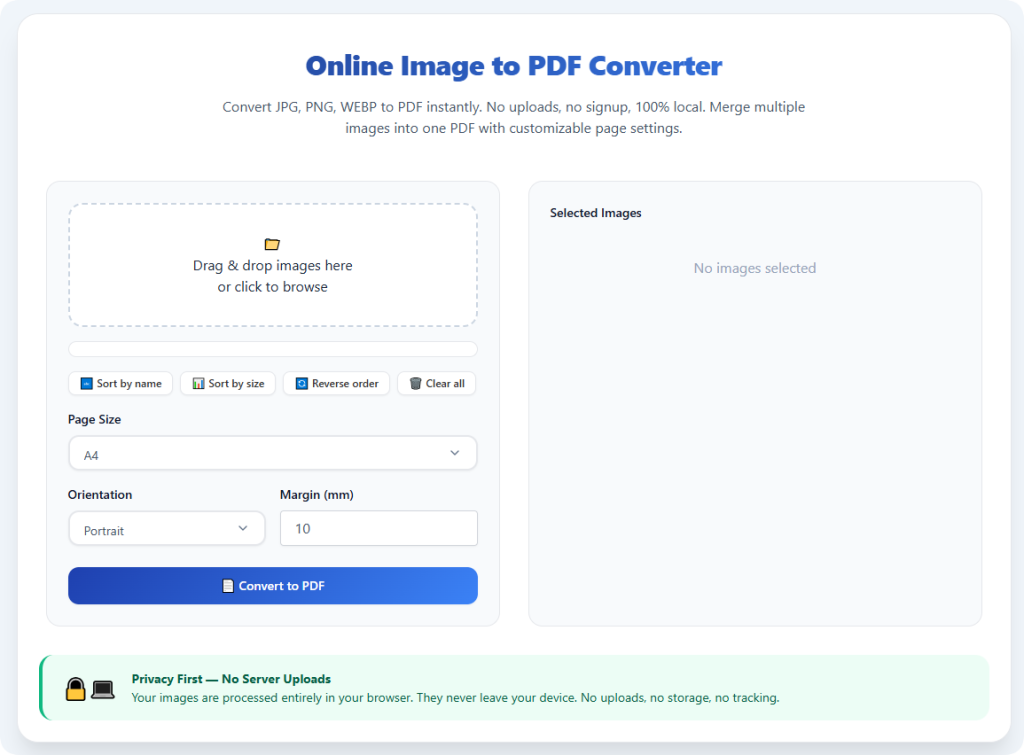
Upload single or multiple images using drag-and-drop or standard file selection. You can upload scanned documents, photos, screenshots, and certificates in any supported image format. The tool will process all files without adding preliminary branding or overlays.
Step 3: Adjust Custom Document Settings
Modify page size, margin spacing, and orientation to match your intended use. Standardize pages to A4 or Letter sizing for school and business documents, or customize layouts for creative portfolios and personal archives.
Step 4: Rearrange Batch Page Order
If converting multiple images into one merged PDF, drag and drop thumbnails to arrange pages in logical order. This step ensures your final document flows correctly with no post-conversion editing required.
Step 5: Start the Conversion Process
Initiate the conversion process. The tool will compile your images into a structured PDF file using lossless processing and zero-watermark technology, ensuring every page remains completely clean and unmarked.
Step 6: Preview and Download Your Clean PDF
Review the final preview to confirm no watermarks, logos, or text overlays appear on any page. Verify image clarity, formatting, and page order before downloading the finished file directly to your device for immediate use.
Common Mistakes to Avoid With Watermark-Free Conversion
Even with an image to PDF converter without watermark, simple user errors can compromise your final document quality. Avoid these common pitfalls to ensure consistently perfect results.
Confusing free trial tools with true no-watermark tools: Many tools claim free conversion but add watermarks on long documents or batch files. Always confirm the tool offers permanent zero-watermark exports for all file types and batch sizes.
Uploading pre-watermarked source images: If your original images already contain watermarks from previous tools, conversion cannot remove existing marks. Always use clean original source files for best results.
Overlooking quality compression settings: Some watermark-free tools remove branding but over-compress images. Always enable high-quality or lossless modes to preserve sharpness and detail.
Skipping the final preview check: A quick preview catches rare formatting errors or hidden overlay issues before you save and share the final document.
Expert Tips for Perfect Watermark-Free PDFs
Use these professional tips to maximize the performance of your image to PDF converter without watermark and create studio-quality clean documents every time.
- Always use original image files: Start with unedited, uncompressed source images to ensure both zero watermarks and maximum clarity in your final PDF.
- Standardize page settings upfront: Set consistent margins and page sizes before conversion to avoid uneven layouts that require extra editing.
- Batch process similar documents together: Group related files like receipts or notes to create organized, single-file archives with uniform clean quality.
- Save clean PDFs for future reuse: Once converted, store your unmarked PDFs in dedicated folders to avoid repeated re-conversion tasks.
Final Thoughts
Watermarks turn simple, clean PDF documents into unprofessional, unusable files that waste time and ruin submissions. For too long, users have been forced to choose between free watermarked outputs and expensive premium subscriptions for basic image conversion tasks. This outdated system creates unnecessary barriers for students, business professionals, and everyday users who simply need clean, reliable PDF files.
A trusted image to PDF converter without watermark changes the game entirely by delivering truly free, unmarked, high-quality conversions with zero strings attached. It eliminates third-party branding, preserves original image resolution, supports batch processing, and produces professional-grade PDFs ready for school, work, printing, and official archiving. There are no paywalls, no hidden fees, no mandatory signups, and no quality compromises.
You should never have to sacrifice document cleanliness or pay for basic conversion functionality. Ditch limited freemium tools that clutter your files with logos and overlays. Start using an image to PDF converter without watermark to generate polished, clean, and professional PDF documents for every personal and professional project effortlessly.
After learning the operation method, click the link below to enter the tool page for immediate use.