PDF files remain the most reliable format for sharing standardized documents across education, business, legal, and personal workflows. Their fixed layout structure, universal device compatibility, and print-ready formatting make them ideal for archiving, submitting assignments, sharing client reports, and storing official records. Even with these strong advantages, PDFs lack flexible usability for digital sharing, content creation, and quick previews. Most users regularly need to extract individual pages, scanned photos, signature files, data charts, and graphic elements from PDFs to use as standalone images for presentations, social media posts, printed documents, and personal backups.
Unfortunately, nearly all free PDF conversion tools spoil final outputs with prominent watermarks, branded text overlays, or logo stamps across every extracted image. These obstructive marks cover important text, obscure fine details, and turn professional-looking files into unpolished, unusable content. Most platforms force users to upgrade to expensive premium subscriptions simply to remove watermarks, even for basic one-time conversions. This unnecessary paywall creates frustration for casual users, students, and small business owners who only need occasional file conversions.
This is why a trustworthy PDF to image converter without watermark free has become an essential tool for everyday digital workflows. A quality PDF to image converter without watermark free delivers completely clean, unmarked, high-quality image extractions at zero cost, with no hidden fees and no forced upgrades. In this detailed user guide, we will cover the downsides of watermarked tools, key tool features, real-world use cases, a step-by-step conversion tutorial, common mistakes, and professional tips for flawless clean-image results every time.
Why Most Free PDF to Image Tools Add Watermarks
To fully appreciate the value of a PDF to image converter without watermark free, it is important to understand why standard free tools rely heavily on watermark branding. For most online tool providers, free conversion functions act as a marketing funnel designed to push users toward paid subscription plans.
Free platforms cover server and processing costs by restricting clean outputs to premium members only. Watermarks serve as constant advertising on every file you export, encouraging users to pay for upgrades to remove branding. While this business model benefits tool providers, it creates serious problems for regular users. Watermarked images cannot be used for formal school submissions, client deliverables, official documents, portfolio work, or printed records. Even faint semi-transparent marks appear obvious in printed copies and high-resolution previews, making files look unprofessional and unpolished.
Many basic free tools also apply heavy watermarks that cover critical content, including handwritten signatures, small text details, and data chart visuals. In worst-case scenarios, the overlay completely obscures key information, rendering extracted images useless. Worse, some free tools add watermarks and heavily compress image quality simultaneously, leaving users with blurry, marked files with no practical value. A reliable PDF to image converter without watermark free eliminates all these issues by offering truly free, unbranded, clean image extraction with zero quality compromise and zero paywall restrictions.
Key Benefits of a PDF to Image Converter Without Watermark Free
A premium PDF to image converter without watermark free delivers unique advantages that standard free and freemium tools cannot match. These benefits make it the top choice for students, freelancers, content creators, office workers, and everyday casual users who prioritize clean, professional file outputs.
100% watermark-free image outputs: The core advantage of this tool is completely unmarked exports. No logos, text overlays, brand banners, or promotional stamps appear on any extracted image. Every file comes out clean, original, and ready for professional or personal use immediately after download.
Truly free unlimited conversions: Unlike freemium tools that limit clean exports or lock watermark removal behind subscriptions, this tool offers full functionality at no cost. Users enjoy unlimited single and batch PDF-to-image extractions with no trial limits, no credit card requirements, and no hidden charges.
Preserved original image quality: Many watermark-free free tools sacrifice resolution to reduce file size. A professional PDF to image converter without watermark free uses balanced compression and lossless rendering to keep text sharp, colors accurate, and fine details intact throughout conversion.
No mandatory account registration: Top-tier tools operate entirely without signups, email verification, or personal data collection. Users can upload, convert, and download files instantly without creating profiles or receiving follow-up spam emails.
Multi-format flexible outputs: Users can extract PDFs into popular image formats, including high-quality JPG and transparent PNG. This flexibility supports different use cases, from lightweight web sharing to high-end presentation and design work.
Improved professional credibility: Clean, unmarked images look polished and trustworthy for client sharing, school submissions, portfolio displays, and official archiving. Zero watermarks ensure no third-party branding interferes with your personal or business content.
Must-Have Features of a Quality PDF to Image Converter Without Watermark Free
Not all watermark-free free tools deliver consistent, reliable results. Some low-quality platforms claim clean outputs but add subtle hidden overlays or drastically reduce resolution. A legitimate PDF to image converter without watermark free always includes the following professional features to guarantee perfect, usable outputs every single time.
Genuine zero-watermark technology: The tool ensures every extracted page remains completely unbranded, whether converting a single page or processing large multi-page documents. There are no hidden watermarks, faint logos, or embedded text tags on finished images.
Batch page extraction support: Instead of converting one page at a time, users can upload full multi-page PDFs and extract all pages into clean images in one session. Batch processing saves massive time for long reports, scanned books, and multi-page document files.
Selective page range conversion: For lengthy PDFs, users can choose specific page ranges instead of converting every page. This targeted function reduces redundant files and keeps your image folders organized and clutter-free.
High-resolution output retention: Premium tools preserve sharp text clarity, precise color tones, and clean edge definition. Extracted images stay crisp enough for printing, presentation displays, and formal document submissions.
Fast browser-based processing: No software downloads or app installations are required. The tool runs entirely online, processing PDFs quickly on any device while maintaining zero-watermark quality standards.
Automatic file privacy protection: Trusted tools delete uploaded files and converted images immediately after processing, ensuring no private or sensitive documents are stored on external servers.
Common Real-World Use Cases
A PDF to image converter without watermark free fits a wide range of daily scenarios where clean, unmarked visuals are mandatory. Below are the most practical use cases for students, professionals, creators, and personal users.
Academic assignments and coursework: Students frequently extract textbook diagrams, data charts, scanned notes, and worksheet pages from PDF learning materials. Watermarked images can result in unprofessional submissions and even grade deductions on formal assignments. Clean outputs ensure neat, acceptable schoolwork.
Business reports and client deliverables: Freelancers and corporate workers extract infographics, product visuals, proposal charts, and report graphics for client presentations and business slides. Unmarked images maintain brand neutrality and professionalism without third-party tool branding.
Content creation and social media posting: Bloggers and social media creators repurpose PDF content into visual posts, quote graphics, and educational visuals. Clean watermark-free images look clean, aesthetic, and original on public platforms.
Official document archiving: Users convert scanned certificates, legal forms, tax documents, and personal ID PDFs into image backups. Unmarked files preserve the official integrity of important records for long-term digital storage.
Home and office printing: Watermarks print visibly on physical documents and ruin formal printed copies. A watermark-free converter ensures clean, professional print results for personal and business use.
Step-by-Step Guide to Using a PDF to Image Converter Without Watermark Free
Follow this simple, foolproof workflow to generate clean, unmarked, high-quality images using a professional PDF to image converter without watermark free. No experience or technical skills are required.
Step 1: Open the Watermark-Free Conversion Tool
Launch the online PDF-to-image converter known for permanent zero-watermark free outputs. Confirm the platform has no mandatory login prompts, no paywall popups, and no premium upgrade reminders for basic conversion features.
Step 2: Upload Your Target PDF File
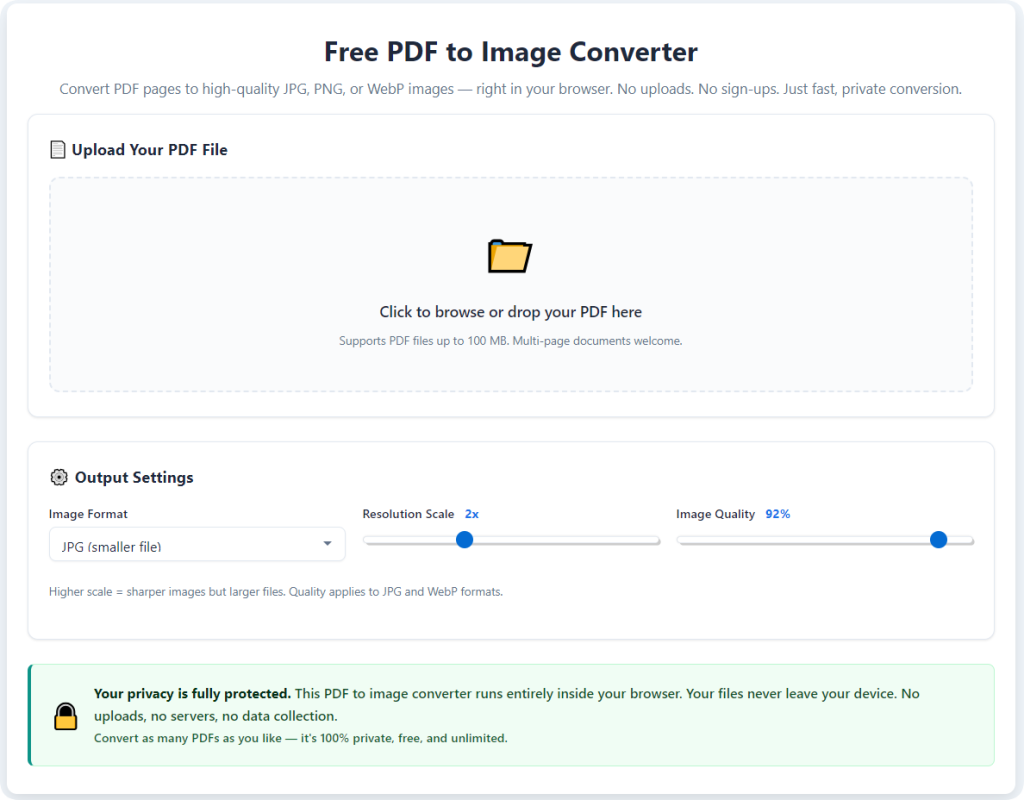
Upload your document via drag-and-drop or standard file selection. You can upload single-page files or large multi-page PDFs, including scanned documents, reports, and portfolio files. The tool accepts all standard PDF types, including text-based and scanned files.
Step 3: Choose Your Preferred Image Format
Select your output format based on your needs. Choose JPG for smaller file sizes ideal for sharing and archiving, or PNG for sharper text and transparent backgrounds perfect for presentations and graphic design use.
Step 4: Select Page Range or Batch Mode
Choose full batch conversion to extract every page of your PDF, or manually input a custom page range to extract only specific sections. This step helps you avoid generating unnecessary files and keeps your output content organized.
Step 5: Start Free Watermark-Free Conversion
Initiate the conversion process with one click. The tool will render each PDF page individually, applying zero-watermark processing while preserving original image clarity, colors, and text sharpness.
Step 6: Preview and Download Clean Images
Preview all extracted images to confirm there are no watermarks, overlays, or quality defects. Once verified, download your images individually or as a compressed batch folder for immediate use, sharing, printing, or storage.
Common Conversion Mistakes to Avoid
Even with a reliable PDF to image converter without watermark free, simple user errors can compromise your final results. Avoid these common mistakes to ensure consistently clean, high-quality images every time.
Using pre-watermarked source files: If your original PDF or source images already contain watermarks from previous tools, conversion cannot remove existing marks. Always start with clean, original PDF files for perfect results.
Enabling aggressive compression settings: Some watermark-free tools offer optional compression modes. Over-compressing files reduces sharpness and creates blurry outputs, even with no watermarks visible.
Ignoring page preview checks: Skipping the final preview may let minor formatting errors or incomplete page rendering go unnoticed before you save and share files.
Confusing trial tools with true free tools: Many platforms advertise free conversion but add watermarks on batch files or longer documents. Always confirm the tool offers permanent zero-watermark free conversion for all file sizes.
Expert Tips for Perfect Watermark-Free Results
Use these professional tips to maximize the performance of your PDF to image converter without watermark free and produce polished, studio-quality images for every project.
- Always use original PDF files: Working from unedited, uncompressed master PDFs ensures both maximum clarity and clean watermark-free results after extraction.
- Match output format to your usage: Use PNG for text-heavy documents and presentation graphics, and save JPG for general archiving and social media sharing to balance quality and file size.
- Organize batch files after extraction: Rename and categorize multi-page extractions immediately to maintain a neat, easy-to-access digital file library.
- Preview before bulk sharing or printing: A quick final check guarantees no hidden formatting issues ruin your printed or published content.
Final Thoughts
Unnecessary watermarks continue to ruin countless PDF-to-image conversions every day. Most free online tools force users to choose between marked, unprofessional files or expensive premium subscriptions for basic, routine conversion tasks. This outdated system wastes time, ruins document quality, and creates unpolished results for students, business professionals, and content creators alike.
A trusted PDF to image converter without watermark free solves these pain points completely. It delivers truly free, unlimited, clean image extraction with zero branding overlays, zero hidden fees, zero account signups, and zero quality loss. Whether you are converting documents for school assignments, client work, social media content, official archiving, or home printing, this tool produces professional-grade images ready for immediate use.
You never need to settle for watermarked files or pay for basic conversion functionality again. Ditch restrictive freemium tools that clutter your work with unwanted branding. Use a PDF to image converter without watermark free to streamline your file workflow, protect your document professionalism, and create clean, high-quality images for every personal and professional project.
After learning the operation method, click the link below to enter the tool page for immediate use.