Text formatting issues often come in pairs: messy fragmented line breaks and random extra spaces. Many everyday editing tasks create this dual problem, from copying online content to reformatting old notes and drafting formal documents. Broken lines split sentences apart and ruin reading flow, while leftover spaces make paragraphs look uneven and unpolished.
Most basic text editing tools only solve half the problem. They either remove line breaks but leave bulky extra spaces behind, or strip gaps but fail to fix fragmented sentence lines. This forces users to spend extra time manually adjusting spacing and reworking paragraph structure repeatedly.
For students, content creators, and business professionals, inconsistent formatting wastes valuable editing time and lowers document quality. This is why a dedicated line break remover without extra spaces is a must-have tool for clean, precise, and error-free text formatting.
This complete beginner tutorial breaks down the most common line break and spacing errors, the flaws of standard editing tools, core benefits of precision line break removal, real-world use cases, and a step-by-step workflow to get perfectly formatted text every single time.
Common Line Break & Spacing Errors in Regular Text
Most users do not realize how paired formatting errors damage their content. Line breaks and extra spaces often appear together and create layered layout issues.
Unnatural forced line splits
Copied text, old document files, and imported content frequently feature forced line breaks that cut complete sentences into short, disjointed chunks. These breaks serve no logical purpose and disrupt smooth reading.
Residual extra spaces after break removal
Generic line break tools merge split lines but add unnecessary spacing between words and sentences. The fixed text becomes one block of content but filled with uneven gaps.
Over-sized paragraph gaps
Random blank lines between paragraphs create inconsistent vertical spacing. Formal writing requires uniform breaks, but messy gaps make documents look unstructured and unprofessional.
Hidden whitespace characters
Invisible spaces and subtle tab gaps linger after basic cleaning. These hidden errors create alignment issues during document conversion and online publishing.
Compacted text with no breathing room
Some aggressive cleaners strip all spacing entirely. This turns well-structured paragraphs into dense blocks of text that are hard to scan and read.
Why Standard Tools Fail to Balance Breaks and Spacing
The biggest flaw in regular text cleaners is their lack of precision. They operate on basic all-or-nothing logic that cannot balance line break removal and clean spacing retention.
Imprecise bulk removal logic
Basic tools either delete every line break indiscriminately or keep unnecessary splits. They have no smart system to separate redundant breaks from valid paragraph divisions.
Creates new spacing errors
Traditional line break removers insert automatic spaces when merging lines. This creates double gaps, oversized word spacing, and uneven sentence alignment across paragraphs.
Requires heavy manual re-editing
After using generic tools, users still need to fix new spacing errors manually. This defeats the purpose of automated cleaning and slows down workflows significantly.
Alters original text structure
Low-quality tools often merge separate paragraphs or destroy intentional formatting. Users risk losing organized section breaks and logical text division.
Key Benefits of Line Break Remover Without Extra Spaces
A professional line break remover without extra spaces solves the core flaw of generic tools: imprecise formatting. It delivers targeted cleaning with zero new spacing errors.
Removes only redundant line breaks
This specialized tool targets only unnatural, forced line splits. It keeps valid paragraph breaks intact to preserve logical content structure and section separation.
Generates zero extra spacing gaps
Unlike generic cleaners, it merges split sentences with standard single spacing. No double gaps, no oversized blanks, and no compacted text blocks appear after processing.
Preserves 100% original text content
The tool never modifies wording, punctuation, phrasing, or sentence meaning. It only adjusts faulty line structure while keeping your entire original content accurate.
Eliminates hidden whitespace errors
It scans and removes invisible residual spaces that basic tools miss. The final text features perfectly uniform spacing across every line and paragraph.
Cuts down editing workload drastically
Users no longer need double-check spacing after cleaning. One single processing step delivers polished results with zero manual correction required.
Delivers publishing-ready formatting
The output meets academic, business, and online publishing standards. Text remains clean, structured, and consistently formatted for all professional use cases.
Core Features of a Premium Line Break Remover Without Extra Spaces
Top-tier tools with precise formatting technology include unique features that separate them from basic free cleaners.
Smart context-based break detection
The algorithm reads sentence context to identify faulty line splits caused by copying errors. It ignores intentional paragraph breaks and structural formatting.
Zero new spacing generation
The tool merges fragmented lines using standard single-space formatting. It never adds extra gaps or removes necessary spacing for readability.
Full hidden whitespace purification
It detects trailing spaces, leading gaps, and invisible whitespace characters. All redundant spacing gets cleared while valid layout remains untouched.
Long-document bulk processing
The tool handles full essays, articles, reports, and lengthy notes without truncation. It maintains consistent formatting across entire multi-section documents.
Non-destructive formatting logic
It protects lists, short notes, formal paragraphs, and structured content. No original layout elements get damaged or altered during cleaning.
Best Use Cases for Precision Line Break Removal
A line break remover without extra spaces works perfectly for any scenario where clean, error-free text formatting is required.
Academic assignment formatting
Students often work with copied research text and fragmented study materials. The tool fixes broken lines without adding messy gaps, ensuring papers meet strict academic formatting rules.
Online content publishing
Bloggers and content writers refine drafted text for web publication. Clean spacing and continuous paragraphs improve readability and visual page appearance.
Business document polishing
Professional reports, meeting notes, and proposals require neat layout. Precise line break removal creates structured, formal documents with consistent spacing.
Personal note organization
Learners and professionals tidy up copied excerpts and archived notes. Clean formatting makes personal files easier to read, annotate, and store long-term.
Resume and formal file editing
Job seekers fix fragmented text in official documents. Uniform spacing enhances professionalism without altering original personal content.
Step-by-Step Guide: Use Line Break Remover Without Extra Spaces
Follow this simple workflow to achieve flawless text formatting with zero line breaks and zero extra spacing errors.
Step 1: Prepare Your Fragmented Text
Gather your unformatted text containing broken line splits and inconsistent spacing. This includes copied web content, old draft files, and unorganized notes.
Complete all content edits first to avoid reintroducing formatting errors after cleaning.
Step 2: Open Precision Formatting Tool
Launch a dedicated line break remover without extra spaces. Avoid generic multi-purpose tools that create new spacing issues after break removal.
Step 3: Paste Full Text Content
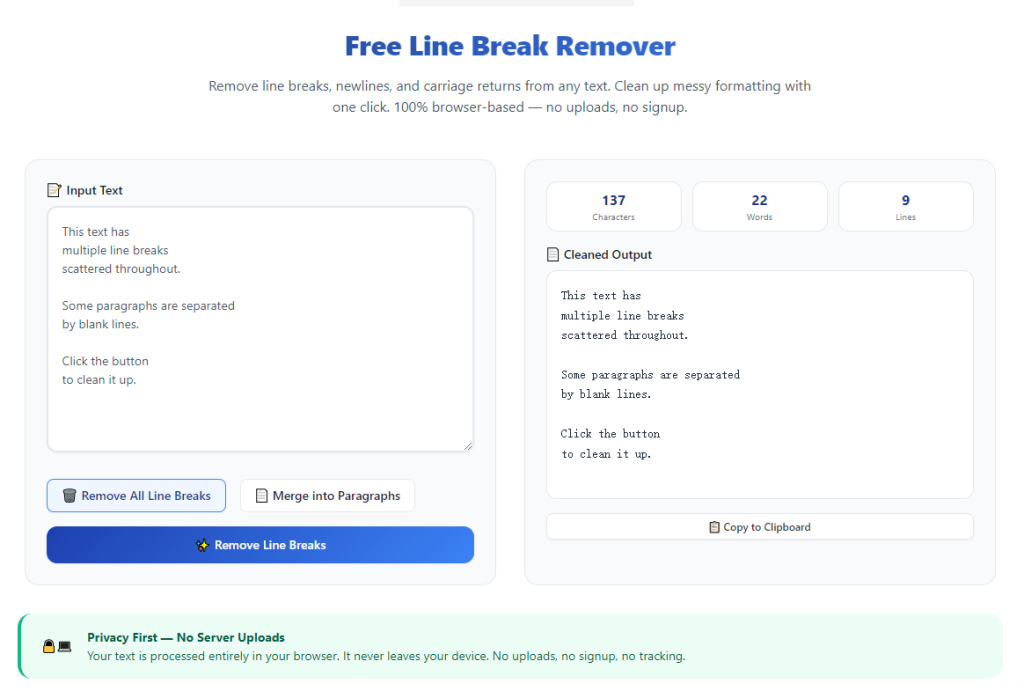
Paste your entire text block into the tool input box. Always paste complete paragraphs for the algorithm to recognize context and avoid partial cleaning errors.
The tool supports both short snippets and long-form documents with no usage limits.
Step 4: Start Targeted Line Break Cleaning
Initiate the cleaning process. The tool will remove all redundant forced line breaks and merge fragmented sentences naturally.
It automatically regulates spacing to ensure no extra gaps appear between words and sentences.
Step 5: Review Cleaned Formatting
Check the optimized text for smooth continuous paragraphs. Confirm all broken lines are fixed and no new extra spaces have appeared.
Verify that intentional paragraph divisions and structural elements remain fully preserved.
Step 6: Copy and Save Final Text
Once formatting consistency is confirmed, copy the polished text. Paste it back into your document editor and save the final version for submission or publishing.
Common Formatting Mistakes to Avoid
These small errors can compromise results even when using a high-quality precision tool.
Using all-in-one editing tools
Multi-purpose editors mix line removal and spacing adjustment randomly. They cannot guarantee zero extra spaces after fixing broken lines.
Cleaning partial sentence fragments
Incomplete text snippets confuse the tool’s context logic. Always use full paragraphs for accurate and consistent results.
Post-cleanup manual spacing edits
Manual adjustments after processing often create new uneven gaps. Trust the tool’s standardized spacing for uniform layout.
Expert Tips for Perfect Formatting Results
Use these professional tips to maximize accuracy every time you clean text formatting.
- Always finish writing and editing content before fixing line breaks to preserve clean formatting.
- Rely on a line break remover without extra spaces to avoid double work from post-cleanup spacing fixes.
- Process full document sections at once to maintain consistent layout across all paragraphs.
- Check formal documents briefly to confirm zero spacing errors and intact paragraph structure.
- Use precision cleaning for all copied content, which always contains hidden breaks and gaps.
- Avoid aggressive cleaners that strip necessary readability spacing for compact results.
Final Thoughts
Line break issues and extra spacing errors are some of the most repetitive and avoidable formatting problems in daily writing. Generic tools force users to choose between fixed line breaks or clean spacing, never both.
A reliable line break remover without extra spaces eliminates this compromise entirely. It fixes fragmented sentence lines, removes redundant breaks, and maintains perfect uniform spacing without altering original text content.
This precision editing tool saves hours of manual formatting work, improves document professionalism, and ensures publishing-ready text for academic, business, and personal use.
By following this detailed guide, you can consistently produce clean, well-structured text with zero broken lines and zero unnecessary extra spaces, stabilizing your editing workflow and elevating content quality.
After learning the operation method, click the link below to enter the tool page for immediate use.