Group dining with friends, family or coworkers creates wonderful shared moments, but wrapping up the meal often brings a frustrating financial hassle. Figuring out fair individual payments after adding sales tax and restaurant tips is a common pain point for every group.
Most people rely on rough mental math, phone note scribbles or basic phone calculators to divide the total cost. This quick approach almost always leads to uneven splits, overpayments, underpayments and awkward conversations about who owes what.
Tax rates vary by location, and tip percentages shift based on service quality or group size. Mixing these two variables into a fair split multiplies the math work dramatically. Small miscalculations add up fast and leave one person covering extra cash without realizing it.
Mastering how to use split bill calculator with tax and tip eliminates all these messy manual calculations. This specialized tool automatically factors in subtotals, local tax fees and custom tip amounts to generate perfectly equal individual balances for every person in your group.
This comprehensive beginner tutorial breaks down the flaws of manual bill splitting, core advantages of a dedicated tax-and-tip split bill tool, must-have functional features, real-life usage scenarios and a complete step-by-step workflow anyone can follow with zero math expertise.
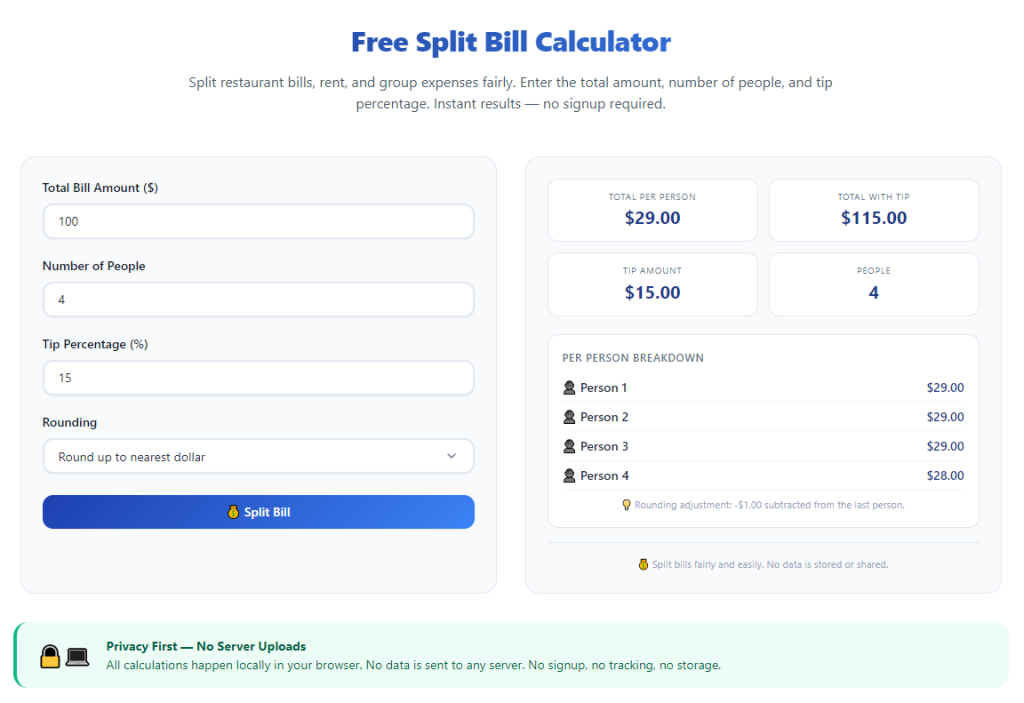
Common Headaches of Manual Bill Splitting With Tax and Tip
Calculating individual shares of a restaurant bill by hand creates consistent, avoidable frustrations that ruin the end of group outings. Every issue stems from mixing three separate financial variables: food subtotal, sales tax and gratuity.
Easy human math errors
Most diners do not carry a dedicated calculator for group meals. Quick mental division of tax-inclusive totals often leads to rounding mistakes. A few cents of error per person can turn into a several-dollar gap across a large group.
Confusion over tax and tip allocation
Many people argue over whether tax should apply to the tip, or if the tip should only calculate on the pre-tax food amount. Different restaurants follow different conventions, and untrained manual math cannot account for both splitting styles automatically.
Time-consuming scribbled notes
Writing down every diner’s ordered items, tax amount and tip percentage on a phone memo takes valuable post-meal time. Long lists of individual food costs require repeated recalculations if anyone adds an extra drink or dessert last minute.
Uneven burden for group organizers
The person who volunteers to tally the bill always bears the full math workload. Without a specialized tool, they waste minutes sorting numbers while everyone else waits around to settle their balances.
Awkward money disputes
When manual splits produce inconsistent amounts, group members often debate who covered extra tax or tip costs. These small financial disagreements turn relaxed social gatherings tense and uncomfortable.
No quick adjustment for late additions
If someone orders extra appetizers or drinks after the initial tally, recalculating tax, tip and individual shares from scratch doubles the math work when relying on pen and paper.
Core Benefits of Learning How to Use Split Bill Calculator With Tax and Tip
Taking two minutes to learn how to use split bill calculator with tax and tip streamlines every group dining settlement and removes every stress point tied to dividing combined restaurant costs.
Fully automated tax and tip math integration
The tool handles all complex multi-step calculations internally. Users only input basic numbers, and the software instantly combines subtotal, tax rate and selected tip percentage before splitting the final grand total evenly.
Two standard tip calculation modes
Top-quality split bill tools include both industry common formulas: tipping on pre-tax food subtotal, or tipping on the full tax-included bill. Users toggle between the two standards to match local restaurant customs without manual recalculation.
Zero rounding errors for fair group splits
Unlike mental math or basic phone calculators, this specialized tool rounds every individual balance consistently. No single group member gets stuck covering leftover loose change from uneven division of tax and tip totals.
Saves massive amounts of post-meal time
What used to take five to ten minutes of scribbled math finishes in under thirty seconds. Groups settle their balances faster and move on to conversation or travel without lingering over payment tallies.
Customizable group size flexibility
The calculator works equally well for pairs, small friend groups of four to six, large family gatherings and big office team dinners with ten or more participants. It adjusts split formulas instantly for any number of people.
Transparent breakdown for every participant
Every generated individual payment clearly separates three line items: each person’s food share, proportional sales tax portion and matching tip amount. Full transparency removes all suspicion of unfair cost distribution.
Mobile-friendly instant access
These online tools load on any smartphone browser. No app downloads, account creation or complicated setup steps are required to start splitting bills with integrated tax and tip logic.
Must-Have Features of a Reliable Split Bill Calculator With Tax and Tip
Before you fully master how to use split bill calculator with tax and tip, learn to identify the critical built-in features that separate high-functioning tools from basic generic calculators.
Separate subtotal, tax and tip input fields
Quality tools split entry boxes into three distinct sections: pre-tax food subtotal, local sales tax percentage, and custom tip percentage. Separated inputs prevent accidental number mixing and inaccurate final totals.
Dual tip calculation logic toggle
Look for a switch to select “tip on pre-tax subtotal” or “tip on total including tax.” This feature accommodates regional dining customs across different locations and eliminates guesswork about proper gratuity math.
Adjustable group participant counter
A dedicated number input lets users type the exact count of people splitting the bill. The tool automatically divides the full tax-plus-tip grand total by this number to create equal individual payments.
Itemized custom split mode (beyond equal division)
Advanced tools support unequal splits for anyone who ordered far more expensive meals. You can assign specific dollar amounts to individual diners while still evenly distributing proportional tax and tip fees across all participants.
Real-time live calculation updates
Every time you edit subtotal, tax rate, tip percentage or group size, the individual payment amounts refresh instantly. No need to re-click a calculate button repeatedly for small number adjustments.
Clear line-item result breakdown
The final output displays three distinct values per person: allocated food cost, shared tax portion, allocated tip amount, and combined total owed. Simple labeled lines make results easy to read for every group member.
No hidden usage limits or paywalls
Functional free versions support unlimited bill splits, no caps on group size, and full access to tax and tip calculation features. There are no mandatory upgrades to unlock core splitting functionality.
Clean, clutter-free mobile interface
The layout prioritizes large input boxes and readable results panels. Tiny text, crowded ads and unnecessary pop-ups do not distract users while tallying restaurant bills in busy dining spaces.
Real-World Usage Scenarios for Split Bill Calculator With Tax and Tip
A functional split bill calculator with built-in tax and tip logic fits every common social and professional situation where groups share food and dining expenses. Mastering how to use split bill calculator with tax and tip simplifies all of these routine situations.
Casual friend group restaurant dinners
Weekend lunch, dinner or brunch outings with friends are the most common use case. Equal cost division with standard tax and tip percentages lets everyone settle up quickly after the meal.
Family holiday and celebration meals
Large family gatherings at restaurants involve multiple generations and variable order costs. The calculator evenly distributes tax and tip while supporting unequal food splits for children or smaller portions.
Office team work lunches and happy hours
Company group dining requires transparent, accurate splits for expense reimbursement. The itemized tax and tip breakdowns make submitting workplace expense reports simple and fully verifiable.
Date night two-person bill division
Couples who choose to split restaurant costs evenly use the tool to avoid quick mental math errors. Adjust tip percentages up or down based on server service quality for fully personalized results.
Catered small event cost splitting
For private small catering events with a set food subtotal, the calculator factors venue sales tax and standard event gratuity to split the full catering bill evenly across attendees.
Road trip shared dining stops
Travel groups stopping at multiple restaurants throughout a trip save every split calculation to track shared travel spending. Consistent tax and tip math ensures fair cost sharing across the whole vacation.
Student group campus dining outings
College student groups often split meals on tight budgets. Precise tax and tip division eliminates small dollar disputes that frequently arise when dividing costs by hand.
Step-by-Step Complete Guide: How to Use Split Bill Calculator With Tax and Tip
Follow this simple, actionable workflow to fully master how to use split bill calculator with tax and tip and generate accurate, fair individual payment amounts in under one minute.
Step 1: Gather all key bill numbers before opening the tool
Retrieve the physical or digital restaurant receipt and note three core values to input later:
- Pre-tax food and drink subtotal (the amount listed before sales tax is added)
- Local sales tax percentage printed on the receipt
- Your agreed tip percentage for the server (common options: 15%, 18%, 20%)
Also confirm the exact number of people splitting the full bill equally. If some diners owe different food amounts, note each individual’s separate food cost for unequal split mode later.
Step 2: Launch the split bill calculator tool on your mobile browser
Pull up the tool on your smartphone or tablet’s web browser. The main page loads instantly with no login screens, registration prompts or mandatory setup steps.
Take a quick glance at the main input sections: subtotal field, tax percentage box, tip percentage box, group size counter, and calculation results panel.
Step 3: Enter your pre-tax food subtotal
Type the exact pre-tax amount from your restaurant receipt into the dedicated subtotal input box. Do not include tax or tip dollars in this field, as the tool calculates those values separately.
Double-check for decimal point errors, such as mistyping $42.50 as $425.00, which will skew all final split results.
Step 4: Input your local sales tax percentage
Locate the tax rate field and type the numerical percentage shown on your dining receipt. For example, a 7.5% sales tax only requires entering “7.5” without adding the percent symbol.
If your location charges variable county or city surtaxes, combine all tax rates into one single total percentage for accurate calculations.
Step 5: Select your preferred tip calculation rule
Toggle the built-in selector to choose your region’s standard tipping method:
- Tip calculated only on the pre-tax food subtotal (most common US restaurant practice)
- Tip calculated on the full tax-included total bill (used in some regional dining areas) This small setting ensures your gratuity math matches local restaurant expectations.
Step 6: Type your agreed tip percentage
Enter the group’s chosen gratuity percentage into the tip input box. Popular standard values include 15% for average service, 18% for good service and 20% for excellent server support.
If your group decides to tip a flat dollar amount instead of a percentage, switch the tool’s mode to fixed-dollar tip entry where available.
Step 7: Input the total number of splitting participants
Find the group size counter and type the exact number of people dividing the combined bill cost. The tool automatically uses this number to split the full tax-plus-tip grand total evenly across every diner.
If you plan to use unequal itemized splitting, skip this step temporarily and switch to custom individual amount mode next.
Step 8 (Optional): Enable unequal split mode for variable food costs
If some group members ordered far more expensive meals, activate the custom itemized split feature. Enter each person’s individual pre-tax food cost one by one.
The tool will still divide the total sales tax and full tip amount evenly across all participants, even when individual food subtotals differ widely.
Step 9: View the auto-generated split results
As soon as all numbers are entered, the calculator refreshes instantly to display complete breakdowns for every person in the group.
Each result panel shows three clear separate figures: individual food share, proportional tax portion, allocated tip amount, and combined final total each person must pay.
Read every line aloud to the group to confirm full transparency on how tax and tip costs are distributed equally.
Step 10: Adjust any variables and recalculate as needed
If your group decides to raise or lower the tip percentage, or adds an extra participant last minute, simply edit the corresponding input value.
The split totals update live without retyping all other numbers, saving you from redoing the full calculation workflow from scratch.
Step 11: Share the individual payment amounts with your group
Read each person’s final owed balance out loud, or copy the text breakdown to send in your group chat for digital payment transfers.
The clear separation of food, tax and tip eliminates any questions about where each dollar of their payment is allocated.
Step 12: Save the calculation for expense tracking (optional)
If you need to log shared dining costs for personal budgets, office expense reports or travel tracking, jot down the full subtotal, tax, tip and individual split values from the result panel.
You can close the tool after settling all group payments; no saved account or data storage is required to retain your math results separately.
Common Mistakes to Avoid When Using Split Bill Calculator With Tax and Tip
Even with a streamlined, accurate tool, these frequent user errors skew split calculations and create minor group payment confusion, even after learning how to use split bill calculator with tax and tip.
Mixing pre-tax subtotal and full grand total inputs
Many users accidentally type the tax-included final bill number into the subtotal field. This double-counts sales tax and creates vastly inflated individual payment amounts for every group member.
Forgetting to switch the tip calculation toggle
Leaving the default tip mode set incorrectly (tip on total vs tip on pre-tax subtotal) creates inconsistent gratuity math that conflicts with local restaurant standards. Always confirm this setting before finalizing split numbers.
Estimating tax percentages instead of using receipt exact values
Guessing the sales tax rate instead of copying the printed receipt percentage leads to small cumulative errors across large groups. Even a 0.5% tax miscalculation adds up to multiple dollars split across ten or more diners.
Ignoring unequal split mode for lopsided meal orders
Using equal split calculations when one person ordered expensive steak drinks and others only ordered salads creates unfair cost sharing. Utilize the custom itemized split feature for unbalanced food costs.
Miscalculating group participant count
Accidentally typing one fewer or one extra person into the group size counter shifts every individual’s owed balance up or down significantly. Double-check headcount before finalizing split results.
Rushing through results without reviewing line-item breakdowns
Skipping the read-through of tax and tip allocations leaves hidden math errors undiscovered. Always scan each person’s separate food, tax and tip line items before collecting payments from the group.
Using fixed dollar tip mode when percentage tipping is agreed
Switching to flat dollar tip inputs by mistake overrides your selected percentage rate and creates inconsistent gratuity distribution across the full group bill.
Pro Tips to Maximize Accuracy When Using Split Bill Calculator With Tax and Tip
These practical expert tactics refine your workflow and eliminate nearly all calculation mistakes as you master how to use split bill calculator with tax and tip for every group dining occasion.
- Pull out the physical restaurant receipt before opening the tool to avoid guessing subtotal, tax and tip values from memory.
- Standardize your group’s default tip percentage ahead of time to avoid editing this field repeatedly during every meal split.
- For large work teams, always use the itemized split mode to separate client meal costs from employee personal orders for clean expense reporting.
- Test both tip calculation toggle modes side-by-side to show your group the minor difference in gratuity totals before picking one standard rule.
- If multiple separate checks get combined into one group tally, add all individual pre-tax subtotals together first before entering the combined number into the tool.
- Screenshot the final split breakdown on your phone to share instantly in group messaging apps for quick digital money transfers between friends and coworkers.
- Save a note of your local standard sales tax percentage to skip checking the receipt’s tax line on routine neighborhood dining trips.
- Always run a second quick recalculation after any last-minute food additions or extra drinks ordered mid-meal to update split tax and tip balances accordingly.
Final Thoughts
Splitting group restaurant bills with included sales tax and gratuity does not need to involve stressful manual arithmetic or awkward money conversations with friends, family and coworkers. Rough mental math and handwritten notes introduce avoidable errors and waste valuable post-dinner time for everyone in your group.
A dedicated split bill calculator built to handle integrated tax and tip logic removes every pain point of traditional bill splitting workflows. The tool automates layered multi-step calculations, offers dual tipping formulas, supports equal and unequal cost division, and generates fully transparent line-item breakdowns for every participant.
Once you fully learn how to use split bill calculator with tax and tip, every group dining settlement becomes fast, fair and completely stress-free. The tool works seamlessly for small pairs, large family gatherings, office team meals, student outings and travel group catering costs across all locations with varying sales tax rates.
By following the step-by-step usage workflow, avoiding common input mistakes and applying the accuracy-boosting expert tips shared above, you can consistently generate perfectly balanced individual payment amounts that account for food subtotals, local sales tax and custom server tip percentages every single time you dine out with a group.
After learning the operation method, click the link below to enter the tool page for immediate use.