Building web links, query parameters and online data strings often involves spaces, accents, punctuation and unique symbols.
Standard web protocols do not recognize most special characters. When these symbols appear in raw URLs, they cause page failures, data loss and connection errors.
Manually rewriting special characters takes plenty of time. It also creates typos that lead to hidden bugs across websites and applications.
A reliable URL encoder decoder for special characters solves these common web issues. It converts problematic symbols following official web rules for stable performance.
This complete guide covers troubles caused by unprocessed symbols, core tool advantages, must-have features, real use cases and a detailed beginner-friendly usage tutorial.
Problems Caused by Unhandled Special Characters in URLs
Leaving special characters unencoded in web addresses and data strings creates a wide range of technical issues for developers, content creators and site managers.
Broken web links that fail to load in browsers
Symbols such as ampersands, slashes and accented letters disrupt standard URL structure. Visitors will see error pages instead of the intended content.
Failed API calls and incomplete data transmission
Most application interfaces rely on formatted query strings. Unconverted special characters block data from sending or receiving between client and server systems.
Corrupted text and garbled displayed content
When special characters are not decoded properly, original text turns into random symbols. This ruins user experience on forms, comment sections and dynamic pages.
Inconsistent behavior across different browsers
Some browsers interpret unencoded symbols differently. A link that works on one browser may completely break on another, hurting cross-platform compatibility.
Complicated debugging for hidden coding errors
Issues from special characters do not always show up immediately. Tracking down these subtle bugs wastes hours of work during development and maintenance.
Key Benefits of URL Encoder Decoder for Special Characters
Integrating a professional URL encoder decoder for special characters into your workflow makes handling web symbols simple, fast and error-free.
Full conversion for all types of special characters
This dedicated tool processes spaces, accents, punctuation marks and reserved web symbols. Every problematic character gets converted to valid URL-safe code automatically.
Dual functions for encoding and decoding in one tool
You can switch between two core modes anytime. Encode raw text for valid links, or decode existing encoded strings back to their original readable format.
Strict compliance with universal web standards
All conversions follow widely accepted web specifications. The output works perfectly with every mainstream browser, web server and programming framework.
Eliminate manual editing and human errors
You no longer need to memorize character replacement rules or rewrite strings by hand. The tool handles all conversions accurately in an instant.
Stable results across devices and network environments
Whether you use a desktop, laptop or mobile device, the converted URL strings stay identical. This removes uncertainty during cross-device testing and deployment.
Fast processing for single links and bulk text content
Short web addresses and long blocks of form data both get processed quickly. The tool keeps up with busy coding, content creation and troubleshooting schedules.
Essential Features of a Quality URL Encoder Decoder for Special Characters
When selecting a dependable URL encoder decoder for special characters, check these practical features to match your daily web work demands.
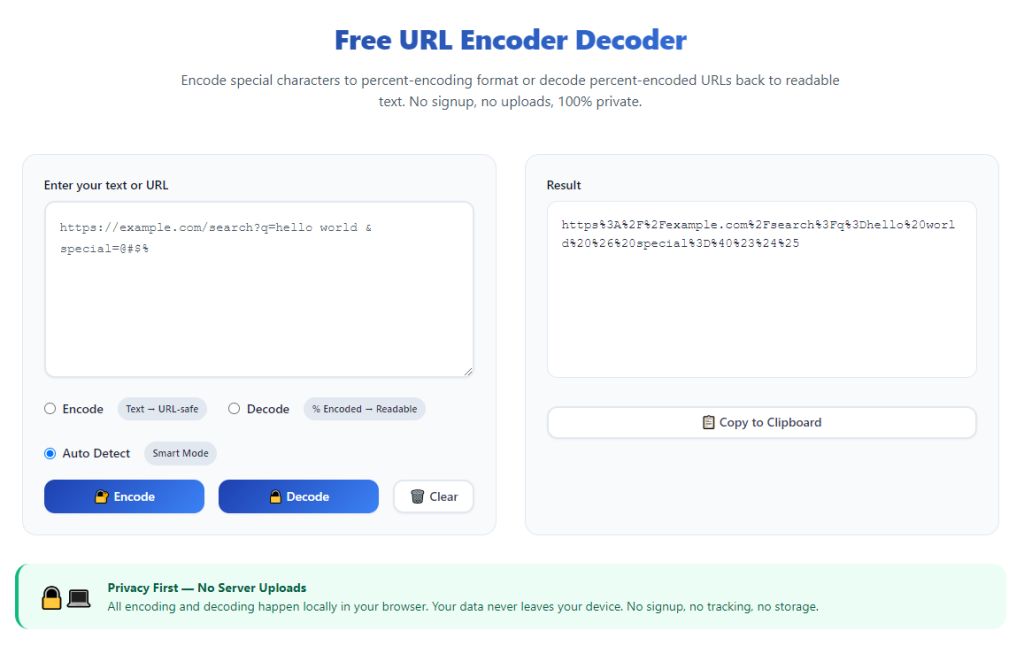
Simple toggle between encode and decode modes
A clear mode switch lets you change functions with one click. It is easy to shift between preparing new URLs and examining existing encoded content.
Support for extended and accented characters
High-quality tools do not only handle basic symbols. They also process accented letters and international characters for multilingual websites and global content.
Large input area for long strings and multiple URLs
Complex query strings, form data and batch link lists require ample space. A spacious input box supports large content without cutting off text or limiting usage.
Real-time preview of converted results
As soon as you paste or type content, the converted version appears on screen. You can spot issues and make adjustments right away without extra clicks.
One-click copy button for quick content reuse
Copy the finished URL or string directly to your clipboard. This seamless function speeds up pasting content into code editors, platforms and configuration files.
One-click reset to clear all content
Wipe input and output fields with a single action. You can start a new round of conversion tasks quickly without manually deleting old text.
Common Usage Scenarios for URL Encoder Decoder for Special Characters
A fully functional URL encoder decoder for special characters serves developers, content creators and site managers across many daily web tasks.
Creating page links with spaces and special symbols
Page titles and file names often include spaces or punctuation. Encoding these characters ensures internal and external links load correctly for all visitors.
Building query strings for API integration
Most API requests carry custom parameters with unique symbols. Proper encoding guarantees data transmits completely between connected systems and services.
Processing user input from web forms
Visitors frequently type spaces, emojis and punctuation in online forms. Converting this input prevents data loss when forms submit to backend servers.
Debugging broken links and malformed web strings
When links stop working, decode the existing URL to check original content. This helps you find problematic special characters and fix errors efficiently.
Managing multilingual website content
International content uses accented letters and regional symbols. The tool converts these characters to keep navigation links and page paths fully functional worldwide.
Configuring scripts and server routing rules
Server files and custom scripts rely on formatted URL paths. Using converted strings avoids routing failures and keeps website operations stable long-term.
Step-by-Step Guide: Use URL Encoder Decoder for Special Characters
Follow this easy workflow to operate a URL encoder decoder for special characters and get standard-compliant results every time.
Step 1: Prepare your original web string or URL
Copy the raw link, query text or form content that contains spaces, symbols or accented characters.
Review the content briefly to confirm all required text is included before moving to the conversion process.
Step 2: Open the URL conversion tool
Launch the tool inside your regular browser. Wait for the full interface to load before adding any text to the input area.
Locate the mode toggle, input field and result display section to get familiar with the simple layout.
Step 3: Select your working mode
Choose encode mode if you need to turn raw text into a valid URL. Pick decode mode to restore encoded strings back to readable content.
Always double-check your selection. Using the wrong mode will ruin your web strings and create extra troubleshooting work.
Step 4: Paste or type content into the input box
Paste your prepared URL or text directly into the designated input area. You can also manually type short links for quick tests.
Keep extra blank lines or unnecessary symbols out of the input unless your specific project requires these elements.
Step 5: Check real-time converted output
The tool will process all special characters instantly. The finished string will show clearly in the output section.
Scan the result to make sure every space and symbol has been properly converted according to web standards.
Step 6: Copy the final result for deployment
Click the copy button to move the converted string to your clipboard. This method avoids mistakes from manual text selection.
Paste the copied content into your code, website editor, API test panel or server configuration right away.
Step 7: Reset the tool for new conversion tasks
Once you finish one task, use the reset function to clear all text. The tool returns to its default state for your next set of links or strings.
Repeat the full process for additional URLs or content that contains special characters.
Common Mistakes to Avoid During Operation
Even with a reliable URL encoder decoder for special characters, simple missteps can cause functional issues for your web content.
Selecting the wrong encode or decode mode
Encoding an already converted string or decoding raw text breaks URL structure. Always match the mode to your actual task goals.
Ignoring hidden special characters in raw content
Invisible spaces and hidden symbols still disrupt links. Clean up your original text before running any conversion work.
Skipping result verification before deployment
Always preview converted strings. Unchecked content can lead to broken links and data errors after publishing online.
Processing extremely large text blocks all at once
Huge batches of content are hard to troubleshoot. Split long lists into smaller parts to locate errors quickly.
Reusing old converted strings for new projects
Different web projects have unique path rules. Do not apply old URL strings to brand-new website or application work.
Practical Tips to Boost Usage Efficiency
These useful tips help you make the most of URL encoder decoder for special characters in your daily web development and content work.
- Bookmark the tool for instant access whenever you create links, test APIs or fix broken web strings.
- Stick to one main browser for this tool to keep conversion results fully consistent across all your projects.
- Process individual URLs first when working with bulk content to spot character-related problems faster.
- Use the one-click copy feature every time to save time and prevent accidental content loss.
- Create a simple test link with common special symbols regularly to confirm the tool works as expected.
- Clear all content after each task to prevent mixing old and new strings during continuous work sessions.
Final Thoughts
Special characters are a common part of modern web content, yet they remain one of the top causes of broken links and data failures.
Manual conversion and low-quality tools create extra bugs and slow down progress for developers and content managers alike.
A dedicated URL encoder decoder for special characters simplifies this essential work. It delivers standard, reliable conversions for every symbol and web string.
With dual working modes, full character support and cross-device stability, this tool fits every stage of web building, testing and maintenance.
By following the step-by-step guide and practical tips shared above, you can handle all special character conversions confidently and keep your web content fully functional at all times.
After learning the operation method, click the link below to enter the tool page for immediate use.