Many homeowners, handymen, and flooring contractors struggle to build reliable project budgets when installing new floors. Every flooring project relies on precise area measurements to buy the right volume of planks, tile, carpet, or vinyl.
Manual measuring and math often lead to costly mistakes. You might order too much flooring and waste money on excess material, or buy too little and face project delays waiting for additional shipments.
Basic pen-and-paper math also leaves room for human error. Oddly shaped rooms, closets, hallways, and nooks complicate calculations and throw off your final flooring estimate numbers.
Mastering how to use square footage calculator for flooring estimates eliminates these costly errors. This simple digital tool automates area math and generates precise material counts for any residential or commercial flooring job.
This complete user guide breaks down the downsides of manual flooring measurement, core tool benefits, critical calculator features, real-world project use cases, and a detailed step-by-step workflow for accurate flooring estimates every time.
Common Problems With Manual Flooring Square Footage Calculations
Calculating floor space by hand creates consistent financial and scheduling headaches for DIY renovators and professional flooring crews alike.
Subjective human math errors
Most people struggle to add multiple room areas together without slip-ups. Small miscalculations in length or width multiply into huge discrepancies in total flooring material needed.
Difficulty measuring irregular room layouts
Standard rectangles are simple to compute, but most homes include angled walls, built-in closets, curved entryways, and recessed storage spaces. Manual formulas for these shapes are complex and easy to mess up.
Forgotten waste factor adjustments
Every flooring installation requires extra material for cuts, damaged pieces, and replacement scraps. Amateur estimators often skip adding waste to their totals, leading to material shortages mid-project.
Wasted time recalculating multiple spaces
A full home flooring job includes bedrooms, bathrooms, kitchens, and hallways. Repeating multiplication and addition for every room takes hours of extra planning time.
Inaccurate budget projections
When your square footage number is wrong, your total flooring cost estimate becomes unreliable. This leads to unplanned overspending or last-minute budget cuts that ruin your renovation timeline.
No quick way to adjust layout changes
If you alter a room’s planned flooring coverage mid-planning, recalculating all measurements from scratch slows down your entire project planning phase.
Core Benefits of Learning How to Use Square Footage Calculator for Flooring Estimates
Adding a dedicated square footage tool to your renovation toolkit transforms how you plan every flooring project, whether you’re a DIY homeowner or professional flooring contractor.
Fully automated, error-free area math
The calculator handles all multiplication, addition, and shape-based area formulas instantly. You avoid the arithmetic mistakes that skew manual flooring estimates entirely.
Accounts for all room shapes and extra spaces
Quality calculators support rectangular rooms, triangular nooks, curved spaces, separate closets, and connecting hallways. Every section of your floor gets included in the total square footage tally.
Built-in waste percentage adjustment tools
Top floor-focused calculators include customizable waste factor sliders. You can input standard industry waste rates for tile, hardwood, carpet, and luxury vinyl to build realistic material estimates.
Cuts project planning time drastically
Instead of measuring, writing down numbers, and solving math problems by hand, you input dimensions and receive a full flooring footage total in seconds. This speeds up bid writing and personal renovation planning.
Creates reliable cost projections
Accurate total square footage lets you multiply by per-square-foot material pricing to build precise budgets. You avoid surprise overcharges or mid-project material reorders.
Works for all popular flooring material types
Whether you plan hardwood planks, ceramic tile, sheet vinyl, laminate, wall-to-wall carpet, or luxury vinyl plank, the calculator adapts its output to match standard material ordering rules.
Supports both residential and commercial flooring jobs
Small apartment remodels, full house renovations, retail store flooring, and office fit-outs all benefit from consistent, accurate square footage calculations generated by the tool.
Must-Have Features in a Square Footage Calculator Built for Flooring Estimates
Not all online area calculators support flooring planning workflows. When selecting a tool to master how to use square footage calculator for flooring estimates, prioritize these renovation-focused features.
Multi-room entry functionality
You can input dimensions for dozens of separate rooms, closets, and hallways in one session. The tool automatically sums all individual areas into one combined total floor square footage.
Irregular shape measurement modules
Look for calculators with inputs for rectangles, triangles, trapezoids, and partial curved spaces. These modules capture hard-to-measure areas that basic rectangular calculators ignore.
Custom waste factor percentage slider
Flooring professionals rely on waste allowances between 5% and 15% depending on material. A dedicated slider lets you adjust this value and view your adjusted total material footage instantly.
Separate width and length input fields
Clear, labeled boxes for room length and width prevent mixed-up measurements. Many tools also support inch and foot unit conversion for flexible measuring tape input.
Unit conversion toggle (feet, inches, yards)
Measuring tapes often display both feet and inches. Built-in conversion removes the need to manually convert small inch measurements into full square foot values for flooring orders.
Cost estimate preview field
Premium flooring calculators include a pricing input box. After generating total square footage, you can add your material’s per-square-foot rate to view a complete rough project cost estimate.
Save or copy total footage results
One-click copy functionality lets you paste your final square footage number into bid documents, shopping lists, or renovation spreadsheets without retyping long figures.
Clean, uncluttered interface focused on measurements
Tools cluttered with unrelated construction math slow down your workflow. The best flooring-focused calculators strip out irrelevant features to keep measurement entry fast and simple.
Common Real-World Use Cases for a Flooring Square Footage Calculator
Understanding how to use square footage calculator for flooring estimates delivers value across every type of floor installation project for amateurs and trade professionals alike.
DIY full-home renovation planning
Homeowners replacing flooring across multiple rooms use the calculator to order the exact right volume of carpet, tile, or hardwood without overbuying expensive material.
Flooring contractor bid preparation
Professional tradespeople generate accurate square footage totals to build formal client bids. Precise measurements reduce disputes over material costs and project pricing after installation starts.
Single-room small remodels
Bathroom tile updates, bedroom carpet swaps, and kitchen vinyl replacements all require tight estimates. The calculator delivers quick single-room footage numbers for small-scale jobs.
Multi-unit rental property upgrades
Landlords refreshing flooring across several apartments input each unit’s room dimensions to calculate bulk material orders and compare total renovation expenses across properties.
Commercial retail and office fit-outs
Large open-concept commercial spaces combine big main floors with small storage closets and break rooms. The calculator tallies all segmented areas for large-scale commercial flooring orders.
Secondary space finishing projects
Basement flooring, attic conversion floors, sunroom tile, and mudroom plank installations all feature unique, uneven layouts the calculator easily measures for reliable estimates.
Material comparison shopping
When comparing two different flooring products, you can plug the same square footage total into each material’s pricing to accurately compare overall project costs before making a purchase decision.
Step-by-Step Full Tutorial: How to Use Square Footage Calculator for Flooring Estimates
Follow this straightforward, renovation-friendly workflow to generate precise, usable square footage totals for any flooring material order or client bid.
Step 1: Gather all physical room measurements first
Grab a measuring tape and walk through every space getting new flooring. Record the length and width of each main room, plus separate dimensions for closets, hallways, nooks, and recessed storage areas.
Write down measurements in either feet or inches consistently. Mixing unit types will create conversion errors later when inputting data into the calculator tool.
Step 2: Note your flooring material to set the correct waste percentage
Different floor materials require different waste allowances. Tile with complex patterns needs higher waste, while wide laminate planks use a smaller cut allowance. Jot down your material type to reference later in the tool.
Standard industry guidelines: carpet 5–8%, hardwood 7–10%, ceramic tile 10–15%, luxury vinyl plank 5–7%.
Step 3: Launch the square footage calculator tool for flooring estimates
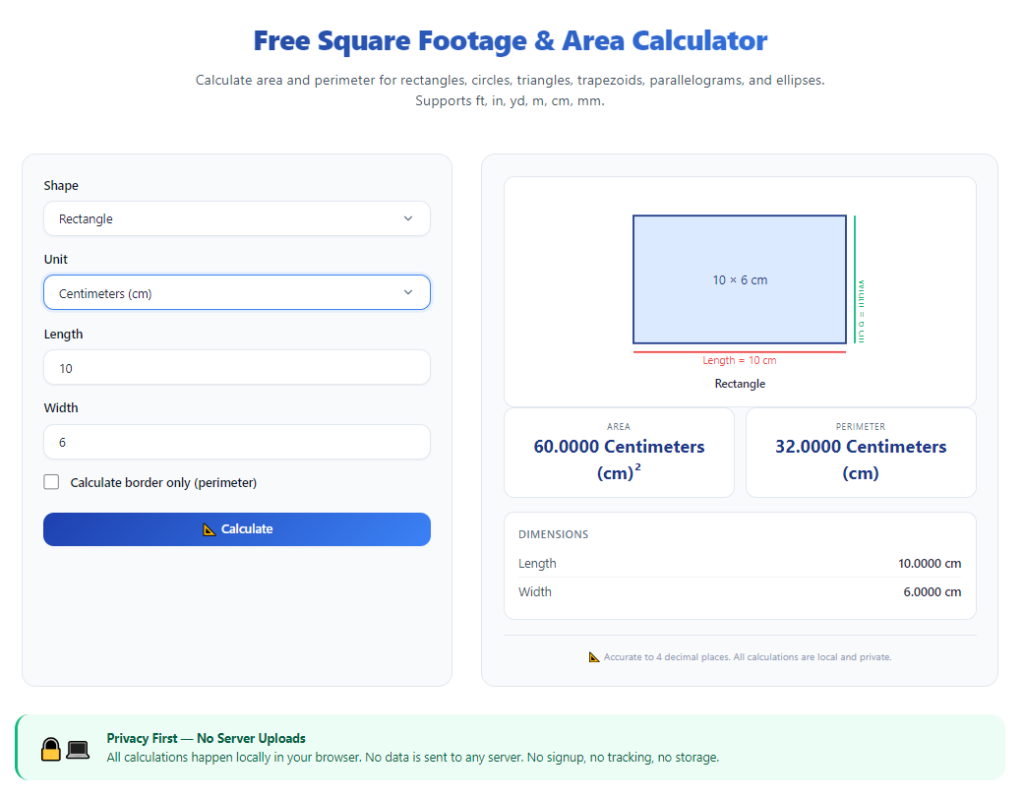
Open the tool in your browser. The primary screen will display separate input sections for room dimensions, unit selection, waste factor adjustment, and total result display.
Take 30 seconds to locate all core controls: length/width fields, shape selection menu, waste percentage slider, calculate button, and copy results button.
Step 4: Select your measurement unit (feet or inches)
Toggle the unit converter to match how you recorded your tape measurements. This eliminates manual math to turn inches into decimal feet and prevents footage calculation mistakes.
Step 5: Input dimensions for your first room segment
Choose the room shape from the dropdown menu (rectangle, triangle, trapezoid). Type the recorded length and width numbers into the matching input boxes for that space.
Click “add room” to save this segment to your running total before moving on to closets or adjacent hallways.
Step 6: Repeat dimension entry for all connected spaces
Enter every closet, hallway, alcove, and storage nook as its own separate room entry. Skipping small auxiliary spaces will create an undercounted flooring estimate and material shortages.
The tool automatically accumulates each added room’s area into a running combined total visible at the bottom of the screen.
Step 7: Adjust the waste factor slider to match your flooring material
Locate the waste percentage control and slide it to the industry standard number for your chosen floor product. This critical step builds extra cut allowance directly into your final square footage estimate.
If you are creating a rough client bid without final material selection, use a mid-range 10% waste factor as a safe default placeholder.
Step 8: Run the full calculation to generate total adjusted square footage
Press the main calculate button to trigger the tool’s math functions. Within one second, the screen will display two distinct totals: raw total square footage of all floor space, and adjusted total footage including waste cuts.
The adjusted number is the figure you will use when ordering flooring material or writing client project bids.
Step 9: Input per-square-foot pricing to build a full cost estimate (optional)
Locate the material cost input field and type in your supplier’s per-square-foot price for your flooring product. The calculator will multiply the adjusted footage total to show a complete rough project material cost.
This feature streamlines budget planning for homeowners and simplifies bid drafting for professional flooring contractors.
Step 10: Copy the final adjusted square footage result
Click the one-click copy button next to your adjusted total footage number. Paste this value into your renovation notebook, shopping list, or formal client bid document for permanent record-keeping.
Step 11: Adjust measurements and recalculate for layout changes (if needed)
If you decide to remove a closet from your flooring plan or expand a room’s covered floor space, edit the corresponding room entry’s dimensions and recalculate the total footage instantly.
No full retyping of all measurements is required, saving significant planning time on revised project layouts.
Step 12: Finalize your flooring order or client bid using the accurate footage number
Use the adjusted waste-included square footage total to place your material order with flooring suppliers or finalize written pricing bids for residential and commercial clients.
Double-check all copied numbers once to confirm you used the waste-adjusted total instead of the raw bare room footage to avoid material shortages.
Common Costly Mistakes to Avoid When Using a Square Footage Calculator for Flooring Estimates
Even with a reliable tool and clear workflow, these frequent errors will skew your flooring square footage totals and create expensive project setbacks.
Forgetting to add separate closet and hallway measurements
Many users only input main bedroom, kitchen, and living room dimensions. Closets and connecting hallways add significant floor area, and omitting them leads to drastically under-ordered flooring.
Setting the wrong waste percentage for your material
Using a 5% waste factor for intricate mosaic tile creates massive shortages mid-install. Always match the slider setting to the cut complexity of your specific flooring product.
Mixing inch and foot measurement units without conversion
Inputting some room sizes in feet and others in inches breaks the calculator’s area formulas, producing wildly inaccurate square footage totals for your flooring estimate.
Only calculating raw square footage and ignoring waste adjustments
Ordering material based solely on bare room square footage leaves no room for broken planks, mis-cut tile, and replacement pieces. This nearly always results in emergency reorders and project delays.
Miscalculating irregular room shapes with rectangle-only inputs
Angled walls, bay window nooks, and triangular entryways cannot be measured accurately with standard rectangular inputs. Always select the matching shape module for non-standard spaces.
Rushing measurement recording before entering data
Hasty tape measure readings lead to wrong length and width numbers typed into the calculator. Double-check every dimension against your written notes before hitting the calculate button.
Discarding old measurement records after generating one estimate
If you revise your flooring layout weeks later, you will need original room dimensions to recalculate footage. Save your written measurement notes alongside your calculator results for future edits.
Expert Pro Tips to Maximize Accuracy When Using a Square Footage Calculator for Flooring Estimates
Use these simple industry tactics to get the most reliable, budget-friendly flooring estimates every time you operate the tool.
- Bookmark the square footage calculator for flooring estimates in your browser so you can pull it up instantly during on-site measuring sessions.
- Complete all physical tape measurements first before opening the tool, to avoid running back and forth between rooms and your device.
- Round all tape measurements up to the nearest half-foot when recording dimensions; this adds a tiny built-in buffer to your final flooring square footage number.
- Create separate calculator sessions for each floor of a multi-story home to keep footage totals organized and easy to compare between levels.
- When writing client bids, list both raw square footage and waste-adjusted footage to show full transparency on how you calculated material quantities.
- Save a blank note template to log all room dimensions after measuring, so you never lose critical data before inputting values into the calculator.
- Recalculate your square footage total a second time after adjusting the waste slider to confirm your final material order number makes sense for your project size.
Final Thoughts
Accurate square footage measurements form the foundation of every successful flooring installation project. Bad math leads to wasted money, delayed renovations, and frustrated clients or homeowners.
Manual pen-and-paper calculations cannot compete with the speed and precision of a dedicated digital tool. Odd room layouts, multiple connected spaces, and required waste cut allowances make hand-calculated flooring estimates risky and unreliable.
Learning how to use square footage calculator for flooring estimates eliminates all these planning pain points. The tool automates complex area math, accounts for material waste, and generates consistent, trustworthy footage totals for every type of residential and commercial floor project.
Whether you are a DIY homeowner tackling a single room refresh or a professional flooring contractor writing formal client bids, this calculator streamlines your entire pre-installation planning workflow.
By following the complete step-by-step tutorial and avoiding common measurement and calculation mistakes covered above, you can generate precise flooring square footage estimates, stick to your renovation budget, and complete floor installation projects without costly material shortages or overstock waste.
After learning the operation method, click the link below to enter the tool page for immediate use.