If you’ve ever stared blankly at an event guest cost calculator screen, wondering which boxes actually matter and which ones you can skip, you’re far from alone. I’ve been exactly in that spot countless times during my early event planning days.
I used to rush through calculator inputs, guessing what each field meant, plugging in half-finished numbers, and moving on thinking I’d nailed the budget. Every single time, that lazy approach came back to bite me. I’d end up with wildly inaccurate per-guest costs, messed up client quotes, and last-minute budget shortfalls I had to fix out of pocket.
Back then, I had no clear answer to what inputs do I enter in event guest cost calculator. I thought the tool would compensate for my vague entries and auto-correct any missing details. Spoiler: calculators don’t do that. They only work with the exact data you feed into them.
After ruining multiple small event budgets due to wrong or missing inputs, I decided to break down every single required entry, test which fields impact final pricing, and figure out exactly how to structure my data for perfect results every time.
This guide is all real-world experience, no generic textbook fluff. I’ll walk you through every required fields for event guest cost calculator, share my biggest past mistakes, and show you exactly how to input data the right way for flawless event budgeting.
Why Your Calculator Results Are Always Inaccurate (The Real Reason)
Most new event planners blame their budgeting tools for bad numbers, but the tool is almost never the problem. Bad results almost always stem from incomplete or incorrect manual inputs.
Event guest cost calculators operate on strict data logic. If you skip a fixed venue fee, mislabel a variable guest expense, or leave percentage fields blank, the tool can’t generate a realistic budget. It just calculates based on the limited, wrong data you provide.
I used to make the classic mistake of only entering food and drink costs. I ignored setup fees, tax rates, and custom guest add-ons, then wondered why my final event spend was way higher than the calculator estimate. It was such a frustrating, repetitive error.
Once I finally learned exactlyhow to fill event guest calculator inputs correctly, my budget accuracy improved overnight. No more surprise overspending, no more incorrect client quotes, no more guessing at per-person pricing.
Core Mandatory Inputs You Must Enter (No Exceptions)
Let’s start with the non-negotiable inputs. These are the fields every single event guest cost calculator requires to function properly. Skip any of these, and your entire calculation will be unreliable.
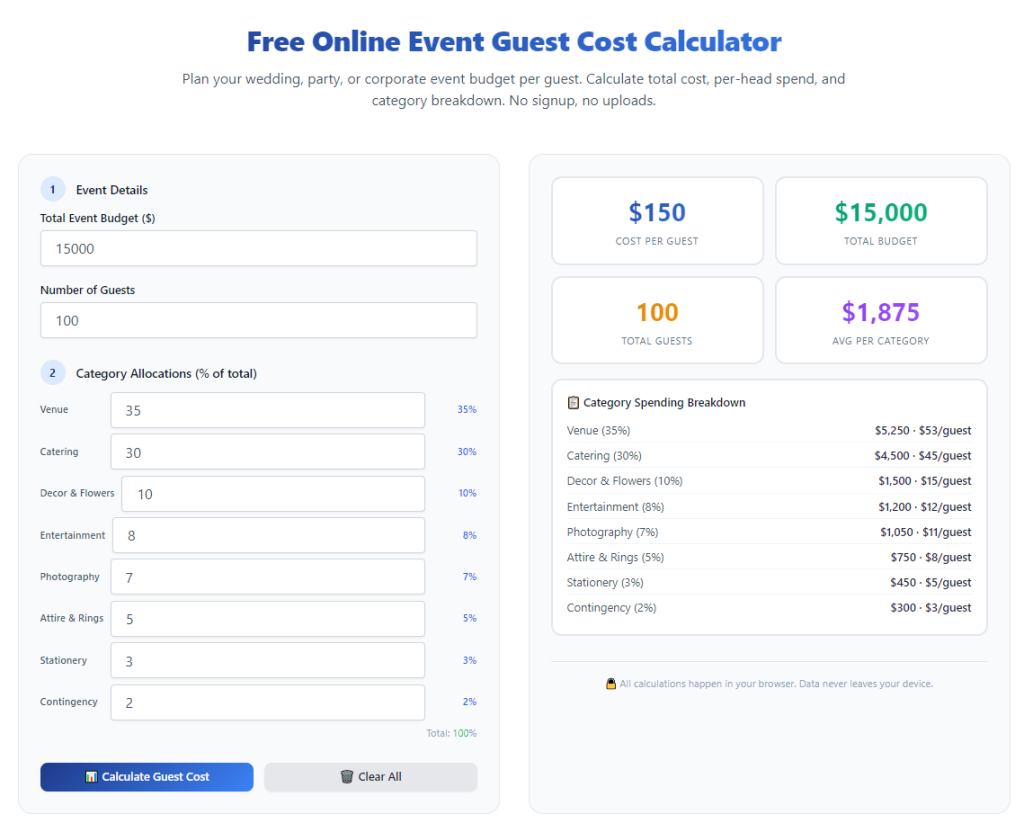
First up is your total guest attendance count. This is the foundational input for every calculation. Every per-guest rate, every allocated fixed cost, and every variable expense hinges entirely on this number.
A huge mistake I see all the time is mixing up staff, vendors, and actual event guests in this field. Staff and vendor fees are operational fixed costs, not per-guest expenses. Early in my career, I lumped everyone into the guest count and completely skewed my per-person averages.
Always input only confirmed or projected attendee numbers here. If you’re planning early and don’t have final RSVPs, round up slightly to build a safe budget buffer. Never round down to save hypothetical money—it always backfires.
Second mandatory input: variable per-guest expenses. These are costs that change directly based on how many people attend your event. This includes plated meals, buffet service, individual beverage packages, guest party favors, and personal event amenities.
You have to enter every single per-person line item here. Even small costs like custom name tags or disposable place settings add up across a full guest list. I used to skip these tiny entries to save time, and those overlooked costs created massive budget gaps.
Third mandatory input category is fixed event costs. This is where most new planners fall short in their fixed and variable inputs for event budgeting tools. Fixed costs are flat fees that don’t change with guest count, including venue rental, stage setup, AV equipment, and decor installation fees.
The calculator automatically splits these flat costs evenly across every guest to show your true per-person investment. If you skip these inputs, you only see partial pricing, which is super misleading for client quotes and personal budget planning.
Critical Percentage Inputs Most Planners Always Skip
This section is the hidden culprit behind almost all inaccurate event budget calculations. Percentage-based fees are not optional inputs—they’re essential for real-world pricing accuracy.
Every professional event venue and vendor adds service fees, gratuity, and sales tax. These percentages apply to your entire catering and service total, and they drastically shift your final per-guest cost.
I can’t stress this enough: never rely on default calculator percentages. Default settings rarely match local tax rules or individual vendor contract terms. You need to manually enter the exact tax rate, service fee percentage, and gratuity rate from your vendor agreements.
I once skipped adjusting these inputs for a corporate event, sticking with the tool’s generic default tax rate. I undercalculated my total fees by nearly 15%, and I had to adjust my entire profit margin last minute to cover the difference. It was a stressful mistake I never repeat now.
Optional Custom Inputs for Unique Event Scenarios
Once you’ve filled out all mandatory fields, you can move on to custom inputs. These are flexible fields designed for custom input entries for unique event pricing, perfect for events with one-of-a-kind expenses.
Not every event needs these entries, but they’re incredibly useful for detailed, precise budgeting. Custom inputs cover things like guest transportation fees, photo booth per-print costs, kids’ activity kits, branded swag bundles, and special entertainment add-ons.
I always recommend filling these out if they apply to your event. Even if a custom expense feels small, adding it to the calculator ensures your final budget is 100% realistic, not just a generic estimate.
New planners often ignore custom fields because they think minor expenses don’t matter. But event budgeting is all about small details. Every line item adds up, and the best planners account for everything.
Step-by-Step Input Workflow for Perfect Calculator Results
Now that you know exactly what to enter, I’ll share my personal repeatable workflow. This is the exact routine I use for every event to eliminate common input errors for event cost calculators and guarantee accurate numbers.
Start by gathering all your vendor quotes and event paperwork first. Never guess your input values. Always use exact numbers from official contracts and price lists. Guessing inputs is the fastest way to ruin your budget accuracy.
Next, enter your verified guest count, double-checking that you’ve excluded staff, vendors, and crew members from the total. This one quick check fixes so many calculation errors right off the bat.
Then log every variable per-guest expense line by line. Take your time here. Go through your catering menu, amenity list, and guest packages one by one to ensure nothing is missed.
After that, input all fixed flat-rate event costs. Don’t leave out setup, teardown, delivery, or equipment rental fees—these are some of the most commonly overlooked fixed expenses.
Adjust your percentage fee inputs to match your exact vendor terms. Overwrite any default tax or gratuity settings to align with your local regulations and contract agreements.
Add any custom unique event expenses in the optional fields. Review every input box one final time for typos, missing numbers, or misplaced values before hitting calculate.
Real-World Input Example (My Personal Event Case Study)
Let me walk you through a real event I planned to show how correct inputs change your entire budget outlook. This was a mid-sized community gathering with 90 confirmed guests.
At first, I only input meal and drink per-guest costs into the calculator. The tool showed a cheap per-person rate that looked way too good to be true. I almost sent this budget draft to my client before double-checking my inputs.
I went back and added fixed venue rental fees, audio visual setup costs, local sales tax, mandatory vendor gratuity, and custom guest tote bags. Instantly, the true per-guest cost updated to reflect real-world pricing.
If I’d submitted the initial incomplete calculation, I would have massively underbid the event and lost money on the project. This example proves just how critical full, accurate inputs truly are.
Top Input Mistakes to Avoid (Learned From Years of Errors)
I’ve compiled all my worst calculator input mistakes into one simple list so you can skip the trial and error I went through. These are the most frequent issues that plague new and seasoned planners alike.
First, incomplete fixed cost entries. Most planners only input obvious venue fees and forget hidden flat costs like cleanup fees, equipment delivery charges, and security fees. All fixed costs need to be included for proper guest allocation.
Second, generic percentage rate usage. Default tool percentages almost never match your actual vendor terms. Always manually update these values for every single event you plan.
Third, inconsistent guest count entries. Swapping estimated RSVPs with confirmed guest numbers mid-planning without updating the calculator creates messy, conflicting budget data.
Fourth, skipping small variable line items. Name tags, disposable utensils, small desserts, and water service feel trivial, but they scale quickly across dozens or hundreds of guests.
Fifth, ignoring custom input fields for unique event add-ons. Every event has small unique costs, and leaving them out creates gaps between your calculator estimate and final spend.
How Correct Inputs Elevate Your Event Planning Work
Mastering exactly what inputs do I enter in event guest cost calculator does more than just fix bad math. It completely upgrades your entire event planning process.
When your inputs are accurate and complete, your budget estimates become client-ready. You no longer have to send revised quotes or apologize for unexpected price adjustments. You build trust and professionalism with every client.
You also eliminate last-minute financial stress. You’ll know your exact per-guest spend from the very start of planning, letting you make smart decisions about catering upgrades, decor additions, and guest amenities without breaking your budget.
What I love most is how much time this skill saves me now. I used to spend hours cross-checking spreadsheet math and correcting calculator errors. Today, with clean, precise input habits, I generate perfect budget breakdowns in minutes.
Final Summary & Quick Planner Checklist
To wrap it up simply, there are three core input groups you always need for an accurate event guest cost calculation: verified guest counts, full variable per-guest expenses, and all-inclusive fixed event costs. Pair these with customized percentage fees and optional custom line items for perfect results every time.
Always double-check your entries, avoid generic default settings, and never skip small line items. These tiny, consistent habits eliminate nearly every budget error event planners face.
Once you fully understand what inputs do I enter in event guest cost calculator, you turn a basic budgeting tool into your most reliable planning asset, delivering consistent, accurate, and trustworthy event budgets for every project.
After learning the operation method, click the link below to enter the tool page for immediate use.