Text formatting consistency is the foundation of professional writing. Whether you work on academic essays, business reports, blog content, or personal notes, unwanted extra spaces always compromise document quality. These messy gaps usually appear after copying text from web pages, importing files, or quick manual editing sessions.
The biggest challenge of space cleaning is balance. Users want tidy, uniform spacing but refuse to alter their original wording, sentence structure, and core message. Many common editing tools either leave spacing errors unaddressed or overwrite valid text details, creating more problems than they solve.
This makes a tool designed to remove extra spaces without changing text content an essential editing asset. It solves all whitespace issues while keeping every word, sentence, and detail exactly the same. This guide covers tool advantages, core features, common user mistakes, and a complete step-by-step workflow for perfect results every time.
Common Spacing Issues That Mess Up Your Documents
Most writers overlook how many types of hidden spacing errors exist. These subtle issues hurt readability and violate standard formatting rules.
Double and triple word gaps
Copied online content often contains random double spaces between words. These inconsistent gaps make paragraphs look unorganized and unpolished to readers.
Leading and trailing hidden spaces
Every line or paragraph may carry invisible blank spaces at the start or end. These hidden gaps break alignment and cause uneven formatting across full documents.
Excessive paragraph line breaks
Unnecessary blank lines between paragraphs create oversized gaps. This ruins uniform layout standards required for school assignments and business submissions.
Invisible whitespace characters
Tabs, broken spacing codes, and hidden whitespace often remain undetected during manual checks. They cause formatting glitches during file conversion or online publishing.
Why Regular Tools Ruin Your Original Text Content
Standard text cleaners and basic word processor tools fail to separate spacing errors from valid content, leading to unwanted text modifications.
Over-editing deletes valid text structure
Generic space removers often remove intentional single line breaks, structured indents, and necessary gaps. This flattens organized content and destroys original layout logic.
Auto-correct alters unique wording
All-in-one editing tools may adjust vocabulary, fix phrasing, or replace words automatically. This changes your original writing voice and core content meaning.
Manual cleaning risks content loss
Manually deleting extra spaces requires line-by-line scanning. It is easy to accidentally delete words or punctuation while fixing gaps, modifying original text unintentionally.
Premium tools force unnecessary changes
Most professional editing software bundles space cleaning with rewriting and paraphrasing features. Users cannot clean spacing alone without triggering text alterations.
Key Benefits to Remove Extra Spaces Without Changing Text Content
A specialized tool built to remove extra spaces without changing text content delivers exclusive advantages that generic editors cannot match.
100% original text retention
The tool only targets redundant whitespace. Every word, sentence, punctuation mark, and original phrasing stays completely unchanged, preserving your writing accuracy and voice.
Perfect standardized formatting
It converts messy double gaps, trailing spaces, and oversized breaks into uniform single spacing. Your document layout becomes clean and professional without content edits.
Saves massive editing time
Automated one-click cleaning replaces slow manual scanning. You can fix full-document spacing errors in seconds instead of spending hours on line-by-line adjustments.
No accidental content damage
Since the tool is programmed to ignore all text characters, there is zero risk of deleting words, altering sentences, or distorting original meaning during cleaning.
Compatible with all content types
It works for academic papers, formal reports, blog drafts, resumes, and personal notes. No matter the text style, original content always remains intact.
Must-Have Features of Professional Space Cleaning Tools
A reliable tool to remove extra spaces without changing text content includes these precise, user-focused features for flawless performance.
Whitespace-only scanning logic
The algorithm exclusively detects blank spaces, line breaks, and hidden whitespace. It never interacts with letters, numbers, symbols, or original phrasing.
Smart valid formatting protection
It preserves intentional single line breaks, paragraph separations, and standard indents. Only redundant and excessive gaps get removed to maintain natural document structure.
Full-spectrum error removal
The tool clears double spaces, triple gaps, trailing spaces, leading spaces, hidden tabs, and oversized paragraph breaks in one single scan.
Long-text bulk processing
Users can upload lengthy essays, full articles, and multi-page reports. The tool processes large text blocks without truncation or partial cleaning issues.
Zero auto-correction and rewriting
There are no grammar changes, synonym replacements, or sentence rewrites. The tool focuses solely on spacing, keeping your original content untouched.
Best Real-World Use Cases
This dedicated space cleaning tool fits countless daily writing and formatting scenarios where content originality must stay intact.
Academic paper formatting
Students often copy research content for essays and literature reviews. They can quickly clean messy spacing while keeping cited statements and original analysis 100% accurate.
Professional business reports
Business documents rely on precise wording and data accuracy. Cleaning spacing without altering text ensures all statistics, conclusions, and formal statements remain correct.
Blog and article pre-publishing
Content creators tidy up drafted articles before posting. Uniform spacing improves page appearance without changing original writing style or key messages.
Resume and official document editing
Job seekers and professionals standardize layout for formal documents. Clean spacing boosts professionalism while preserving every personal detail and qualification statement.
Personal study note organization
Learners organize copied textbook excerpts and lecture notes. Clean layout improves readability without modifying important study information.
Step-by-Step Guide: Remove Extra Spaces Without Changing Text Content
Follow this simple workflow to get perfectly formatted text with zero changes to your original content.
Step 1: Prepare Your Raw Text
Gather your drafted or copied text that contains uneven spacing errors. You do not need to manually fix any gaps beforehand.
Ensure your core content, facts, and wording are finalized to avoid post-cleaning revisions.
Step 2: Open a Dedicated Space Cleaning Tool
Launch a professional tool designed specifically to remove extra spaces without changing text content. Avoid multi-purpose editors that rewrite or alter original text.
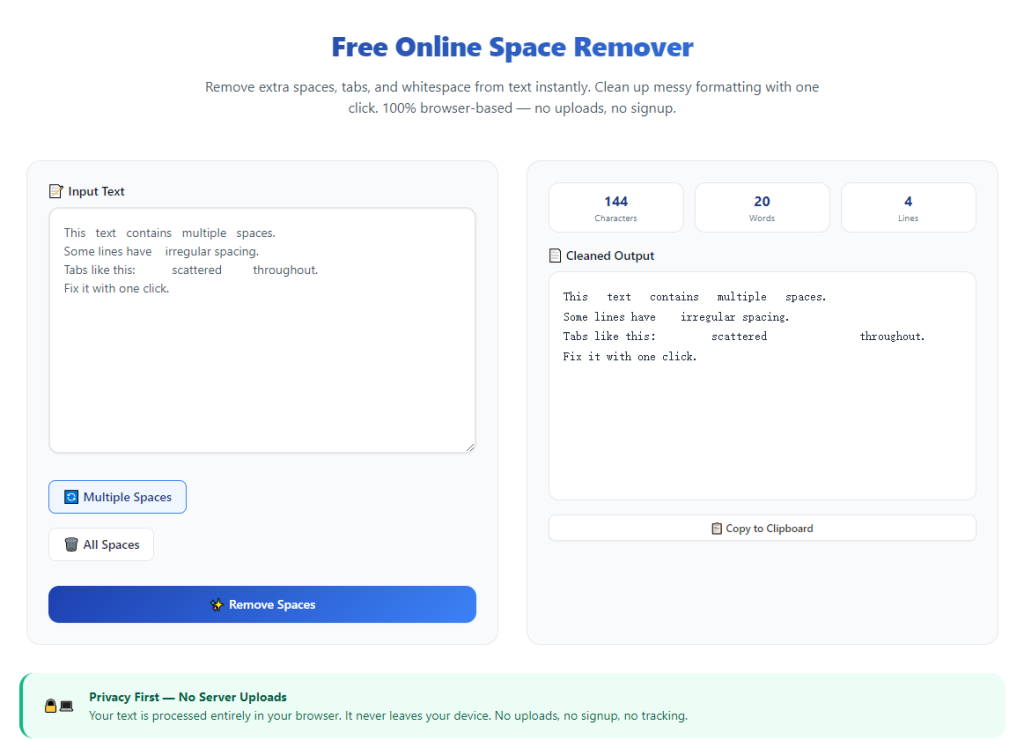
Step 3: Paste Your Full Text
Paste your entire text block into the input box. The tool supports both short paragraphs and long-form content with no restrictions.
Double-check that all text pastes completely for full uniform cleaning.
Step 4: Start Whitespace Cleaning
Initiate the space removal process. The tool will scan the entire text and eliminate all redundant extra spaces while locking every original word and sentence in place.
The process takes only a few seconds regardless of text length.
Step 5: Verify Original Content Integrity
Compare the cleaned text with your original draft. Confirm all wording, sentences, facts, and unique phrasing remain completely unchanged.
Check for consistent single spacing and balanced paragraph breaks across the full document.
Step 6: Copy and Save Final Text
Once verified, copy the fully cleaned text. Paste it back into your document editor and save the polished, perfectly formatted final version.
Common Mistakes to Avoid During Space Cleaning
Even with a reliable tool, these small errors can affect your final formatting results.
Using multi-functional editing tools
Avoid all-in-one writers that combine paraphrasing, grammar fixing, and space cleaning. These tools often alter original text unintentionally.
Overlooking hidden whitespace
Manual checks miss tab spaces and invisible gaps. Always use a dedicated tool for complete, thorough space removal.
Modifying text after cleaning
Last-minute edits may reintroduce spacing errors. Complete all content revisions before running space cleaning for best results.
Expert Tips for Perfect Space Cleaning Results
Use these professional tips to maximize formatting quality while fully protecting original text content.
- Always finish content drafting first before cleaning spacing to avoid new formatting errors.
- Use specialized tools to remove extra spaces without changing text content for 100% content safety.
- Process full documents at once to maintain consistent spacing across all sections.
- Double-check formal and academic content after cleaning to confirm zero text alterations.
- Avoid manual space deletion after tool processing to keep uniform layout intact.
- Clean all web-copied content before usage, as online text always contains hidden redundant spaces.
Final Thoughts
Clean, consistent spacing is essential for professional and academic document quality. However, many editing methods force users to choose between tidy formatting and original content integrity.
A dedicated tool to remove extra spaces without changing text content eliminates this compromise. It delivers flawless, uniform spacing cleanup while preserving every word, sentence, and detail of your original writing.
Whether you are a student, content creator, or business professional, this simple editing method streamlines your workflow, improves document appearance, and keeps your content accurate and original.
By following this guide, you can permanently solve spacing issues in seconds, produce polished documents, and protect your original text content from unnecessary modifications.
After learning the operation method, click the link below to enter the tool page for immediate use.